Creative Communities of the World Forums

The peer to peer support community for media production professionals.

Activity Forums Adobe After Effects Anaglyph 3D Effect with only 1 Adjustment Layer?

  • Anaglyph 3D Effect with only 1 Adjustment Layer?

    Posted by Royce Jacobs on January 22, 2022 at 12:52 pm

    Hey guys, I was pondering my orb wondering if there was a way to create a single preset for one adjustment layer to create an anaglyph 3D (red/blue glasses) effect. I know I could create 2 presets to each change the color channels with one having a transform offset, but this was more a mere curiosity for the sake of knowing the program better.

    Any ideas?

    Royce Jacobs replied 4 years, 3 months ago 3 Members · 6 Replies
  • 6 Replies
  • Michael Szalapski

    January 24, 2022 at 4:03 pm

    Are you just asking for chromatic aberration kind of effect or genuine 3d glasses?
    AE has a built-in 3d Glasses effect, but it’s dependent on you having two sources to drive it (either footage from two cameras or two precomps with offset cameras).

  • Royce Jacobs

    January 25, 2022 at 1:09 pm

    Hey there, just looking for an effect, not actual 3d. So one source with basically 2 position-shifted, color-tinted versions. I was thinking maybe something with echo, but then didn’t know how you could color different echos differently. idk, it was more of a mental puzzle exercise than anything, there may not be a way

  • Filip Vandueren

    January 28, 2022 at 9:04 am

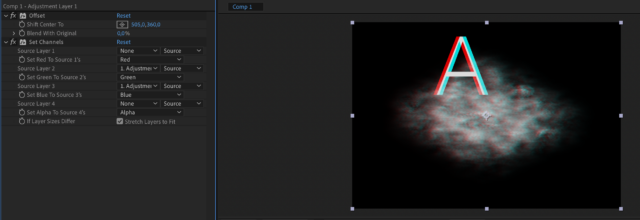
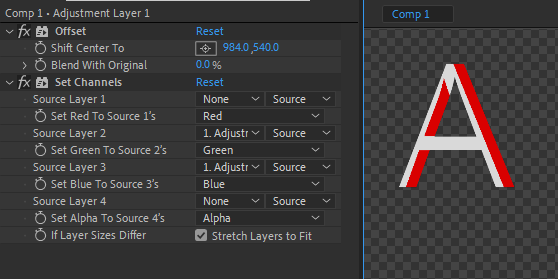
    This seems to work:

  • Royce Jacobs

    February 22, 2022 at 12:32 pm

    Interesting.. I don’t get the same result (cc 2022)
    There’s no fx on the images right?

  • Filip Vandueren

    February 22, 2022 at 12:57 pm

    I think this is because you have an alpha channel and I had a black solid BG.

  • Royce Jacobs

    February 22, 2022 at 3:19 pm

    Ah, quite right! Adding the solid bg did the trick, good looking out ;D

    I don’t understand quite why this works but you solved the puzzle! But now I’m curious why are we able to see the original position and not only the offset position?

We use anonymous cookies to give you the best experience we can.
Our Privacy policy | GDPR Policy