

Command Frame for After Effects

Free download, demonstrations, hands-on tests, and creator resources
Want to try Command Frame?
Command Frame is free. Download the latest version from aescripts + aeplugins.
Adobe added search to After Effects. What comes after search?
Command Frame is a free command interface for After Effects. Search for effects and presets, jump to layers and compositions, type property values, run scripts and plugin actions, chain steps into reusable commands, and assign shortcuts that run without ever opening the interface.
Can’t see this video? Click here!
More than an effect launcher
Adobe added a floating command bar to After Effects with Quick Apply that takes cues from FX Console. Fast effect search now comes as standard. Despite Quick Apply being available by default, Command Frame has been downloaded more than 3,000 times on aescripts since launch.
From one floating interface, you can:
- Search and apply effects and animation presets.
- Find any layer and jump straight to it.
- Search for and open compositions directly.
- Set exact or relative values for properties such as opacity, scale, rotation, and position.
- Run After Effects commands, scripts, and panels.
- Import toolbars and use their individual buttons as searchable actions.
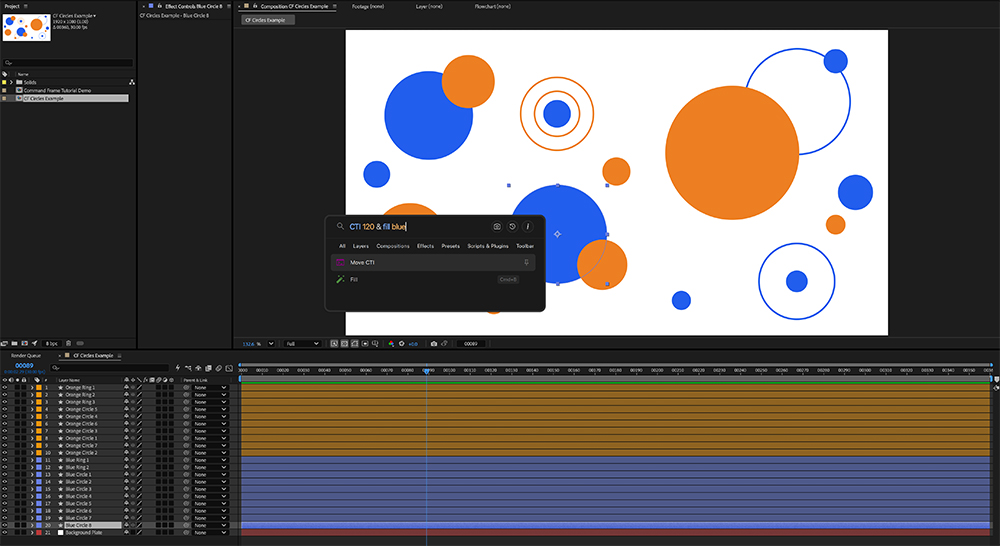
- Chain actions with “&” and save the result as a reusable command.
- Surface After Effects workspaces as searchable actions.
- Assign a shortcut to any action.
- Extend the command set with Control Groups, Select Every Other Layer, and Compstronaut
Below are five hands-on tests to try, along with a prepared project and assets.
Thirteen updates in twelve weeks
Command Frame launched on 11 May 2026 and reached version 1.5 on 3 August, after 13 updates in its first 12 weeks.
Those updates added searchable scripts and panels, more reliable chains and shortcuts, action sound effects, real-in-project “Show Me” tutorials, on-screen action feedback, script watch folders, broader After Effects command coverage, settings backup and restore, and deep customisation options.
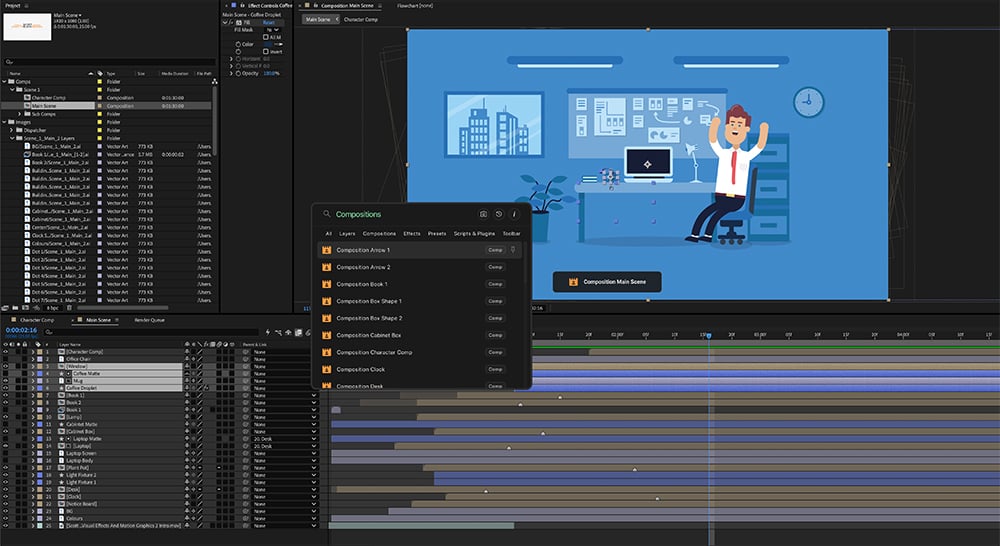
Five example scenarios to try in your projects
Open a project file of your own, or use the project file included in the media kit below, and judge whether these workflows are useful in your normal setup.
1. Apply an effect – Select a visual layer, open Command Frame with “Control/Ctrl+Space”, search for an effect such as “Glow”, and run it.
2. Jump to a layer – Type the unique name of a layer in the active composition and run the result. Command Frame selects the layer and navigates the timeline directly to it.
3. Open a composition – Type the unique name of another composition and run the composition result to open it directly.
4. Type a property value – Select a layer and try:
- “opacity 50” to set an exact value; or
- “scale \*0.5” to halve the current scale.
5. Combine actions – Command Frame resolves the two actions and runs them in order. Sequences can also be saved, assigned a shortcut, and then triggered directly. Select a layer and enter: “fill orange & scale 50”
Note: Command Frame includes an inbuilt tutorial (search “tutorial”) demonstrating how to use these features in the interface directly.
At a glance
| Current version | 1.5, released 3 August 2026 |
| Price | Free |
| After Effects | 2024 or later |
| OS | Windows 10 or later, macOS 13 or later |
| Action catalogue | Over 1,300 actions, including 664 After Effects commands and 24 actions from compatible plugins |
| Search | Effects, presets, layers, compositions, commands, workspaces, scripts, panels, imported toolbars, and compatible plugins |
| Workflows | Command parameters, relative values, multi-step commands, saved actions, and direct shortcuts |
Why compare command palettes now?
Video Copilot’s FX Console has offered shortcut-driven effect and preset search since 2016. Adobe now includes Quick Apply in After Effects, while tools such as Quick Menu and the HotMenu beta take their own approaches to the same category.
These tools share a recognisable starting point, but they take the idea in different directions, which makes this useful ground for a hands-on comparison. FX Console has been the plugin to beat since 2016, and it still tops most best-of lists a decade later. Adobe building their own version of that idea into After Effects has opened up real competition for that spot, with several plugins making their case at once instead of one clear successor. That’s worth covering before it’s decided.
Comparison outline
| Question | Comparsion |
|---|---|
| How does it handle the familiar launcher job? | Search for and apply the same effect or preset. |
| General Usage | How it acts as a floating window generally, options for customising general usage and click-off behaviour |
| Search Behaviour | Auto-complete, tooltips, visual feedback, fuzzy search, search customisability |
| How far does it reach into the project? | Search for named layers or compositions. How consistent are these? How do they compare to After Effect’s standard layer search? |
| Can the search carry values and intent? | Try exact and relative values such as “opacity 50” and “scale *0.5”. |
| Can several actions become one sequence? | Run and save a chain such as “fill yellow & scale 20”. |
| What else becomes searchable? | Test commands, panels, workspaces and toolbars’ buttons |
| What happens after search? | Can all actions be assigned shortcuts, and run without needing the plugin interface open? |
Enjoying the news? Sign up for the Creative COW Newsletter!
Sign up for the Creative COW newsletter and get weekly updates on industry news, forum highlights, jobs, inspirational tutorials, tips, burning questions, and more! Receive bulletins from the largest, longest-running community dedicated to supporting professionals working in film, video, and audio.
Enter your email address, and your first and last name below!

Responses