Creative Communities of the World Forums

The peer to peer support community for media production professionals.

Activity Forums Adobe After Effects Halftone dot wave

  • Halftone dot wave

    Posted by Brett Putman on December 13, 2021 at 5:51 am

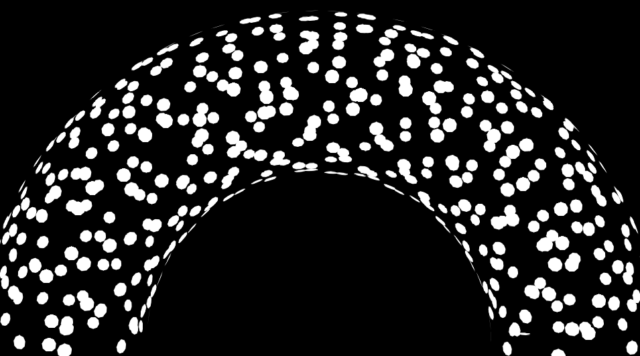
    I am trying to find out if there is a way to recreate this in After Effects so I can add some subtle animation to it and make is ripple like a wave. I need the halftone dots to be mapped on to a solid that I can displace to create the wave effect.

    I have been attempting to do this using Trapcode Form, but not luck. I cant get the dots to map correctly. They always orient toward the camera and I want the dots to seem like they are mapped onto the surface of the wave. There must also be an actual surface that is being displaced that the dots are mapped to so that a wave in front of another wave would occlude it.

    Any help to get me pointed in the right direction would be much appreciated.

    Michael Szalapski replied 4 years, 8 months ago 4 Members · 4 Replies
  • 4 Replies
  • Eric Santiago

    December 13, 2021 at 1:36 pm

    Have you looked into Stardust?
    I’ve done this in the past but in 3D apps.

  • Walter Soyka

    December 13, 2021 at 5:25 pm

    I think you could do this with Trapcode Tao, which creates 3D geometry along paths. You’d apply your halftone as a texture to the geometry and it should deform with the wave.

  • Michael Szalapski

    December 16, 2021 at 5:15 pm

    I can’t see your example, but if you set your particles in Form to be Textured Polygons, they’ll flow along whatever shape you make.

  • Michael Szalapski

    December 16, 2021 at 5:23 pm

    If you set your Particle Type in Trapcode Form to Textured Polygon (and then pick an appropriate Sprite), you get them to follow the surface.

We use anonymous cookies to give you the best experience we can.
Our Privacy policy | GDPR Policy