Forum Replies Created

Page 26 of 549
  • Michael Szalapski

    September 28, 2020 at 3:16 pm in reply to: Formula (Spline) Animation Issue

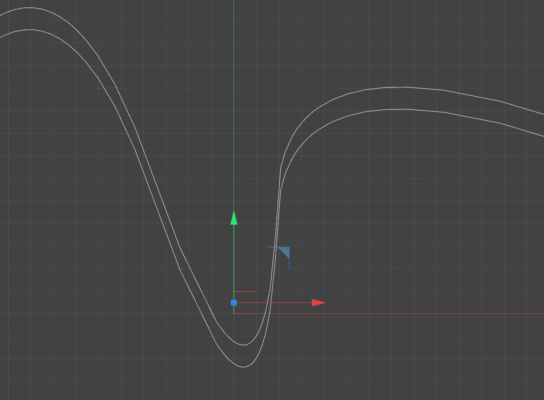
    When you move something up on y, the splines won’t be the same distance on every point like you’re expecting. I’ve made a more extreme curve difference in this example image so it’ll be more obvious. I just duplicated the spline and moved it up.

    As far as tutorials go. I don’t have a quick link handy. All you have to do is right-click on your surface and go to Simulation Tags>Collider Body (you may need to go into the tag’s Collision tab and pick Static Mesh). Then right-click on your ball and choose Simulation Tags>Rigid Body. Then go under the tag’s Force tab and turn Follow Position up to something like 10 (experiment with that to see what works for you).

  • Does this happen with every MP4? That is, if you make a video in AE (just, like, some shape layers or something), export it through AME as an MP4, and then try to re-import that file, does it work?

  • Michael Szalapski

    September 28, 2020 at 2:28 am in reply to: How do I extrude type along a contoured surface?

    Glad you found something that worked!

  • Michael Szalapski

    September 27, 2020 at 3:51 pm in reply to: After Effects using very low memory to render

    You should dial that back a bit. The general rule is to give Adobe apps 3/4 of your RAM and reserve 1/4 for your system.

    AE will use the RAM it needs to use. RAM is not your speed issue.

  • Michael Szalapski

    September 26, 2020 at 7:15 pm in reply to: How do I extrude type along a contoured surface?

    No problem!

    You can either do that or just throw your Jar and text into the volume builder…

  • Michael Szalapski

    September 25, 2020 at 10:15 pm in reply to: How do I extrude type along a contoured surface?

    See if this tutorial helps.

  • Michael Szalapski

    September 25, 2020 at 10:11 pm in reply to: Make multiple layers move in random spirals

    Do you have Cinema 4D? Because it would be a lot easier with it.

  • Michael Szalapski

    September 25, 2020 at 4:02 pm in reply to: 3D Pre Comp blurry in parent comp

    I’m curious about collapse transformations “making the sky fall in” and having everything “lose its 3d character” that you mentioned in your first post. That shouldn’t happen. If you have a comp in your parent comp, it should still work. In fact, layers in the precomp should be able to interact with layers in your parent comp.

    Have you tried rerendering the precomp to see if that changes things? That would let you know if the issue has to do with the layer setup/3d-ness/etc. in your precomp or if something is happening in your main comp to cause it.

  • Michael Szalapski

    September 25, 2020 at 3:44 pm in reply to: How to Offset start time on Sounds.

    Actually, I think that feature isn’t there. I was thinking of offsetting the timing of videos for textures. You’ll just need to add some silence in Audition, Premiere Pro, or whatever your favorite audio app is.

    And that seems like a good feature request to send to Maxon.

  • Michael Szalapski

    September 24, 2020 at 1:26 am in reply to: Cloner's Blend not blending properly

    The reason it worked in that presentation is that they both had fillets set up. One was a small fillet and the other (clearly) was a very large fillet. But they both need to have the fillet option active.

Page 26 of 549

We use anonymous cookies to give you the best experience we can.
Our Privacy policy | GDPR Policy