

Activity › Forums › Maxon Cinema 4D › How to Offset start time on Sounds.
-
How to Offset start time on Sounds.
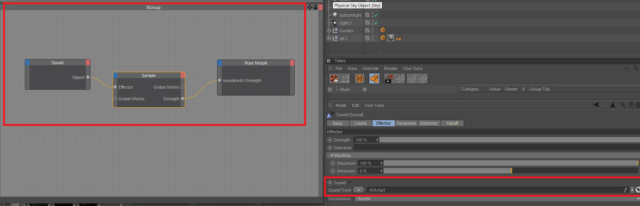
Posted by Daikiri Ichinose on September 12, 2020 at 2:59 pmHi, I am trying to lip sync with Xpresso and posemorth.
I just would like to offset the start time of sounds.
For example, a character waits seconds and then start talking with the assigned sounds.
Is that possible?
Thanks you in advance.
 Jules Huvig replied 4 years ago 3 Members · 5 Replies
 -
5 Replies
-

Michael Szalapski
September 22, 2020 at 8:12 pmI don’t think I’ve following what you’re asking for. Wouldn’t you want the lips to move in sync with the audio? If you want silence at first and then talking, you could offset when the sound file plays in C4D or add silence in your audio editing app or your NLE.
-
Daikiri Ichinose
September 25, 2020 at 8:53 amThank you Miachael.
Yes, I would like to have silence at first and then talking. How do I offset the sound timing?
Thank you
-
Michael Szalapski
September 25, 2020 at 3:44 pmActually, I think that feature isn’t there. I was thinking of offsetting the timing of videos for textures. You’ll just need to add some silence in Audition, Premiere Pro, or whatever your favorite audio app is.
And that seems like a good feature request to send to Maxon.
-

Jules Huvig
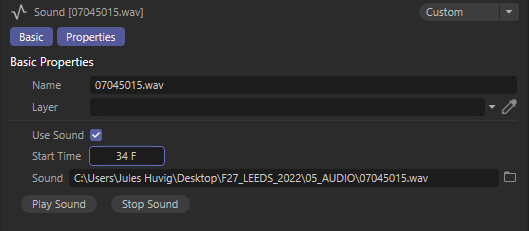
August 31, 2022 at 1:08 pmHello, I work on c4d R26 and I might have a way to offset start sound.
There is a parameter window with a start time and offset in frames for sound.
However this parameter window is not accessed by clicking on the sound object in the object manager.
Instead one needs to click on the sound file in the Timeline.Not sure it works with your Xpresso setup but you might want to give it a try.
à tantôt,
Jules

Reply to this Discussion! Login or Sign Up