Creative Communities of the World Forums

The peer to peer support community for media production professionals.

Activity Forums Maxon Cinema 4D Formula (Spline) Animation Issue

  • Formula (Spline) Animation Issue

    Posted by Matiss Jansons on September 10, 2020 at 8:40 am

    Hi,

    Hope you’re doing well!

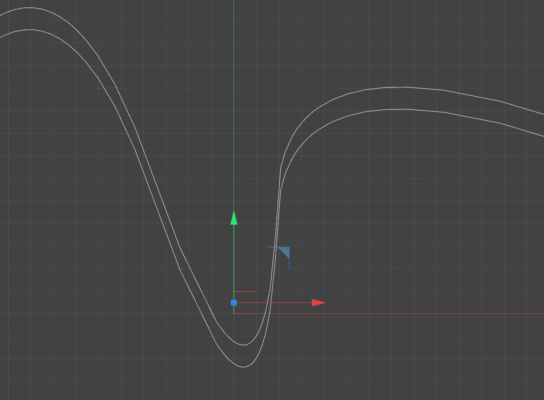
    I’m trying to animate a ball rolling on a surface which would follow a formula spline, however,
    in the middle of the curve it intersects with the spline, even though the center spline of the ball as well as the surfaces are identical.

    Is there any way to fix this?

    Thanks a million!

    Regards,
    Matiss
    Michael Szalapski replied 5 years, 10 months ago 2 Members · 5 Replies
  • 5 Replies
  • Michael Szalapski

    September 22, 2020 at 8:02 pm

    When you say the surfaces are identical, what do you mean? Are you using the same spline and just moving it up in the y axis?

    An easy way to do it would be to use dynamics and the follow position option and that would also let you add some nice random (but art directable) movement into the mix too, if that’s your thing.

  • Matiss Jansons

    September 24, 2020 at 10:12 am

    Yeah, I use the same spline and just move it up the y axis.
    Do you know any good tutorial for the dynamics? Would be super helpful.
    Thanks a lot!

  • Michael Szalapski

    September 28, 2020 at 3:16 pm

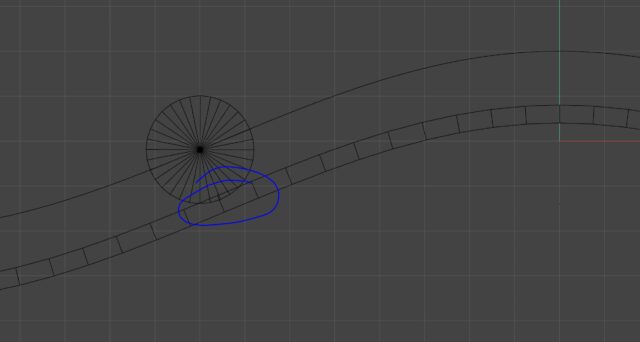
    When you move something up on y, the splines won’t be the same distance on every point like you’re expecting. I’ve made a more extreme curve difference in this example image so it’ll be more obvious. I just duplicated the spline and moved it up.

    As far as tutorials go. I don’t have a quick link handy. All you have to do is right-click on your surface and go to Simulation Tags>Collider Body (you may need to go into the tag’s Collision tab and pick Static Mesh). Then right-click on your ball and choose Simulation Tags>Rigid Body. Then go under the tag’s Force tab and turn Follow Position up to something like 10 (experiment with that to see what works for you).

  • Matiss Jansons

    October 28, 2020 at 3:31 pm

    Thanks for helping out.
    Much appreciated!

  • Michael Szalapski

    October 29, 2020 at 1:51 pm

    No problem!

We use anonymous cookies to give you the best experience we can.
Our Privacy policy | GDPR Policy