Creative Communities of the World Forums

The peer to peer support community for media production professionals.

Activity Forums Maxon Cinema 4D Cloner's Blend not blending properly

Tagged: 

  • Cloner's Blend not blending properly

    Posted by Angel Alcantara on September 23, 2020 at 10:41 pm

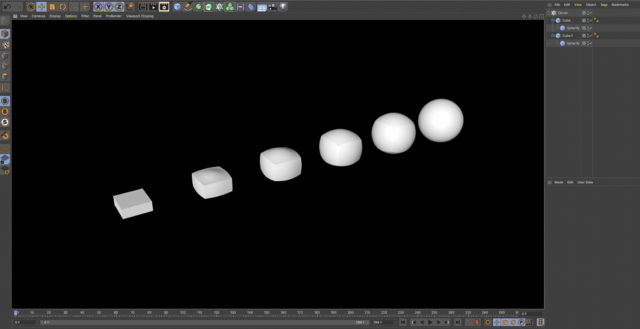
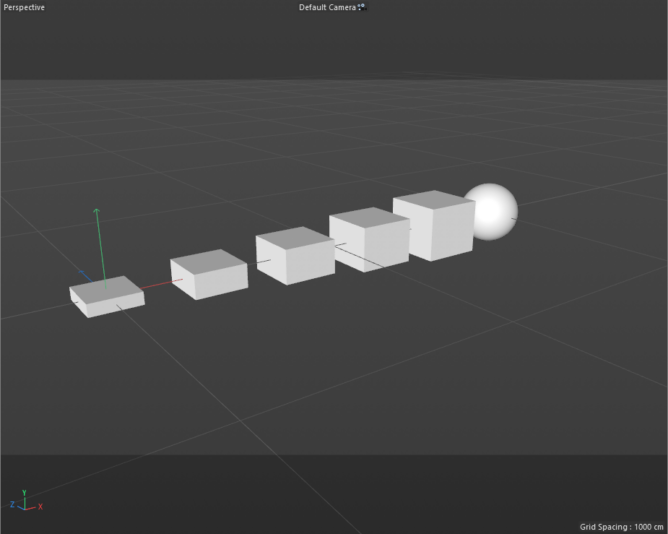
    Hello. I am still fairly new to C4D, and I try to search for solutions to problems as much as I can. I have two cubes inside a Cloner, and I want them to Blend from cube to sphere. I set the Cloner’s Clone field to Blend, and it is expected to blend the first cube’s geometry with the second cube, but that is not happening in my case. Is there anything I am missing, or is this a bug? Help would be hugely appreciated.

    Michael Szalapski replied 5 years, 7 months ago 3 Members · 4 Replies
  • 4 Replies
  • Jim Scott

    September 23, 2020 at 11:37 pm

    Blend only works with parametric primitives of the same type, so you need to start with two cubes, not a cube and a sphere. Give them plenty of segments for a smooth deformation and add a spherify deformer to each, with a strength of 0% on the first one and 100% on the second. The first clone can be flattened, as yours appears to be, but the second needs to be of equal dimensions so that a full sphere is formed. The cloner will then blend from one to the other.

  • Angel Alcantara

    September 23, 2020 at 11:44 pm

    Thank you Jim,

    I used two primitives of the same type, both Cubes, one without fillet and the other one with fillet to give it that spherical look. I wasn’t aware that for two primitives to Blend under a cloner they had to have enough segments in between. I was looking at Zachary Corzine’s presentation and he was able to drop two cubes under a cloner, just as I did, and had them Blend, without any other tool. His result was similar to yours with the Spherify deformer, but he didn’t use any deformer.

  • Jim Scott

    September 24, 2020 at 12:08 am

    Hi Angel,

    My apologies. I read your post too quickly and thought you had used a cube and a sphere. As you found, there’s usually several ways to approach a problem, so as long as your happy with the results — great. It’s easy to forget that a default cube is only 1x1x1 segments, which doesn’t work well with deformations and blending.

  • Michael Szalapski

    September 24, 2020 at 1:26 am

    The reason it worked in that presentation is that they both had fillets set up. One was a small fillet and the other (clearly) was a very large fillet. But they both need to have the fillet option active.

We use anonymous cookies to give you the best experience we can.
Our Privacy policy | GDPR Policy