Forum Replies Created

Page 8 of 126
  • Hey Holly,

    Sounds like you need to create a LUT from the Capture One image, and import that in to the Adobe Premiere PRO Lumetri panel.

    A quick search siggest that it could be a bit of a journey.
    Suggestion (via Google search) is to export the Capture One modified image as a 16-bit TIFF or PNG (sRGB is recommended for consistency).
    Then convert it to LUT in a LUT generator.

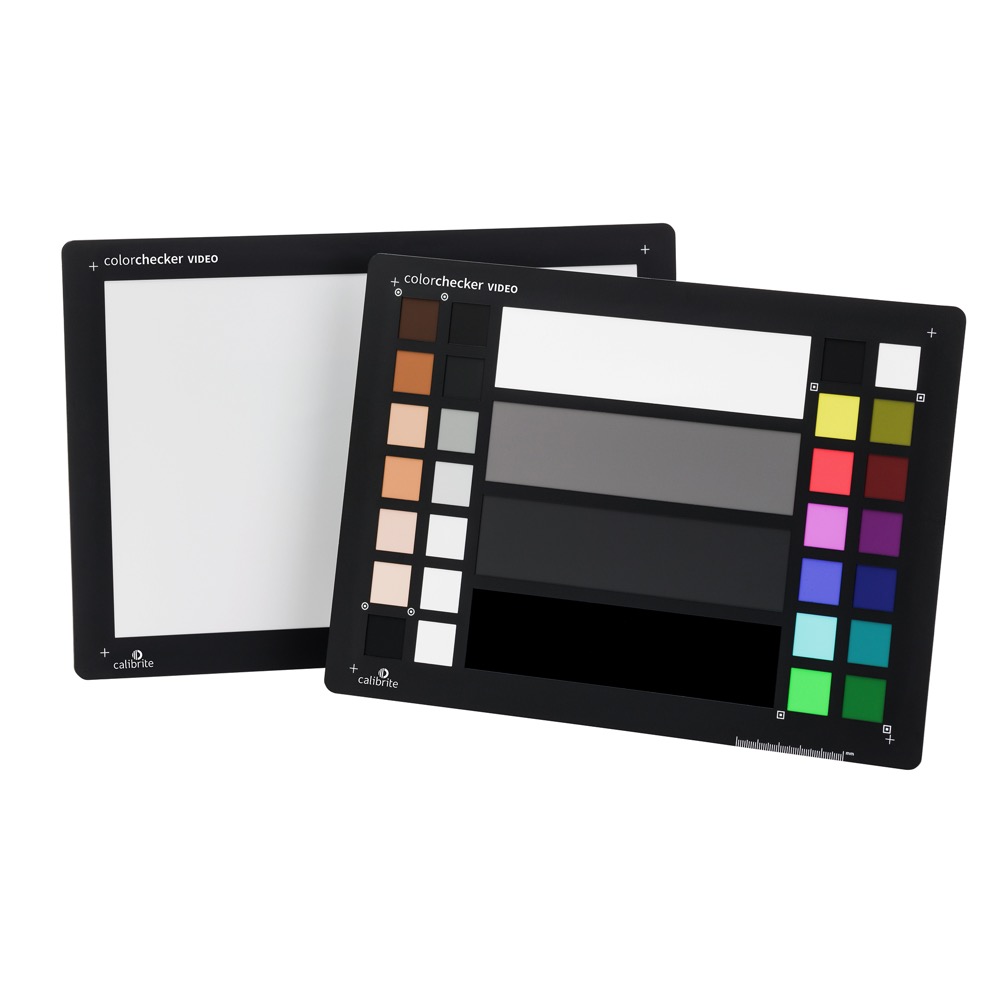
    The other option vould be to use a Calibrate Colorchecker on set – On a recent shoot, our DOP used the Calibrate Video, and that was really helpful for maintaining skin-tones in the edit.
    Although, we did not grade on set, as it was not that kind of shoot.
    https://calibrite.com/product/colorchecker-video

    Maybe experiment with using the Calibrate, including before and after Capture One adjustments?

    Hope that this helps?

    Atb
    Mads

  • Mads Nybo jørgensen

    February 23, 2026 at 5:02 pm in reply to: Export Settings for iPhone Camera Roll

    Hey Geovannie,

    Great to hear that it worked for you, hopefully others with similar problem will find it too.

    I am sure that you’ll find other goodies here on the COW, including a big section of training videos, made regurlarly by a small crowd of dedicated educators.

    Since the original post, all the rave currently, is about vertical microdrama.
    I am gearing up to replace my iPhone for better resolution, and making films.

    Atb
    Mads

  • Mads Nybo jørgensen

    February 21, 2026 at 3:56 am in reply to: Automated montage

    Hey Bob,

    You might be able to upload it to iPhone’s (iCloud) photos and see what that gives you, but I suspect that the end-result will be random.

    Key is to have something at storage level that can analyze your video/photos, and group people either on their own, or as part of a group, (#tags) together.

    “Auto-editing” is a bit more complex.
    Prompt editing is the way forward for some platforms.

    A quick search brings up a few interesting choices – admittedly, some that I’ve never heard of, butcould be interesting (Just don’t give them the option to auto-top-up your A.I. “coins”, or you may find yourself at the poorhouse:

    This one as AI Plugin for either Premiere Pro or Davinci:
    https://www.autocut.com/en/
    One feature they have, may just work for you if you split your projects in to smaller chunks:
    https://www.autocut.com/en/autoviral/

    Descript is currently being trialled by at least one UK broadcaster for highlights etc:
    https://www.descript.com/

    A search for “YouTube” auto AI editing came up with Gling:
    https://www.gling.ai/quality-content

    They also mentioned CapCut, however, I have barred my own kids from using it. As CapCut, like Wetransfer and other online platforms, have decided that they and their affiliated companies should have unrestricted usage of your footage. Do read the small print on any of these platforms before using them.

    Veed was the one, that we looked to when I worked with a now defunkt A.I. web-based video editing company. Back then, they were the closest competitor. They are still going:
    https://www.veed.io/tools/auto-video-editor

    Canva is also an option. I have ditched Adobe Photoshop/Illustrator/In-Design and are instead using the free Affinity (https://www.affinity.studio), which is really good as it has all those Adobe tools inside one piece of software. All you need is a subsprition to Canva.
    As part of their services, they have an A.I. style video editor:
    https://www.canva.com/video-editor/

    If you by now have forgotten what I mentioned at the top, here is the repeat:
    Get your media analyzed and indexed first, then the rest should be easy, if not easier for you.

    Hope that this helps?

    Atb
    Mads

  • Mads Nybo jørgensen

    February 20, 2026 at 7:08 pm in reply to: Who recorded these?

    Hey Stephanie,

    You could be right.
    Based on the list of “Composers”, one could read those names as file names on a SD Card from an audio recorder.

    As in SDC-028025:
    SDC = SD Card
    028025 = File number. or date?
    Keep in mind that the SD Card was introduced in the late 1990’s, when streaming and software was still in its infancy as too how many digits a file name could contain (PC and DOS devices).

    Don’t know if this helps, but it is a thought to pursue.

    Atb
    Mads

  • Mads Nybo jørgensen

    February 20, 2026 at 12:24 pm in reply to: Who recorded these?

    Hey Stephanie,

    Happy to help where possible.

    I suspect, looking at the other audio files coming up with similar name, when doing a search on SoundDogs. That the Audio file that you are interested in, may have come out of a Foley session. Rather than be recorded on location.

    Which could explain why it can’t be traced to an actual location.
    If you can get the details of the person that did the recording, that might help.

    I suspect that in time, maybe not in the near future, A.I. (LLMs) will have a global database of accustics, that allows you to pinpoint a recording to a specific place. But I wouldn’t get my hopes up on that, as there are too many variables involved.

    Keep Hunting!

    Atb
    Mads

  • Mads Nybo jørgensen

    February 20, 2026 at 2:44 am in reply to: Who recorded these?

    Hey Stephanie,

    As you mention, SoundDogs was aquired by Sound Ideas in 2019.

    I only have good experiences with Sound Ideas, going back some 30 years when I first met them at NAB. Still have all the CDs that I’ve purchased over the years.

    I would assume that when they took over SoundDogs, that they would also have the documentation for the origina of the sounds, or who recorded/made them.

    You can find more detailed contact info on LinkedIn, including who is who:
    https://www.linkedin.com/company/sound-ideas-sound-effects-library/

    I have reached out to my contact, and shared the link to your post.

    But won’t hurt if you make yourself known directly to them.

    Atb
    Mads

  • Mads Nybo jørgensen

    February 15, 2026 at 6:27 pm in reply to: Color Grading, It’s all RED, is it fixable?

    Hey Jonathan,

    Sorry, been busy at work on a big job.

    However, on your last upload, on the first screen shot the drummer’s skin-tones looks as good as you are going to get.

    Although everything else might look purple, I would go with that setting.

    Atb
    Mads

  • Hey Christopher,

    Your Canon EOS C50 should be able to switch between the two:

    • Wi-Fi (Optional Third Party Accessory)

      In-built (2.4 / 5GHz bands)
      Supporting 802.11a/b/g/n/ac

    Google A.I. suggests:

    To switch the Wi-Fi on the Canon EOS C50 to 2.4GHz, you generally need to select the appropriate network frequency during the camera’s wireless setup process or, more effectively, configure your router to separate the bands. The C50 supports both Wi-Fi bands for remote control and FTP transfer via the Canon Camera Connect app or XC Protocol.

    If you are considering using a router in the middle, although for Canon printers, this thread might be of help:
    https://community.usa.canon.com/t5/Desktop-Inkjet-Printers/switched-from-2-4-ghz-to-5-ghz-on-my-router-now-airprint-will/td-p/192231

    Hope this helps?

    Atb
    Mads

  • Mads Nybo jørgensen

    February 10, 2026 at 5:10 pm in reply to: Client monitor goes pink! (AVID Import)

    Hey Stevin,

    A bit like finding a fly in your soup, and the waiter says, “Don’t worry, we will not charge you extra”…
    Clients just love that, maybe not.

    Joking aside, although not exactly your problem, but sounds like it is the same type of issue that Kylene had with her setup for an installation. As reported in the “Live Events and Streaming” forum:
    https://creativecow.net/forums/thread/random-projector-blackouts-since-upgrading-to-apple-silicon/#post-2475259

    “In case anyone else has this problem, I figured it out. It was a combination of Apple’s inconsistent signal timing during periods of high computer use and its power management system cutting the feed to the external monitors during periods of low computer use (despite the laptop screen itself staying active with the video feed). Swapping the first Blackmagic converter for a Decimator MD-HX fixed Apple’s inconsistent signal timing and adding the Amphetamine app fixed the power management quirk.”

    Please let us know if it is Apple Power Management or similar that are making your pictures pink, which is marginally better than a black screen.
    Even better, do share with Kylene on her thread too, as if this problem is consistent, maybe Apple needs to step up and fix it.

    Atb
    Mads

  • Thank you for sharing, Kylene.

    I am sure that other users with same problem will be coming to the COW to find your solution.
    Not least as I know a few people about to update their Apple Macs for their grading suites, which will undoubtedly encounter similar problems.

    Hopefully Bessie will award you a solve coin for that share.

    Atb
    Mads

Page 8 of 126

We use anonymous cookies to give you the best experience we can.
Our Privacy policy | GDPR Policy