Forum Replies Created

Page 20 of 126
  • Mads Nybo jørgensen

    June 28, 2025 at 11:25 pm in reply to: Magic Particles

    Hey Bahadir,

    A part from buying it from Envato (if that is an AE template?), there is no easy fix.

    But:

    BorisFX offers Particle Illusion for free:
    https://vfx.borisfx.com/free-particle-illusion
    Small Print: “Particle
    Illusion Pro Trial is a standalone application the never expires the
    only limitation is the inability to import background layers.”

    Blender 3D – is free, and have stacks of courses/tutorials.
    EDIT: Sorry, only just re-read your post regarding Blender, hereby acknowledged that you are considering it.
    Here is on example:
    https://blenderartists.org/t/create-disintegration-effect-with-extra-nodes-geometry-nodes/1542670
    PACKT, for the next 48 hours, they have one of their super sales on eBooks – the more you buy, the lower the price (I got over £300 worth of eBooks and video for £32 yesterday).
    Search on Blender:
    https://www.packtpub.com/en-us/search?q=blender&country=us&language=en
    Suggested Reading list:
    Learn Blender Simulations the Right Way:
    Create attractive and realistic animations with Mantaflow, rigid and
    soft bodies, and Dynamic Paint:
    https://www.packtpub.com/en-us/product/learn-blender-simulations-the-right-way-9781803240169
    And:
    https://www.packtpub.com/en-us/product/taking-blender-to-the-next-level-9781803243825
    https://www.packtpub.com/en-us/product/procedural-3d-modeling-using-geometry-nodes-in-blender-9781804616079

    Unreal Engine starts from fee, and have also got loads of particle tutorials, one example:
    https://youtu.be/pzIORuULNfo?si=ROYQW1FMlTcDoY5j

    Unity also starts for free, with plenty of particles to go around:
    https://learn.unity.com/tutorial/introduction-to-particle-systems

    Although only BorisFX will offer you AE plugins, you are spoiled for choice.

    Hope that this helps you?

    Atb
    Mads

  • Mads Nybo jørgensen

    June 25, 2025 at 9:54 am in reply to: Files Not Importing in DaVinci

    Hey Avi,

    Have you got VLC media player installed on your Mac?
    It is free to use.

    If you play the file in VLC, you should be able to do COMMAND + I to bring up media information.

    Adding, that if the file plays in VLC on the Mac, you might have to upgrade to Davinci Studio, or transcode your rushes to an accepted format.

    Atb
    Mads

  • Hey Raynell,

    Out of interest, are you sure that you have got the original rushes that came straight out of the camera?

    I looked up the manual, and wanted to reverse engineer your issue, by finding the menu item that allows me to burn information on to the media. The only thing of value, although I did not search that hard for it, was a menu to add overlay information to the SDI feed out to monitor.

    Some years back I used After Effects Generative Fill to remove numbers out of a documentary – sometimes it worked, and sometimes it did not. But might work on some of your shots.

    Hope this helps?

    Atb
    Mads

  • Hey Marina,

    Sorry, but is this one camera file, or multiple camera files?

    EDIT: Sorry, forgot the most obvious one, which is to check an earlier version of your project if it exists in the AUTO-SAVE folder.

    Obviously, depending on the length involved, it might be faster to “N” Ripple Edit (Trim for all other systems) and drag the edit point until the whole clip is visible.

    You could also “F” Match Frame the first in-point, then set an outpoint in the viewer, and insert or over write back to Sequence.

    Another “dirty” favourite is to park play-head at the far end, and hit “E” for Extend Selected Edit to Playhead.

    But unless we know how many clips and sources involved, it is difficult to nail the right way. And, often, as is, 10 different people will give you 20 different answers.

    If you want to be “cruel” to the client, if they haven’t already seen the rushes, maybe share the original with them?

    You could also “Zoom In” on every second shot to change the frame, but that won’t work if you’ve done a radio edit and cut every 2 seconds.

    Just a few thoughts.
    Hope that they are helpful.

    Atb
    Mads

  • Mads Nybo jørgensen

    June 22, 2025 at 4:12 pm in reply to: Help Old Project Final Cut Pro 7

    Hey Matotea,

    There is a “recent” thread on the COW here, involving some very kind FCP users who might be able to help you:
    https://creativecow.net/forums/thread/help-creating-an-xml-from-an-old-fcp-7-project/

    Atb
    Mads

  • Mads Nybo jørgensen

    June 18, 2025 at 1:20 am in reply to: Formats for noobs

    Hey Jean,

    As you point out, the Quicktime .mov (and .mp4) is just a wrapper. It has little influence on the actual quality of the video inside the wrapper.

    The difference in the file size is to with one, the H265, is a highly compressed codec with Long-Gop (Timecode only ever so often), where the ProRes QT comes with less compression and every frame has its own timecode.

    Yes, you can turn up the MBps on the compressed format and included more detail (less compression).

    Depending on where the video will be shown, you might want to increase quality (have less compression).

    But most importantly, start with the end in mind – where will your video be shown, and what technology is used for playback. depending on the answer to that, you should be able to work out what format to deliver your video in.

    Atb
    Mads

  • Mads Nybo jørgensen

    June 17, 2025 at 12:17 pm in reply to: Avid Media Composer computer specs

    Hey Vicky,

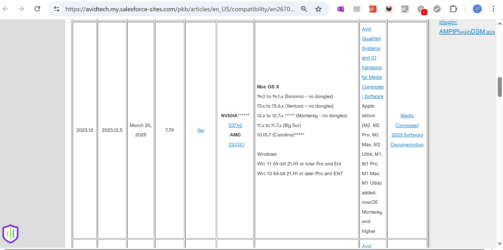
    Just checked, and yes, Salesforce seems to have taken control of AVID links.

    Through Google search I managed to get this link to work:
    https://avidtech.my.salesforce-sites.com/pkb/articles/en_US/compatibility/en267087

    I’ve also screen-shot it for you.

    There are different opinions about Apple on the Mac Silicon, but if AVID has certified it, I would go with it.

    Mainly I use PC, but I once had the job of editing a broadcast programme on a 14-inch MacBook Pro, and promised myself never, ever, to do that again. That was on FCPX, but imagine the problem would be the same on AVID MC.

    My recommendation would be that you, if you don’t have it already, get a 24′ or larger monitor.

    Hope that this helps.

    Atb
    Mads

  • Mads Nybo jørgensen

    June 16, 2025 at 9:38 pm in reply to: Long to render

    Hey Jean,

    I have found in the past that going from one H265 format to another H265, can be painfully slow, or not happen at all.

    I suspect that some exporters “unpack” the H265 to an interim uncompressed format, before compressing back to a new version of H265.

    Which makes sense, as going from one highly compressed format to another might just make it look worse.

    If you have the space, maybe export out to ProRes 4444 or similar, before compressing to QuickTime H265.

    Hopefully, it will be faster + you should retain the high quality.

    I am sure that there might be a better scientific description, and there are smarter people around here that can explain it.

    Atb

    Mads

  • Mads Nybo jørgensen

    June 15, 2025 at 11:04 pm in reply to: Files Not Importing in DaVinci

    Hey Avi,

    MP4 and MP3 file formats are just a wrapper, or a container, for what could be any file format inside the MP4 / MP3.

    Not sure from your post if the source of your files that you use are the same format, and/or identical to the earlier file that you used?

    I am on PC, and have found that for some codecs I needed to purchase that specific codec. Before the MP4 would playback on my system.

    The other issue could be wheter you are on Davinci Free, or Davinci Studio?

    My first go to would be to convert the file to a format that you know will work, forexample take the MP3, and make it a wave file. Question there is whether you need to go online, or get a third-party software to do it for you.

    Hope that this helps?

    Atb
    mads

  • Hey Ciat,

    Have you checked your menu?
    I’ve only used the older cameras, but a quick search suggests that there is way of turning Focus/Zoom controls on off.
    Could be by rotating the lens in a certain direction, or the menu, or both.

    Page 35 in manual:

    https://www.bhphotovideo.com/lit_files/513654.pdf

    Set the mode switch to the desired position.
    • Set it to AUTO mode or MANUAL mode, according to how you want to use the camcorder.

    Page 42-52 has a whole section on Adjusting the Focus in manual or with preset(s), and various Zoom functions.

    Page 84 and 101+ pages might also help.

    But short of copying the pages, have a look at the manual.
    You might already have checked that, but always worth a second read.

    The only alternative is the repair shop, although those cameras are normally solid. So hopefully it is just a switch somewhere that needs to be moved, or a “sticky” button that has not released.

    Atb
    Mads

Page 20 of 126

We use anonymous cookies to give you the best experience we can.
Our Privacy policy | GDPR Policy