Forum Replies Created

Page 40 of 51
  • Kouraib Abdmalek

    January 9, 2024 at 11:28 am in reply to: Unable to switch off tiling in redshift.

    Hi Ahmed,

    Thank you for sharing this with us. There have been new features in Redshift for Cinema 4D 2023 that have made it much easier, as you will see in the video below, you could use Staking instead of Single which would be better, so in the RS settings under “System” → “Legacy” → “Material processing mode” → choose “Staking”

    I hope this is useful to you

    https://www.youtube.com/watch?v=XcEixUdEw7I

    Some contents or functionalities here are not available due to your cookie preferences!

    This happens because the functionality/content marked as “Google Youtube” uses cookies that you choosed to keep disabled. In order to view this content or use this functionality, please enable cookies: click here to open your cookie preferences.

  • Kouraib Abdmalek

    January 8, 2024 at 12:57 pm in reply to: Rearrange Letters After Impact Bounce

    You’re welcome, Sean! I also think that the Dynamic Place tool will be useful to you in this, here are two tutorials that explain how it works.

    thanks!

    https://www.youtube.com/watch?v=vNLsK0xYmeA

    https://www.youtube.com/watch?v=1l3mwxf-Yco

    Some contents or functionalities here are not available due to your cookie preferences!

    This happens because the functionality/content marked as “Google Youtube” uses cookies that you choosed to keep disabled. In order to view this content or use this functionality, please enable cookies: click here to open your cookie preferences.

  • Kouraib Abdmalek

    January 7, 2024 at 10:59 am in reply to: Rearrange Letters After Impact Bounce

    Hi Sean,

    If what you are looking for is to make the letters fall so that the same letters form another word, just add hidden paths that direct each letter to its place and apply Collider Tag to them so that each letter oscillates dynamically but ends in Its desired position, The letter may fall upside down or on its side, so you need to hit it again with a hidden object to correct this.

    I hope this is useful to you

  • Hello Naveen, Thank you very much. This is very kind of you. I just wanted to let you know that you never bother me. On the contrary, I am happy to help you. As for the tutorial, I am surprised that this did not work for you because it used the same principle you looking for, and the result was good, as you can see at the end of the tutorial. anyway, it is good that you managed your matter by amending what we accomplished together previously, as for the continued breakage of the granules, they continue to break for me even after frame 100. The reason may be that the computer processor cannot continue activating the Voronoi feature any longer, as for speeding up the rendering, I don’t think there is much to do with the file. Baking animation speeds up the rendering, but not too much. Don’t use simulation tags on children. You can also use the Team Render or a Render Farm, you can find many of them on the Internet.

    I hope this helps you

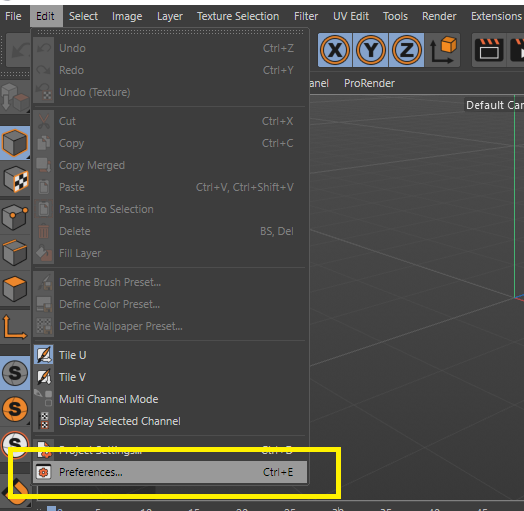
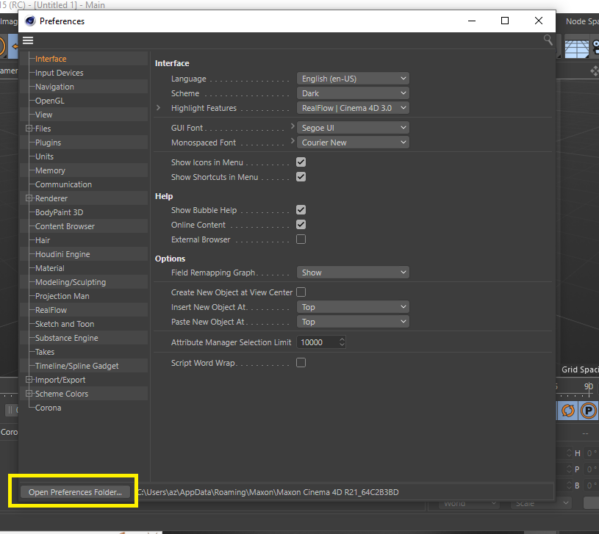
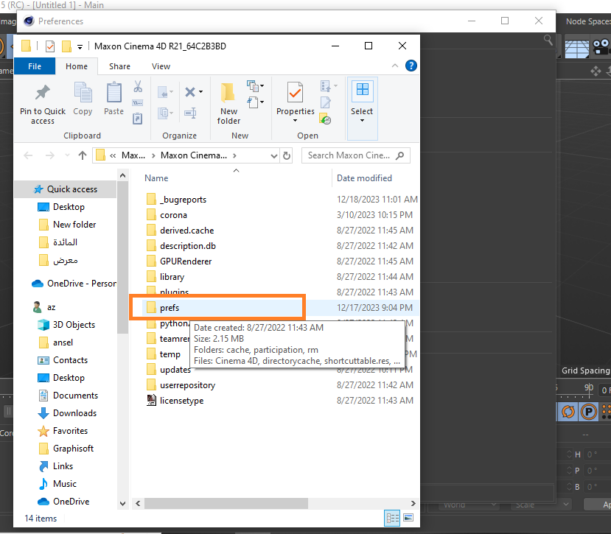
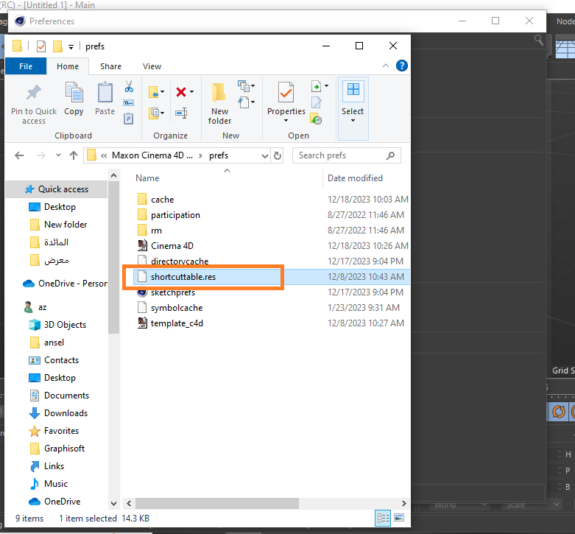
  • As for the file location where your commands are saved, I think it is better to go to Edit and then follow the steps shown in the attached screenshots, instead of following the path, which may not work for everyone, especially on Mac.

    Thanks!

  • Kouraib Abdmalek

    December 30, 2023 at 8:57 am in reply to: Camera doesn’t register wheels rotating issue

    Hi Yasser,

    We are glad to know that the forum is useful to you, thank you! About your issue, you should delete the animation track before making the camera not children, then re-record the path. If this does not work for you, please post the file here so we can check it.

    I hope this helps you.

  • No problem, just follow the steps in this tutorial from 19:00, You can also benefit from this YouTube channel for everything related to expresso.

    Thanks!

    https://youtu.be/pDehm4evFYk?feature=shared

    Some contents or functionalities here are not available due to your cookie preferences!

    This happens because the functionality/content marked as “Google Youtube” uses cookies that you choosed to keep disabled. In order to view this content or use this functionality, please enable cookies: click here to open your cookie preferences.

  • with pleasure! Yes, you have to use Expresso on the Voronoi to make the fracture feature inactive except with the hammer collision.

    Thanks!

  • Kouraib Abdmalek

    December 24, 2023 at 10:13 am in reply to: Scene nodes – Geometry collision

    You are welcome, Jakub! Until now, I have not been able to figure out your project idea. I hope you can attach an illustration or something similar. You can also send the file to my email if you don’t want to post the file here.

    Thanks.

    alasma3i10@gmail.com

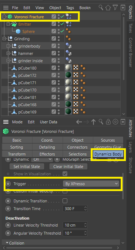
  • You are welcome, Naveen! I have attached a video showing how I did it. One problem remains, which is that the balls will also break when they touch the grinder body before reaching the hammer. If it is a matter of individual balls, you can overcome this by delaying the activation of the Voronoi tool until the frame the grains reaches the hammer, but since you are using an Emitter, then you must use Expresso to make the Voronoi interact only with the hammer, then go to the Voronoi settings and set the trigger to “By Expresso” as in the attached screenshot below.

    I hope this is useful to you

Page 40 of 51

We use anonymous cookies to give you the best experience we can.
Our Privacy policy | GDPR Policy