Creative Communities of the World Forums

The peer to peer support community for media production professionals.

Activity Forums Maxon Cinema 4D Unable to switch off tiling in redshift.

  • Unable to switch off tiling in redshift.

    Posted by Lucas Schwartz on March 23, 2018 at 12:13 pm

    Hi Everyone,

    I decided to learn c4d and animation but now I have run into a trivial problem. I tried to search for a solution online but unable to find an answer.
    I am simply trying to place an image onto an object in c4d. I position the image into its desired location via the “length U” and “length V” settings with “tiling” turned off and this works well with the standard c4d renderer.

    However if I try to render the project with Redshift the texture shows up “tiled” an I can’t figure out how to circumvent that from happening.

    Here is a screenshot of my screen: https://ibb.co/fCrZ0H

    Your advice would be greatly appreciated.

    Many thanks,

    Lucas

    I case anyone would have the same problem here is a video to explain the process: https://www.youtube.com/watch?v=GESiRlLGF6Y

    Kouraib Abdmalek
    replied 2 years, 4 months ago
    5 Members · 4 Replies
  • 4 Replies
  • Fhake Nham

    August 28, 2018 at 8:45 pm

    Getting the exact same issue as above and found this thread via searching the issue.

    Anyone?

  • Brian Jones

    August 28, 2018 at 10:20 pm

    don’t have redshift but he appears to have edited his original question and the linked video explains it starting at the 6:45 point

  • Ahmed Fouad

    January 8, 2024 at 3:09 pm

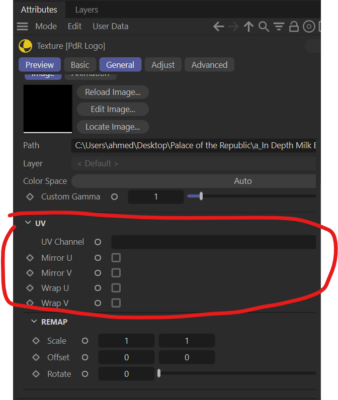
    I found the solution – In the node editor, check the options/attributes window for the imported texture/image, there is a section for UV with tiling settings.

  • Kouraib Abdmalek

    January 9, 2024 at 11:28 am

    Hi Ahmed,

    Thank you for sharing this with us. There have been new features in Redshift for Cinema 4D 2023 that have made it much easier, as you will see in the video below, you could use Staking instead of Single which would be better, so in the RS settings under “System” → “Legacy” → “Material processing mode” → choose “Staking”

    I hope this is useful to you

    https://www.youtube.com/watch?v=XcEixUdEw7I

    Some contents or functionalities here are not available due to your cookie preferences!

    This happens because the functionality/content marked as “Google Youtube” uses cookies that you choosed to keep disabled. In order to view this content or use this functionality, please enable cookies: click here to open your cookie preferences.

We use anonymous cookies to give you the best experience we can.
Our Privacy policy | GDPR Policy