

Activity › Forums › Maxon Cinema 4D › C4D Particles Can someone please help how to shatter particles on collision?
-
C4D Particles Can someone please help how to shatter particles on collision?
Posted by Naveen Ns on December 21, 2023 at 1:51 amIam trying to do a grinding animation where seed particles enter the grinder on colliding with the blades the particles should shatter.
Can anyone please let me know how to do it?
Attaching the c4d file.Kouraib Abdmalek replied 2 years, 8 months ago 2 Members · 9 Replies -
9 Replies
-

Kouraib Abdmalek
December 21, 2023 at 11:15 amHi Naveen,
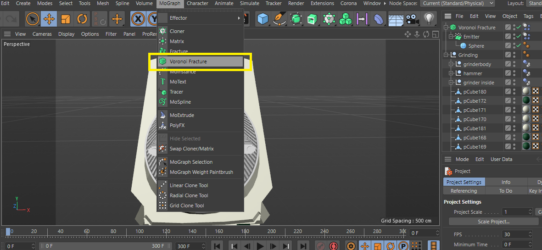
You can do this using the Voronoi Fracture tool, which you will find under the MoGraph drop-down icon, as in the screenshot below. I have added that to the attached file. It still requires additional work from you, otherwise, I will try to return to that when I have the opportunity. You can modify the values in Voronoi to get the desired effect, you can find many tutorials about this tool on YouTube.
I hope this helps you
-
Kouraib Abdmalek
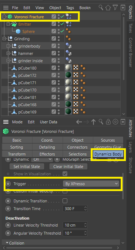
December 24, 2023 at 10:03 amYou are welcome, Naveen! I have attached a video showing how I did it. One problem remains, which is that the balls will also break when they touch the grinder body before reaching the hammer. If it is a matter of individual balls, you can overcome this by delaying the activation of the Voronoi tool until the frame the grains reaches the hammer, but since you are using an Emitter, then you must use Expresso to make the Voronoi interact only with the hammer, then go to the Voronoi settings and set the trigger to “By Expresso” as in the attached screenshot below.
I hope this is useful to you
-

Naveen Ns
December 25, 2023 at 1:29 amHey Kouraib really appreciate for taking time to record the video. thanks a ton bro.
Iam very new to C4D just learning things around. Now i understood what i did wrong I did not select the source correctly.
Sorry but I did not understand xpresso part should I apply xpressso to the blades RB or the voronoi Fracture? -
Kouraib Abdmalek
December 25, 2023 at 7:56 amwith pleasure! Yes, you have to use Expresso on the Voronoi to make the fracture feature inactive except with the hammer collision.
Thanks!
-
Naveen Ns
December 25, 2023 at 9:43 amBro can you show me how apply Xpresso programing tag
I don’t have a clue about xPresso 🙁
thank you
-
Kouraib Abdmalek
December 25, 2023 at 1:22 pmNo problem, just follow the steps in this tutorial from 19:00, You can also benefit from this YouTube channel for everything related to expresso.
Thanks!
https://youtu.be/pDehm4evFYk?feature=shared
Some contents or functionalities here are not available due to your cookie preferences!This happens because the functionality/content marked as “Google Youtube” uses cookies that you choosed to keep disabled. In order to view this content or use this functionality, please enable cookies: click here to open your cookie preferences.
-
Naveen Ns
January 4, 2024 at 4:18 amHi Bro
Wish you and your family Happy New Year.
Sorry for disturbing you again. I followed the tutorial and used xpresso it did not work but I the reduced the emiter size and made the particle fall on the wheel and it worked. but now iam facing different issue. the particles are not breaking after 100frames and it became impossible to render the whole thing.
DO you have any tips to render this sequence? I even tried baking the caches but did help 🙁 -
Kouraib Abdmalek
January 4, 2024 at 3:12 pmHello Naveen, Thank you very much. This is very kind of you. I just wanted to let you know that you never bother me. On the contrary, I am happy to help you. As for the tutorial, I am surprised that this did not work for you because it used the same principle you looking for, and the result was good, as you can see at the end of the tutorial. anyway, it is good that you managed your matter by amending what we accomplished together previously, as for the continued breakage of the granules, they continue to break for me even after frame 100. The reason may be that the computer processor cannot continue activating the Voronoi feature any longer, as for speeding up the rendering, I don’t think there is much to do with the file. Baking animation speeds up the rendering, but not too much. Don’t use simulation tags on children. You can also use the Team Render or a Render Farm, you can find many of them on the Internet.
I hope this helps you

Reply to this Discussion! Login or Sign Up