Forum Replies Created

Page 45 of 112
  • So you want the layer to constantly rotate, but speed up and slow by by the multiplier?

    Try this:

    effect("Slider Control")("Slider")*thisComp.layer("Audio Amplitude").effect("Both Channels")("Slider")*time

    time will keep the layer rotating, but multiplying it by the audio amplitube with a slider control to make the values larger should do the trick.

    Alternatively:

    (effect("Slider Control")("Slider")*thisComp.layer("Audio Amplitude").effect("Both Channels")("Slider"))+time

    Has time act to constantly rotate the solid, while additional rotation is provided by the audio amplitude.

    I tried out both the first option seemed smoother.

  • Graham Quince

    March 7, 2021 at 3:14 pm in reply to: element 3D shadows in mirror reflections

    Element 3D mimics reflections rather than actually raytracing (as far as I know), so I think shadows of a reflection object might be a step too far for it. Could you try duplicating your object, setting its Y scale to 0 and see if that appears in the reflection?

  • That’s very generous of you, thank you. I’ve sent you a connect request, I haven’t tried before, but presumably that will allow me to DM you.

    Thanks again.

  • Graham Quince

    February 21, 2021 at 2:00 pm in reply to: Changing values of individual Keyframes

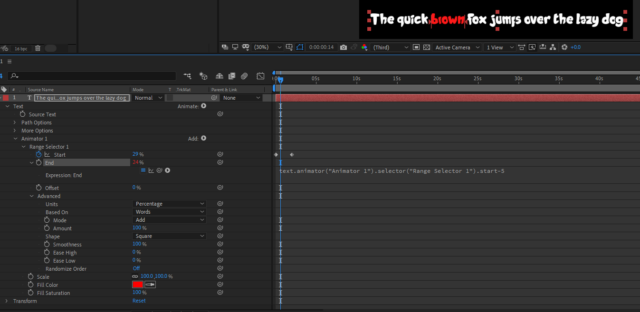
    Try these settings. The Advanced section has a based on word option. And I linked the End Range to the start range with a “-5”. To turn this into an essential graphic, you probably just need to add the Range’s Start value to the Essential Graphics options.

  • Graham Quince

    February 21, 2021 at 1:51 pm in reply to: Trying to create a swirling cloud effect

    Liquify doesn’t give you much options in the way of looping that won’t be jarring, so the next option is to look at using two copies of your comp and fading one out into the start of the next one.

    I made a mini-tutorial a little while back which might help:

    https://www.youtube.com/watch?v=fXT8uUIkuP8

    Some contents or functionalities here are not available due to your cookie preferences!

    This happens because the functionality/content marked as “Google Youtube” uses cookies that you choosed to keep disabled. In order to view this content or use this functionality, please enable cookies: click here to open your cookie preferences.

  • Are you saying you want to know the dimensions of the cube? If you open up the comps in the Project Panel, I think those precomps should give you the sizes.

  • Graham Quince

    February 21, 2021 at 1:45 pm in reply to: Earth colliding effect how do i do this effect

    There’s a lot to unpack here, but check out this blog post from Andrew Kramer.

    https://www.videocopilot.net/blog/2017/01/destruction-experiment/

    It’s not a full tutorial, but at the bottom of the post, he does show the process (he just doesn’t go step by step).

  • Graham Quince

    February 21, 2021 at 1:37 pm in reply to: 3d animations import

    Not used Blender, although I know of it (and it is on my to-do list). I don’t know of a direct link between AE and Blender, but like most 3D programs, you next step is to render them out from Blender – either with an transparent background or with a separate matte. Then importing the footage into After Effects, you can add your animations and “blend” them in, using the colour correction effects.

    The most important things that help are to match camera angles and lighting. Taking spherical HDRIs of the location can help a lot when rendering in Blender.

  • Graham Quince

    February 21, 2021 at 1:34 pm in reply to: Cinema 4D issue…

    Sorry you didn’t get any help here – I can’t speak for anyone else, but I’ve been snowed under. Having said that, thanks for coming back with the solution. I bet there’s someone searching right now trying to figure this out.

  • Graham Quince

    February 20, 2021 at 5:06 pm in reply to: Is this the best way – wiggle in 2 dimensions only

    Brilliant – thank you!

Page 45 of 112

We use anonymous cookies to give you the best experience we can.
Our Privacy policy | GDPR Policy