Creative Communities of the World Forums

The peer to peer support community for media production professionals.

Activity › Forums › Adobe After Effects › Changing values of individual Keyframes

  • Changing values of individual Keyframes

    Posted by Joel Desmond on February 12, 2021 at 10:11 pm

    Hello,

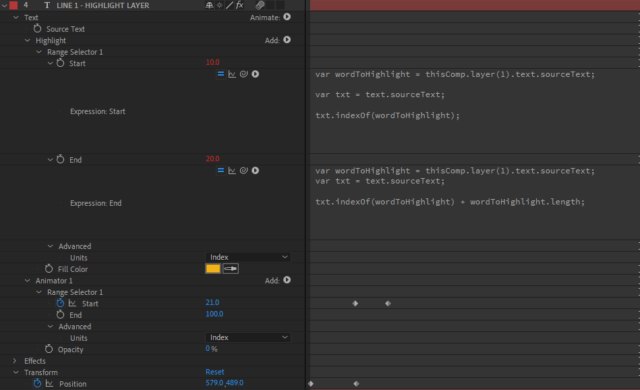
    I am trying to animate on a certain word within a particular phrase. I all ready have a range selector set to identify the word and set it’s values to the start and end. How can I then take the next range to change it’s key frames on the start selector based on that info?


    I’ve tried numerous ways but keep getting no results. A bonus would be being able to have a text box respond as well.


    Ideally I’d like this to be a mogrt where the editor in premiere only has to type in the word and it applies the animations.

    Graham Quince replied 5 years, 7 months ago 2 Members · 1 Reply
  • 1 Reply
  • Graham Quince

    February 21, 2021 at 2:00 pm

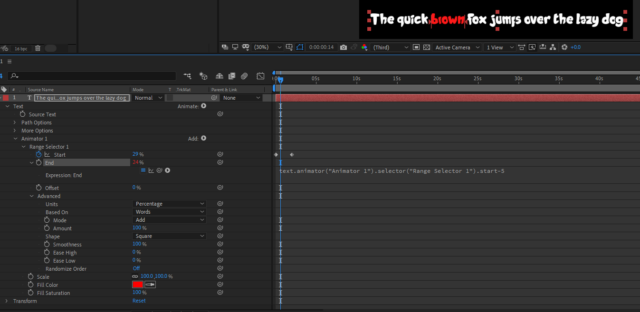
    Try these settings. The Advanced section has a based on word option. And I linked the End Range to the start range with a “-5”. To turn this into an essential graphic, you probably just need to add the Range’s Start value to the Essential Graphics options.

We use anonymous cookies to give you the best experience we can.
Our Privacy policy | GDPR Policy