Forum Replies Created

Page 24 of 112
  • Graham Quince

    June 25, 2022 at 10:35 am in reply to: Help replicating an effect

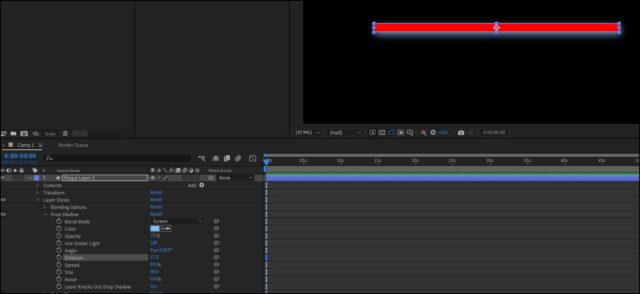
    I’d use a layer style, probably Drop Shadow set to screen

    If you right-click on the layer, in the menu, there’s an option for Layer Styles.

  • Graham Quince

    June 25, 2022 at 10:26 am in reply to: How to make this Light Glow animation?

    This looks like a lot of gradient wipes to me. That transition effect is really powerful when you take time to set it up.

  • Graham Quince

    June 25, 2022 at 10:18 am in reply to: Ignite the letters !

    Thanks for posting a solution. Some day someone else will be struggling to do this and when they find this thread, they’ll get their answer

  • Graham Quince

    June 17, 2022 at 8:48 am in reply to: VCP Element 3D – Add Multiple Materials?

    I think that is the only way unfortunately.

  • If you render out without the alpha channel, is the render time better? If you chuck the comps over to Media Encoder, is that improved?

    (Sorry you’ve posted and no one answered – I can’t speak for other forum members but I’ve been snowed under with family and work.)

  • Graham Quince

    June 17, 2022 at 8:44 am in reply to: Any way to add randomness to this?

    Interesting technique in that tutorial. And the first thing that sprung to mind was to use the included script (Window > Create Nulls from Paths) One of the options in there is the option for paths to follow nulls. You can then set up wiggles on the null positions.

    Alternatively, you could just use the Wiggle paths option, available on the tiny Add menu on the shape layer.

  • I’ve had issues where Element will crash the whole PC – in theory it should not, but i think a conflict arises with the graphics card. Sometimes the only solution was to make sure the rest of AE was using software-only (File > Project settings) so that Element had free run of the card.

  • Graham Quince

    June 17, 2022 at 8:09 am in reply to: “The Cuphead Show” Intro Animation Technique

    I think you can fake this using CC Cylinder for the road. For the looping fence, you could make it in a circle (or use Polar Coordinates), set it in 3D space and have its rotation match the road’s rotation

  • Graham Quince

    June 17, 2022 at 8:08 am in reply to: Failing to export

    If this is repeatedly happening in AME, here’s an option you can try:

    • Open Task Manager
    • Find After Effects
    • End Task – AE will pop back up, but using a much lower amount of RAM, freeing this up for AME
  • Graham Quince

    June 13, 2022 at 8:07 pm in reply to: Expression to offset shape group scale animation

    I’d probably “cheat” and use Keyframe Assistant > Sequence Layers.

    But something like this on opacity would have each layer follow the one below:

    var trans =thisComp.layer(index+1).transform.opacity;

    var dur = 1/30;

    trans.valueAtTime(time-dur)

Page 24 of 112

We use anonymous cookies to give you the best experience we can.
Our Privacy policy | GDPR Policy