

Activity › Forums › Adobe After Effects › Expression to offset shape group scale animation
-
Expression to offset shape group scale animation
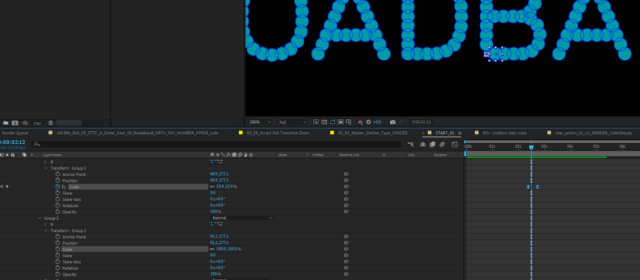
Posted by Angel Tomsom smith on June 9, 2022 at 8:22 amI’m animating dots shapes from typography converted to shapes scaling up with overlapping animation. There are lots of circles in a shape layer and I want them to come on with a 1 frame difference. Is there a way you can offset keyframes like you can layers or do I have to do it manually? What would be your fastest way of doing?
I found this expression online but I don’t really understand how to make it work.
offset = .1; id = thisProperty.propertyGroup(2).propertyIndex content(“circle”).transform.scale.valueAtTime(time-id*offset)
Cheers!
 Angel Tomsom smith replied 4 years, 3 months ago 4 Members · 9 Replies
 -
9 Replies
-

Hung Nguyendac
June 9, 2022 at 10:29 am -
Angel Tomsom smith
June 9, 2022 at 12:06 pmThanks Hung for your suggestions, but I’m not entirely sure Pastiche will help me with this. Maybe you can confirm if it can work with shapes groups as it does with layers.
The fundamental issue is that the font I’m using belongs to the brand identity, so I have to create text with it, and then convert the typo into shapes and animate the scale of the circles or dots in a sequential way.
I believe an expression will work great as I can copy-paste it over the dozens of groups I will have and it will propagate and offset the scale animation based on each group number.
Cheers
-
Angel Tomsom smith
June 13, 2022 at 11:26 amAs far as I understand now, I need to get to know how the “offset=.1” instruction works inside the scripting language.
Anyone can help?
Thanks
-

Dan Ebberts
June 13, 2022 at 7:17 pmoffset = .1;
is just setting the variable the defines the timing offset to one tenth of a second. If you wanted it to be one frame, you could change it to this:
offset = thisComp.frameDuration;
-

Graham Quince
June 13, 2022 at 8:07 pmI’d probably “cheat” and use Keyframe Assistant > Sequence Layers.
But something like this on opacity would have each layer follow the one below:
var trans =thisComp.layer(index+1).transform.opacity;
var dur = 1/30;
trans.valueAtTime(time-dur)
-
Angel Tomsom smith
June 14, 2022 at 12:49 pmSequence layers can’t be an option because if you check the screenshot I posted, the typo made of dots will made a simple sentence of 2 or 3 words very likely a +100 layers comp.
My aim is to understand how to offset an expression linked to an animation of a group of shapes but inside the same layer.
The expression content(“NAME OF THE FIRST GROUP”).transform.scale will link the animation of the scale between shape groups. I just need to offset each of the next groups by 1 or 5 frames from the master animation for the first dot.
Cheers
-
Angel Tomsom smith
June 14, 2022 at 1:00 pmI think I found the right expression:
This one works between shape groups for a SCALE animation
for x5 frames offset
offset = .2;content(“NAME OF THE GROUP“).transform.scale.valueAtTime(time-offset);
for x1 frame offset
offset = thisComp.frameDuration;content(“NAME OF THE GROUP“).transform.scale.valueAtTime(time-offset);
-
Angel Tomsom smith
June 14, 2022 at 1:19 pmAnyhow, it only works for the 2nd group – the rest of the groups will not offset but mimic 2nd group behavior.
Anyone in how to offset depending of group order?
-
Angel Tomsom smith
June 15, 2022 at 11:24 pmFinally made it work with this expression
offset = .1;
id = thisProperty.propertyGroup(2).propertyIndex;
content(“B 2”).content(“Group 2”).transform.scale.valueAtTime(time-id*offset)
Reply to this Discussion! Login or Sign Up