Forum Replies Created

Page 2 of 9
  • George Charoupas

    October 4, 2023 at 9:17 pm in reply to: AXIX : … Y=0

    Hello Mauricio,

    On the “Axis Center” setting the Y to -100% will do something different.

    It will move the pivot axis for each object, in its lowest Y position, according to its structure.

    If you follow Andy’s method, then you don’t move all pivot Axis points to exact 0. Instead you are moving them to average 0. That means that if your objects have different Y positions, all of the axis points will have an average Y value of 0. If all your objects have the same Y position, then it will work.

    The only method I can think of involves a python script. If you are willing to mess with python scripts I can show you how.

  • George Charoupas

    October 4, 2023 at 7:17 am in reply to: image sequence for Displacement shader?

    I think you can, but it is also time consuming to do that.

  • George Charoupas

    October 4, 2023 at 4:51 am in reply to: image sequence for Displacement shader?

    Hello Mikhail,

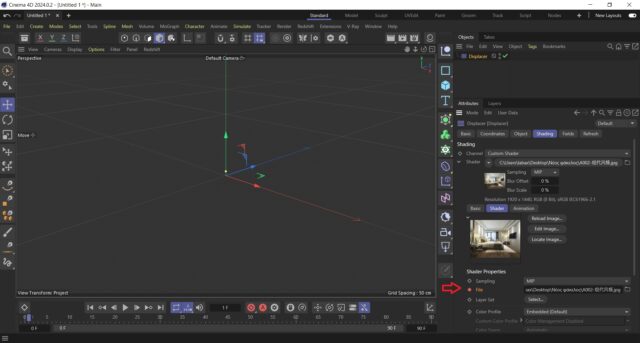
    You can actually use an image sequence. It’s just time consuming. You will have to keyframe all filenames as my image. You will have to expand the shader and keyframe each different file. It is not ideal. As for the “lossless” video file, what kind of file are you putting? Can you share a part from that lossless video file?

  • George Charoupas

    September 27, 2023 at 1:46 pm in reply to: Hair on cloth tear

    🙂

  • George Charoupas

    September 27, 2023 at 1:35 pm in reply to: Hair on cloth tear

    Hello Martin,

    You need to change in the guide section the root from polygon vertex to polygon or polygon area or polygon center. Then it works.

  • Hello Maxi,

    Modern versions of After Effects support c4d files natively, so you don’t have to convert anything. You just need Cineware and to install the Cinema 4D addon in After Effects.

    You can check this

    https://helpx.adobe.com/after-effects/using/c4d.html

    for more help on how to do it.

  • George Charoupas

    September 22, 2023 at 2:27 pm in reply to: Cinema 4d Rotate Camera around an axis

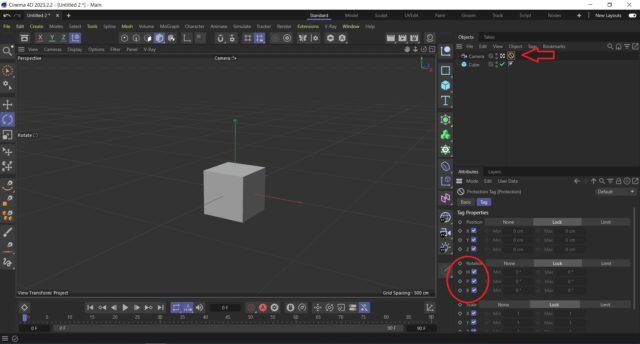
    Propably he means that he switched from Cinema 4D R19 to another software and now he is back to a more modern version of Cinema 4D. I don’t remember that toggle he says but he can achieve this with the protection tag as my video.

  • George Charoupas

    September 22, 2023 at 5:13 am in reply to: Cinema 4d Rotate Camera around an axis

    Hello Andrew,

    The easiest way to rotate the camera in its axis is to press f2 (top view) then change the axis to world [w shortcut] and rotate the camera on its axis.

    Alternatively, you can use the protection tag and unlock only rotation axis on it. So, only the rotation will be allowed to change.

  • Hello, You can bake the animation. This way all the mograph calculations became keyframes. Check the mograph cache tag.

  • George Charoupas

    September 20, 2023 at 9:56 am in reply to: alternatives to boole object (maxon cinema 4d)

    No you can’t do it like that.

    The volume builder’s purpose is to create a connected volume out of shapes. Everything you put in there gets connected or subtracked.

    So the procedure is this:

    1) In the hierarchy you put as top object the Volume Mesher. As a child you put the Volume Builder and as a child the objects.

    2) You will need to have for each object (that needs to get subtracked) a volume Mesher-builder, so they don’t connect with each other.

    3) You place the materials on the Volume Mesher.

    4) On the Volume Builder you might need to add in the object section an SDF Smooth.

    5) Now you will have to place in all these volume builders, a cube inside that will subtrack the main object.

    6) You can place a cube outside these meshers and link them all together, so when you move the external cube, all of them to move. It can be done via expresso(super easy).

Page 2 of 9

We use anonymous cookies to give you the best experience we can.
Our Privacy policy | GDPR Policy