Creative Communities of the World Forums

The peer to peer support community for media production professionals.

Activity Forums Maxon Cinema 4D image sequence for Displacement shader?

Tagged: 

  • image sequence for Displacement shader?

    Posted by Mikhail Margolis on October 3, 2023 at 9:17 pm

    Hello

    I just spent couple hours trying to solve what seems to be a very simple problem.

    I have a displacement shader and I want to animate it.

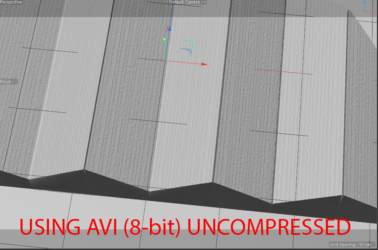
    I can load an AVI and it works fine. However even when it’s “lossless” there are strange artifacts.

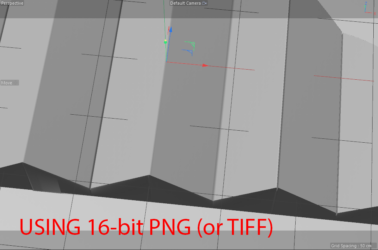
    I can load a single TIFF (or PNG) image and there are no artifacts and it works fine.

    However I can’t load an image sequence!

    Is it even possible ?

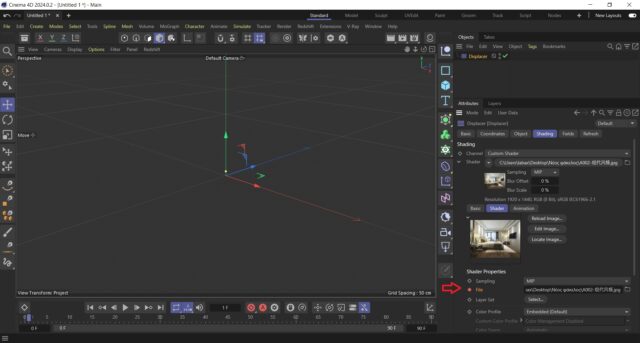
    I have tried TIFF, PNG.. My naming convention is fine (map_XXXX). I can load sequence in material it works. However I CAN’T load it for displacement shader.. it loads single image, but not sequence.

    Displacement -> Shading -> Custom Shader .. I click on triangle, select file…

    SOS! )

    M

    Tom Morton replied 2 years, 7 months ago 4 Members · 9 Replies
  • 9 Replies
  • George Charoupas

    October 4, 2023 at 4:51 am

    Hello Mikhail,

    You can actually use an image sequence. It’s just time consuming. You will have to keyframe all filenames as my image. You will have to expand the shader and keyframe each different file. It is not ideal. As for the “lossless” video file, what kind of file are you putting? Can you share a part from that lossless video file?

  • Tom Morton

    October 4, 2023 at 6:37 am

    Reckon it’s a lot easier to use a video, even if it’s compressed should work more smoothly. I’ve got an ImageMagick script I use to quickly convert image sequences to video, LMK if you want a copy.

  • Tom Morton

    October 4, 2023 at 6:40 am

    George, on your method can’t you use xpresso for the file names? Use file path, and replace the ‘map_XXXX’ with ‘map_’+time although would have to ensure leading zero’s are preserved.

  • George Charoupas

    October 4, 2023 at 7:17 am

    I think you can, but it is also time consuming to do that.

  • Kouraib Abdmalek

    October 4, 2023 at 8:44 am

    Hi Mikhail,

    You can also use the displacement deformer instead of using the displacement channel in the material so you will can load your video etc, into the “shader” tab of the deformer maybe you will avoid the problem.

  • Mikhail Margolis

    October 4, 2023 at 12:16 pm

    Hello,

    Thank you for your answers. Actually I’m already using displacement deformer. I have an animated gradient map, which looks like mp4 in the attachment. If I use AVI (8-bit) for displacement shader, I get very noisy result. If I use 16-bit image, then as you can see it’s perfect. However I need this to be animated and since I can’t use image sequence, I need 16-bit video I guess ? However AVI is 8-bit only, I can use QT Pro-Res, but Cinema4d on PC doesn’t recognize it. So is there a solution ?

    Thanks

    M

  • Mikhail Margolis

    October 4, 2023 at 12:19 pm

    Hello. Thanks for your answer. I have replied above with examples. I’ve attached MP4 as an example. What I need is 16-bit video, that Cinema4D can take. For some reason QT ProRes is not recognized by Cinema4d and AVI doesn’t support 16-bit and image sequences can’t be used…wow )

  • Tom Morton

    October 5, 2023 at 7:29 am

    Why don’t you use 8bit video but increase the resolution? Ensure that sampling is set to “none” and maybe try 4K and 8K video sizes. If you are creating the base video yourself, you can create it square which makes it easier to work with in C4D – so try 4000×4000 and 8000×8000 res and see if that fixes the issue.

  • Tom Morton

    October 5, 2023 at 7:31 am

    Also try rendering your 8bit video that looks grainy and see if it still looks grainy on render? you might find that if you render it on a decent setting it may come out looking better?

We use anonymous cookies to give you the best experience we can.
Our Privacy policy | GDPR Policy