

Activity › Forums › Maxon Cinema 4D › AXIX : … Y=0
-
AXIX : … Y=0
Posted by Mauricio Barrientos on October 4, 2023 at 6:35 pmHi what’s up greetings.
I wanted to know if there is a way to set the AXIS y=0 to a group of 200 elements at once…
and not one by one….
using this tool?
or if there is another way? Mauricio Barrientos replied 2 years, 12 months ago 3 Members · 6 Replies
 -
6 Replies
-

Andy Kiernan
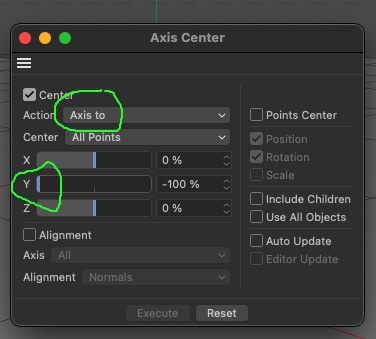
October 4, 2023 at 6:46 pmyou can use this tool sure, it works. Or, select all objects, press ‘7’, to enter axis mode, and use the coordinates manager to set the axis position, or by hand and use snapping
-

George Charoupas
October 4, 2023 at 9:17 pmHello Mauricio,
On the “Axis Center” setting the Y to -100% will do something different.
It will move the pivot axis for each object, in its lowest Y position, according to its structure.
If you follow Andy’s method, then you don’t move all pivot Axis points to exact 0. Instead you are moving them to average 0. That means that if your objects have different Y positions, all of the axis points will have an average Y value of 0. If all your objects have the same Y position, then it will work.
The only method I can think of involves a python script. If you are willing to mess with python scripts I can show you how.
-
Andy Kiernan
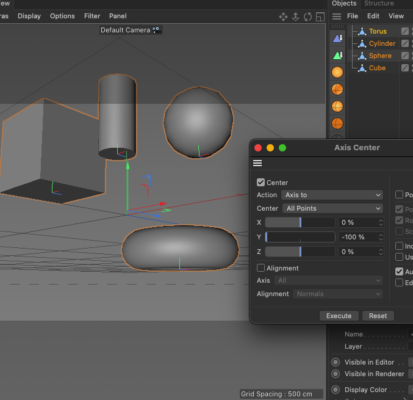
October 4, 2023 at 9:25 pmmaybe im misunderstanding, but if i make various meshes, in random ‘y’ space, then select them, and use axis to, to move Y to -100, then it works, the axis is at the base of the mesh (bounding box), as it uses the points of each mesh.
Im often wrong, so im sorry if im just confusing matters!
-

Mauricio Barrientos
October 5, 2023 at 5:42 amthanks so much all people here really thanks you …!!! bless
.
.
Reply to this Discussion! Login or Sign Up