Creative Communities of the World Forums

The peer to peer support community for media production professionals.

Activity Forums Maxon Cinema 4D Cinema 4d Rotate Camera around an axis

  • Cinema 4d Rotate Camera around an axis

    Posted by Andrew Kartashev on September 22, 2023 at 3:12 am

    When I used r19, it was possible to rotate the viewscreen camera around it’s own axis without it changing locations. There was a little toggle in the corner. Now I’m back to cinema and there’s no toggle. I’m in a cramped space and any rotation now just moves me out of the mesh. Any one have an answer.

    George Charoupas replied 2 years, 7 months ago 3 Members · 3 Replies
  • 3 Replies
  • George Charoupas

    September 22, 2023 at 5:13 am

    Hello Andrew,

    The easiest way to rotate the camera in its axis is to press f2 (top view) then change the axis to world [w shortcut] and rotate the camera on its axis.

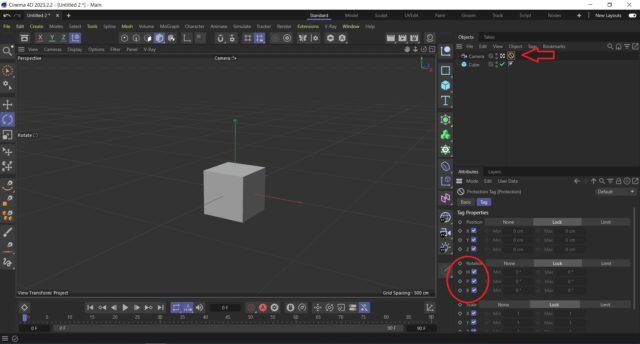
    Alternatively, you can use the protection tag and unlock only rotation axis on it. So, only the rotation will be allowed to change.

  • Kouraib Abdmalek

    September 22, 2023 at 8:41 am

    Hi Andrew,

    Please let me know what you mean when you say (I’m to the cinema)? Do you mean an older version? Usually the camera does not move from its place if you just rotate the view. Maybe your scene has a special case, you could post the file here so we can check it for you.

    Thanks!

  • George Charoupas

    September 22, 2023 at 2:27 pm

    Propably he means that he switched from Cinema 4D R19 to another software and now he is back to a more modern version of Cinema 4D. I don’t remember that toggle he says but he can achieve this with the protection tag as my video.

We use anonymous cookies to give you the best experience we can.
Our Privacy policy | GDPR Policy