Hi Johnny,
I’m not sure I would want to loose all features of 5.1 audio tracks, but to each their own.
You can do this from within Vegas without having to render the video.
And Vegas can put the resulting ‘submixed’ Stereo or MONO audio track back into the timeline as a new track.
Stereo will equal 1 track with two channels. Mono will equal 1 track with one channel.
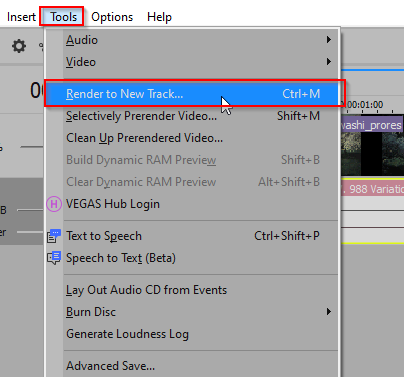
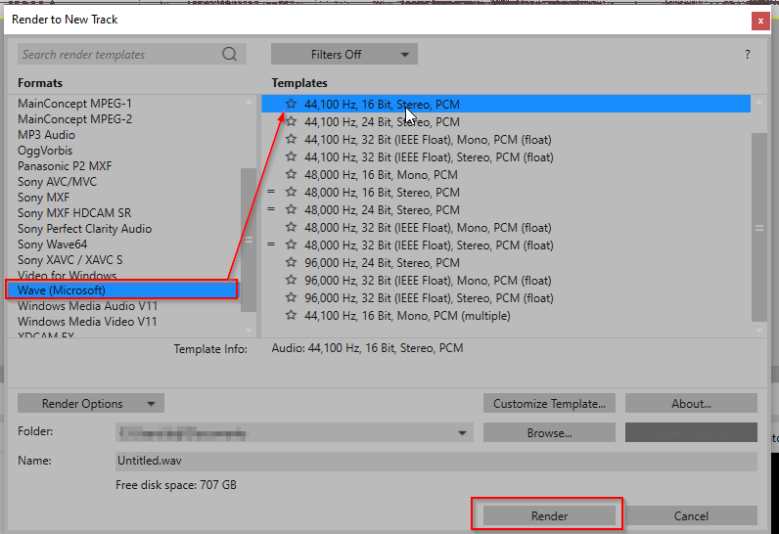
Simply choose ‘Tools->Render to New Track‘ (Ctrl+M) and then choose an “Audio” only format (AC-3,FLAC,MP3 Audio,Wave(Microsoft)). Each of these types have caveats – some are ‘lossy’ compressed formats, some are ‘lossless’.
Once you make your Audio type selection, click ‘Render‘ and once completed, Vegas will drop the new track right into the timeline.
You did not mention which version of Vegas you are using but this feature has been supported for a long time.
Regards,
–Doug