Forum Replies Created

Page 17 of 20
  • Brendon Murphy

    September 11, 2020 at 9:17 pm in reply to: thisLayer.index For Specific Parameter

    If I understand correctly – you are trying to use layer 5 in another comp to drive the scale of layer 5 in the current comp? See if this does it:

    layerNum = thisLayer.index

    refLayerScale = comp(“Comp 2”).layer(layerNum).transform.scale;

    [refLayerScale [0],refLayerScale [1]];

  • Brendon Murphy

    September 11, 2020 at 8:28 pm in reply to: RAM Preview – weird issue

    A few more things to check:

    Do you have “Enable Disk Cache” checked in preferences? Are you using a folder with sufficient space? Have you emptied the disk cache and cleaned your database and cache recently? Have you tweaked your “fast previews” settings under the viewer window (see image).

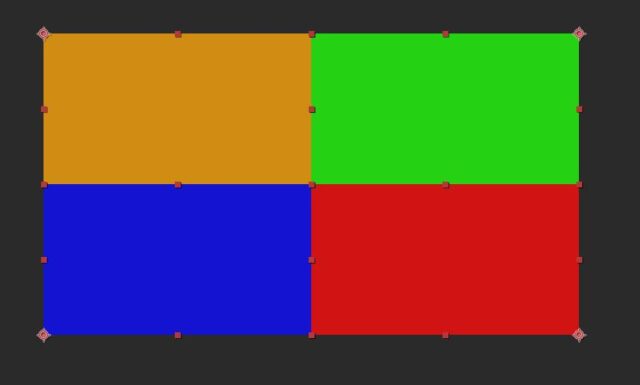
  • Drag all 4 precomps into the master comp. With snapping enabled, use the pan-behind tool (y key) to drag each layer’s anchor point to a different corner of the comp. Scale all layers to 50%. Here’s the end result:

  • Brendon Murphy

    September 11, 2020 at 8:06 pm in reply to: RAM Preview – weird issue

    Did your comp frame rate get accidentally changed to something really low?

  • Brendon Murphy

    September 11, 2020 at 7:38 pm in reply to: Expressions to sort numbers in descending order.

    See if this does it:

    values = [12,5,9,10,3];

    sorted = values.sort(function(a, b){return b-a});

    sorted;

  • Brendon Murphy

    September 11, 2020 at 5:56 pm in reply to: Find the average of two colors

    You could do this:

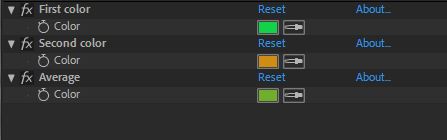
    Add an adjustment layer with 3 color controls as shown in the image.

    Use the first two to pick the colors you want averaged. Add the following expression to the third, “Average” control:

    firstColor = effect(“First color”)(“Color”);

    secondColor = effect(“Second color”)(“Color”);

    (firstColor+secondColor)/2;

    Clicking into the average control won’t show you the actual values, so you may want to add a text layer in the comp with the following expression on “Source Text”.

    avgColor = thisComp.layer(“Color check”).effect(“Average”)(“Color”);

    red = avgColor[0];

    blue = avgColor[1];

    green = avgColor[2];

    if(colorDepth ==8){

    multiplier=255

    };

    if(colorDepth ==16){

    multiplier=32768

    };

    if(colorDepth ==32){

    multiplier=1

    };

    “Average color”+”\r”+red*multiplier+”\r”+blue*multiplier+”\r”+green*multiplier+”\r”;

  • Brendon Murphy

    September 10, 2020 at 9:00 pm in reply to: Keyframes with Expression

    Just for the heck of it –

    if you would like to have the headline scale-in over a duration instead of just popping on, add a slider called “Scale duration” to the headline layer and use the below expression. Note that this assumes there are only two key frames on the subline, animating it from empty text to not empty. This also assumes that the headline has a uniform scale.

    subText = thisComp.layer(“subline”).text.sourceText;

    subTextLength = subText.value.length;

    if(subTextLength>1){

    heroKey = thisComp.layer(“subline”).text.sourceText.nearestKey(time);

    scaleStart = heroKey.time;

    scaleEnd = heroKey.time+(effect(“Scale duration”)(“Slider”)/(1/thisComp.frameDuration));

    scalePerFrame = value[0]/(scaleEnd-scaleStart);

    if(time<=scaleStart){

    [0,0];

    };

    if(time>scaleStart&&time<scaleEnd){

    [(time-scaleStart)*scalePerFrame,(time-scaleStart)*scalePerFrame];

    };

    if(time>=scaleEnd ){

    [value[0],value[1]];

    };

    }else{[0,0]};

  • Brendon Murphy

    September 10, 2020 at 5:55 pm in reply to: Keyframes with Expression

    I’ll assume that you are trying to drive the headline size by animating the subline’s Source Text. AE sees the length of an empty text layer as 1, so if you want the headline scale to be 0 when the source text is empty, you’ll need to do:

    if (thisComp.layer("subline").text.sourceText.length > 1) {

    value;

    } else {

    [0,0];

    }

  • Brendon Murphy

    September 10, 2020 at 3:36 pm in reply to: Keyframes with Expression

    What kind of animation is on the subline?

  • You can do this by applying expressions to a shape. Quick google search turns up a few example tutorials… here’s one that might apply: https://www.youtube.com/watch?v=0wiz-h3ZU_I

    *Edit* I see now what you meant… I haven’t tested it, but something like this could work: https://www.youtube.com/watch?v=bD5xw9m-sc4

    Some contents or functionalities here are not available due to your cookie preferences!

    This happens because the functionality/content marked as “Google Youtube” uses cookies that you choosed to keep disabled. In order to view this content or use this functionality, please enable cookies: click here to open your cookie preferences.

Page 17 of 20

We use anonymous cookies to give you the best experience we can.
Our Privacy policy | GDPR Policy