Forum Replies Created

Page 16 of 20
  • Brendon Murphy

    September 15, 2020 at 9:05 pm in reply to: Simple light streaks/lines Workflow?

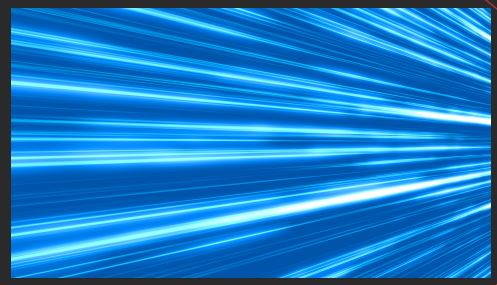
    One really simple way is to use a solid (any color) with a fractal noise effect. Under transform, change the scale width to something like 2500, and the scale height to something like 8.

    Use a levels effect to play with contrast, then add a tint and glow. I made the image below using this recipe, with the solid rotated a bit in 3D space. It can be animated in various ways within the fractal noise effect.

  • Brendon Murphy

    September 15, 2020 at 5:54 am in reply to: Link shapes with expressions

    This works:

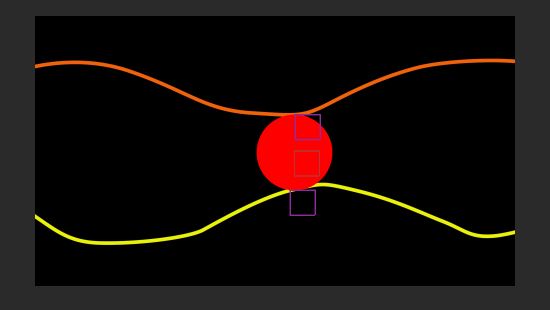
    On a new solid, draw a path along the ceiling (just the surface where the ball will touch). Do the same for the floor on another solid.

    Add a circle using the ellipse tool (this assumes you will have a uniform circle). Be sure to zero out the shape’s anchor point and position under “Contents” so it matches the layer anchor point.

    Add three null objects. One will be the “Leader” that you animate on the x axis. The other two, “Top Tracer” and Bottom Tracer” will follow along the top and bottom paths when you paste this into the “position” parameter (change pathLayer so you have the correct paths selected):

    pathLayer = thisComp.layer(“Bottom Path”)

    pathToTrace = pathLayer(“ADBE Mask Parade”)(1)(“ADBE Mask Shape”);

    startPos = pathLayer.toComp(pathToTrace.pointOnPath(0));

    endPos = pathLayer.toComp(pathToTrace.pointOnPath(1));

    pathWidth = endPos[0]-startPos[0];

    leaderX = thisComp.layer(“Leader”).transform.position[0];

    followOffset = 0-startPos[0];

    pathUnits = 1/pathWidth;

    progress = (leaderX*pathUnits)+(pathUnits*followOffset);

    pathLayer.toComp(pathToTrace.pointOnPath(progress));

    On your ball, use this for position:

    topTracer = thisComp.layer(“Top Tracer”).transform.position;

    bottomTracer = thisComp.layer(“Bottom Tracer”).transform.position;

    vertPos = (topTracer[1]+bottomTracer[1])/2;

    horizPos = thisComp.layer(“Leader”).transform.position[0];

    [horizPos,vertPos];

    And for the ball’s scale:

    topTracer = thisComp.layer(“Top Tracer”).transform.position;

    bottomTracer = thisComp.layer(“Bottom Tracer”).transform.position;

    neededHeight = topTracer[1]-bottomTracer[1];

    origHeight = content(“Ellipse 1”).content(“Ellipse Path 1”).size[1];

    newHeight = (neededHeight/origHeight)*100;

    [newHeight,newHeight];

    Hope that helps!

  • Brendon Murphy

    September 12, 2020 at 9:08 pm in reply to: Anchor Point based on the character index

    Note that the above expression is for changing the text’s anchor point to the second character. If you want to change the anchor point of another layer to be at the second character, it’s like this:

    textLayer = thisComp.layer(“CHARACTER”);

    textWidth = textLayer.sourceRectAtTime().width;

    numLetters = textLayer.text.sourceText.length;

    characterWidth = textWidth/numLetters;

    charIndex = 2;

    horizAnchor = (textLayer.transform.position[0]-textLayer.transform.anchorPoint[0])+(characterWidth*charIndex)-(characterWidth*.5);

    verticalAnchor = textLayer.transform.position[1]-textLayer.transform.anchorPoint[1];

    [horizAnchor,verticalAnchor];

  • Brendon Murphy

    September 12, 2020 at 8:59 pm in reply to: Anchor Point based on the character index

    There may be a more elegant solution, but this will get you there:

    textWidth = thisLayer.sourceRectAtTime().width;

    numLetters = thisLayer.text.sourceText.length;

    characterWidth = textWidth/numLetters;

    charIndex = 2;//this is the index of the letter you want

    horizAnchor = (value[0])+(characterWidth*charIndex)-(characterWidth*.5);

    verticalAnchor = value[1];

    [horizAnchor,verticalAnchor];

  • Brendon Murphy

    September 12, 2020 at 5:17 pm in reply to: Link Master Properties to CSV file

    Each cell in a given column has a different index number. If the lines are in separate cells, you need to call both indices in your expression. However, this would break the 1 to 1 relationship between layer number and row number (ie index number).

    If the lines are in the same cell, you can probably split them based on a period or other character and then read them to separate lines using “\r”. There’s some good information here that might help: https://fluxvfx.com/blogs/blog-fluxvfx/data-driven-expressions-for-after-effects-2019

  • It’s a quick way to make sure the precomps land in the exact right place without needing to tweak the position.

  • Brendon Murphy

    September 12, 2020 at 1:53 am in reply to: Link Master Properties to CSV file

    Wait – I just noticed that you’re referencing another value in “TEXT 0” via expression. This may be closer to what you need:

    textNum = thisLayer.index-2; //change the minus to whatever makes sense for your layers

    param = thisComp.layer(“CSV TEST.csv”)(“Data”)(“Outline”)(“TEXT”)

    subParam = param(textNum);

    subParam.toUpperCase();

  • Brendon Murphy

    September 12, 2020 at 1:18 am in reply to: Link Master Properties to CSV file

    I think you’re looking for something like this:

    textNum = thisLayer.index-2; //change the minus to whatever makes sense for your layers

    param = thisComp.layer(“CSV TEST.csv”)(“Data”)(“Outline”)(“TEXT”)

    textName = param.name+” “+textNum.toString();

    textName.toUpperCase();

  • Brendon Murphy

    September 12, 2020 at 1:07 am in reply to: thisLayer.index For Specific Parameter

    Glad to help!

  • Brendon Murphy

    September 11, 2020 at 9:27 pm in reply to: thisLayer.index For Specific Parameter

    Sent you a reply in the expressions forum.

Page 16 of 20

We use anonymous cookies to give you the best experience we can.
Our Privacy policy | GDPR Policy