

Activity › Forums › Adobe After Effects Expressions › Find the average of two colors
-
Find the average of two colors
Posted by Kevin Snyder on September 11, 2020 at 4:55 pmIs it possible to find the average of two or more color samples using an expression? If so, is there any place I can be pointed towards to get me started?
Kevin Snyder replied 5 years, 11 months ago 2 Members · 2 Replies -
2 Replies
-

Brendon Murphy
September 11, 2020 at 5:56 pmYou could do this:
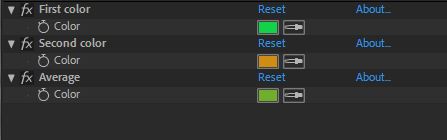
Add an adjustment layer with 3 color controls as shown in the image.
Use the first two to pick the colors you want averaged. Add the following expression to the third, “Average” control:
firstColor = effect(“First color”)(“Color”);
secondColor = effect(“Second color”)(“Color”);
(firstColor+secondColor)/2;
Clicking into the average control won’t show you the actual values, so you may want to add a text layer in the comp with the following expression on “Source Text”.
avgColor = thisComp.layer(“Color check”).effect(“Average”)(“Color”);
red = avgColor[0];
blue = avgColor[1];
green = avgColor[2];
if(colorDepth ==8){
multiplier=255
};
if(colorDepth ==16){
multiplier=32768
};
if(colorDepth ==32){
multiplier=1
};
“Average color”+”\r”+red*multiplier+”\r”+blue*multiplier+”\r”+green*multiplier+”\r”;


Reply to this Discussion! Login or Sign Up