Forum Replies Created

Page 6 of 27
  • I think they changed it in recent versions, I think you just select sprite, assign from the drop-down or designer, then use the colour gradient/ random colour.

    I could be wrong, I do spend a lot of my life trying to figure out how that darn plug-in works!

  • Andy Kiernan

    October 2, 2023 at 7:00 pm in reply to: How can I add an effect to a comp layer?

    when you pre-comped the footage with the contrast, or whatever, effect, did the effect go into the precomp or stay on the comp?

    I just gave it a go and worked as expected

  • Andy Kiernan

    October 2, 2023 at 9:17 am in reply to: How to approach this motion track?

    yer i think thats a good idea. Thanks for spurring me on to get learning fusion, i needed a kick in the pants to do it ha

  • Andy Kiernan

    October 1, 2023 at 10:27 pm in reply to: How to approach this motion track?

    ah brilliant glad it’s sorted, and yer looks great!

    I really need to start using fusion…

  • Andy Kiernan

    October 1, 2023 at 9:47 pm in reply to: Roto Brush Not Working

    Nice work glad you figured it out.

    In case you, or anyone, runs into this… (it gave me a headache for a while!)

    Sometimes when using rotobrush, the option to alter the brush size is greyed out (in the brushes panel). The solution, or so I’ve found, is to select the other paintbrush tool in the toolbar and then reselect the roto brush brush, and like magic the size options are un-greyed

  • Andy Kiernan

    October 1, 2023 at 9:41 pm in reply to: How to approach this motion track?

    it’s a tricky one as the camera is moving in ‘Z’ space and you’re trying to add a 2D plane that is facing the camera, but the front and back of the plate are essentially moving at different speeds.

    If I were to tackle this type of shot, I would probably have to bite the bullet and go down the projection mapping and multi-plane route.

    So, 3D-track the shot, add a 3D solid aligned to the ground, and project the golf course on it. And add a lot of little solids where there are trees etc. so this adds paralax in. Not for every tree but some to sell it.

    Time consuming and quite often a headache but will yield the best results I think.

    Edit: also mask out the foreground trees and add them over the top

  • Andy Kiernan

    September 26, 2023 at 10:13 am in reply to: alternatives to boole object (maxon cinema 4d)

    hows about either making the telehandler one poly object (with tons of material tags et al, then use one vertex map linked to materials? If the object is animated, that wont work though.

    Or if its lots of poly objects and no generators, copy the vertex tag to every object? (easy wasy is to put the tag on the parent null and then right click and choose apply to children

  • Andy Kiernan

    September 21, 2023 at 2:56 pm in reply to: alternatives to boole object (maxon cinema 4d)

    If the object textures are reliant on UVs, youll lose them using the volume builder as its creating new geo and new UVs.

    Could it be as simple as using the camera near clipping plane?

    Im not sure about Redshift, but Octane has a clipping material which is good for this I think.

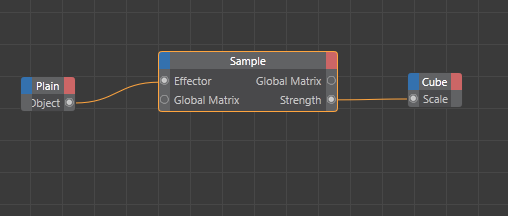
  • I think, if you add a range mapper between the sample and the object, you can use the spline function within it, to have it hit 100 before the effector gets to 100, like you want, there’s an upper clamp button too. You can get fancy and use the spline to add some overlap too i think.

  • I think you want the object on the clone to scale up rather than the object to control the rotations right?

    If so You can try the mograph sample node, works with fields and add some range mapping and other fancy things to get it to work how you want.

Page 6 of 27

We use anonymous cookies to give you the best experience we can.
Our Privacy policy | GDPR Policy