Forum Replies Created

Page 6 of 13
  • Here’s a helpful tutorial:

    https://youtu.be/-n0RKDlbGas?si=abArBOJvLzdZy0NZ

    Is this what you’re aiming for?

    Some contents or functionalities here are not available due to your cookie preferences!

    This happens because the functionality/content marked as “Google Youtube” uses cookies that you choosed to keep disabled. In order to view this content or use this functionality, please enable cookies: click here to open your cookie preferences.

  • Dan is right—expressions don’t store previous values and will only access the pre-expression value when referencing their own property. To hold the position after 10 seconds, you can use valueAtTime(duration) to “freeze” the last calculated position:

    var duration = 10;

    if (time < duration) {

    var progress = time / duration;

    [

    linear(progress, 0, 1, value[0], value[0] + 100),

    linear(progress, 0, 1, value[1], value[1] + 100)

    ];

    } else {

    valueAtTime(duration);

    }

  • Yoan Boisjoli

    October 31, 2024 at 12:16 pm in reply to: marker.numKeys works sometimes, sometimes not

    Yeah! After Effects’ keyframe indices start at 1. This means the first keyframe is key(1), the second is key(2), and so on !

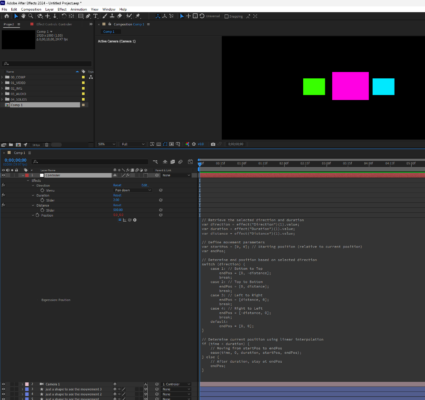
  • Hey Hiro! I finaly got to test the expression and it wasn’t working so here’s a working one with the right steps:

    1. Make a null object and link you camera to it.
    2. add a dropdown menu and two sliders
    3. paste this expression in the position:

    // Retrieve the selected direction and duration

    var direction = effect("Direction")(1).value;

    var duration = effect("Duration")(1).value;

    var distance = effect("Distance")(1).value;

    // Define movement parameters

    var startPos = [0, 0]; // Starting position (relative to current position)

    var endPos;

    // Determine end position based on selected direction

    switch (direction) {

    case 1: // Bottom to Top

    endPos = [0, -distance];

    break;

    case 2: // Top to Bottom

    endPos = [0, distance];

    break;

    case 3: // Left to Right

    endPos = [distance, 0];

    break;

    case 4: // Right to Left

    endPos = [-distance, 0];

    break;

    default:

    endPos = [0, 0];

    }

    // Determine current position using linear interpolation

    if (time < duration) {

    // Moving from startPos to endPos

    ease(time, 0, duration, startPos, endPos);

    } else {

    // After duration, stay at endPos

    endPos;

    }


    Here’s a screenshot of how it looks for me.

  • Yoan Boisjoli

    October 31, 2024 at 11:19 am in reply to: marker.numKeys works sometimes, sometimes not

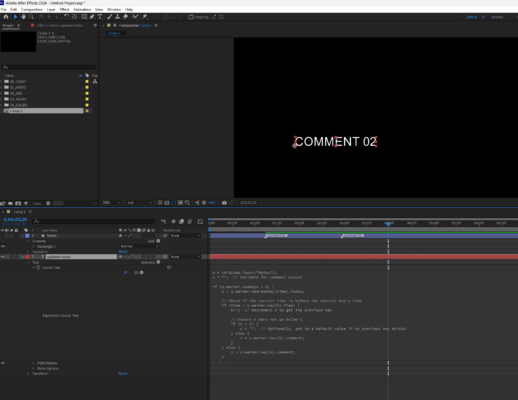
    I think the error occurs because the expression sometimes sets the key index to 0, and After Effects keyframes start at 1, making index 0 invalid.

    Try something like this:

    s = thisComp.layer("Notes");
    v = ""; // Variable for comment output
    if (s.marker.numKeys > 0) {
    k = s.marker.nearestKey(time).index;
    // Check if the current time is before the nearest key's time
    if (time < s.marker.key(k).time) {
    k--; // Decrement k to get the previous key
    // Ensure k does not go below 1
    if (k < 1) {
    v = ""; // Optionally, set to a default value if no previous key exists
    } else {
    v = s.marker.key(k).comment;
    }
    } else {
    v = s.marker.key(k).comment;
    }
    } else {
    v = " "; // Default value if there are no markers
    }
    v
  • Hi Hiro! Something like this might work. I’m using ease() in this case but feel free to use easeOut(), easeIn() or linear() if you prefer.

    Position:

    var sel = effect(“Camera Angle”)(“Dropdown”);

    var duration = effect(“Animation Duration”)(“Slider”); // Assuming you have a duration slider

    // Define keyframes for each option

    var positions = [

    [[0, 0, 0], [200, 0, 0]], // Bottom to top

    [[0, 0, 0], [0, -200, 0]], // Top to bottom

    [[0, 0, 0], [-200, 0, 0]], // Left to right

    [[0, 0, 0], [200, 0, 0]] // Right to left

    ];

    // Calculate progress

    var t = time – inPoint;

    var progress = clamp(t / duration, 0, 1);

    // Interpolate using ease

    ease(progress, 0, 1, positions[sel-1][0], positions[sel-1][1]);

    And for Rotation:

    var sel = effect(“Camera Angle”)(“Dropdown”);

    var duration = effect(“Animation Duration”)(“Slider”);

    var rotations = [

    [[0, 0, 0], [0, 15, 0]], // Bottom to top

    [[0, 0, 0], [0, -15, 0]], // Top to bottom

    [[0, 0, 0], [0, 0, 15]], // Left to right

    [[0, 0, 0], [0, 0, -15]] // Right to left

    ];

    var t = time – inPoint;

    var progress = clamp(t / duration, 0, 1);

    ease(progress, 0, 1, rotations[sel-1][0], rotations[sel-1][1]);

    I haven’t tested it but let me know if this is what you were looking for. 🙂

  • Yoan Boisjoli

    October 11, 2024 at 1:10 am in reply to: Stop loopOut!

    Why not use only the loopIn() function instead of loopOut() ?

  • Yoan Boisjoli

    September 5, 2024 at 3:49 pm in reply to: overshoot expression bug

    The issue might be related to how After Effects is handling memory and cache. Given that clearing the cache temporarily fixes the issue, here are a few steps that could help you troubleshoot the problem:

    1. Cache & memory Issues: Since you’ve already mentioned clearing the cache helps, try adjusting the cache settings in After Effects. You could increase the disk cache size or change its location to a faster drive. Also, close any other unecessary programs while working in AE to free up RAM.

    2. Text Rendering & Font Issues: The fact that changing the font makes it render suggests it might be an issue with how AE is rendering text. Try converting the text layer into shapes or pre-composing the text animation to see if it stabilizes the rendering.

    3. <strong style=”font-family: inherit; font-size: inherit; color: var(–bb-body-text-color); background-color: var(–bb-content-background-color);”>Slider Values: You’re using a slider to control frequency, decay, and delay. Sometimes sliders can cause unexpected behavior, especially when they’re set to extreme values or rounding errors occur. Try clamping the slider values within a reasonable range to see if that helps here’s an example: clamp(effect(“Speed”)(“Slider”), 0, 10)
    4. Out Transition: To modify the expression for an increasing sine wave (rather than a decreasing one), you can reverse the amplitude by multiplying amp by -1 in the overshoot calculation. You could adjust this section of the expression:

    amp = (endVal - startVal)/dur;

    endVal - amp*(Math.sin((t-dur)*w)/Math.exp(decay*(t-dur))/w);

  • Yoan Boisjoli

    September 5, 2024 at 3:37 pm in reply to: Animate Between 2 Slider Values Help

    Hi Sammy!

    I think something like this would work:

    anim = value;

    startval = thisComp.layer(“CONTROLS”).effect(“START”)(“Slider”);

    endval = thisComp.layer(“CONTROLS”).effect(“END”)(“Slider”);

    linear(anim, 0, 2, 0, endval)

    Although If you still want to preserve control over the “midpoint” value (B), you can adjust the scaling and leverage a remapping approach:

    anim = value;

    startval = thisComp.layer(“CONTROLS”).effect(“START”)(“Slider”);

    endval = thisComp.layer(“CONTROLS”).effect(“END”)(“Slider”);

    // Midpoint value (Slider 1)

    midval = (startval + endval) / 2;

    // Remap anim from 0-2 range to startval-midval-endval

    linear(anim, 0, 2, 0, endval);

  • Yoan Boisjoli

    September 5, 2024 at 2:44 pm in reply to: Expression doesn’t work with keyframes

    Hey Fernando, does this help?

    C = comp(“Binny_Front_FULL”);

    ctrl = C.layer(“Brazo L”).transform.rotation;

    L = C.layer(thisComp.name);

    remappedTime = L.timeRemap.value;

    ctrl.valueAtTime(remappedTime + L.startTime);

Page 6 of 13

We use anonymous cookies to give you the best experience we can.
Our Privacy policy | GDPR Policy