Wayne Waag
 2
COW Coins
2
COW Coins
Forum Replies Created
-

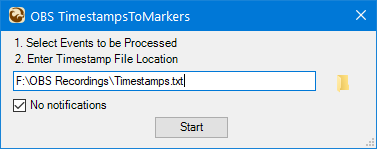
Just added a new tool–OBS TimestampsToMarkers. The script adds markers to OBS recordings on the Vegas timeline based upon timestamps that are added during recording using the Infowriter plugin for obs-studio. The Infowriter plugin can be downloaded at https://github.com/partouf/OBSInfoWriter.
A short demo can be found here. https://vimeo.com/477804049.
The script can be downloaded from the HOS Free Tools Library at https://tools4vegas.com/library/
Here is a screen grab of the UI.
 Some contents or functionalities here are not available due to your cookie preferences!
This happens because the functionality/content marked as “Vimeo framework” uses cookies that you choosed to keep disabled. In order to view this content or use this functionality, please enable cookies: click here to open your cookie preferences.
-
New build 1.0.3.11 is now available.
Change log may be found here. https://tools4vegas.com/wp-content/uploads/HappyOtter-Change-Log.pdf
New Tool
OtterControl—external app enabling power users to launch large number (max 119) of editing actions
-Vegas actions include execution of scripts, extensions, keyboard shortcuts
-External actions include launching external apps and folder navigation
-Highly customizable UI with choice of button size, text, color and icon
<div>-Compatible with multi-button mouse and Contour ShuttlePro V2Detailed information can be found at https://tools4vegas.com/ottercontrol/
New Features
ProxySwitch—automatically changes project resolution for proxies created with KwikProxyOtterBar, OtterInfoBar
</div>-Action repeat button added which runs the last executed action
-Option to add Vegas keyboard shortcuts as toolbar iconsOtterBar–Maximum of 100 icon buttons with selectable number of buttons per row.Bug Fixes
<div>ProxySwitch—not working correctly with ProxyAssist after mod to support KwikProxy—fixed</div><div>
ProxyAssist—crash if no saved project and cancel selected in project save dialog—fixed
KwikProxy
-Range selection (full vs limited) not being honored for MPEG-2 and GPU renders—fixed</div>-Mpeg-2 proxies pixelated—fixed (default bit rate was set too low)
-
New build 1.0.3.10 is now available.
Change log may be found here. https://tools4vegas.com/wp-content/uploads/HappyOtter-Change-Log.pdf
Bug Fixes
- Better exception handling if FrameServer fails to start—all rendering tools
- RenderPlus—2 pass option for X264 and X265 not working—fixed
- Crash if tool launched from OtterMenu or Vegas script menu after new install–fixed
-
New build 1.0.3.9 is now available.
Change log may be found here. https://tools4vegas.com/wp-content/uploads/HappyOtter-Change-Log.pdf
New Tool
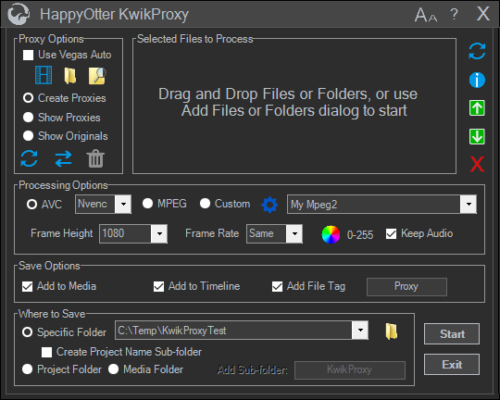
- KwikProxy—tool which increases the speed of proxy creation when compared to native Vegas For additional information and a demo, see https://www.vegascreativesoftware.info/us/forum/quicker-proxy-creation–124298/
<div>
New Features
- All tools—displays long folder names if larger than dropdown list width
- Added Nvenc lossless as a mode to all rendering tools
Bug Fixes
- SpeedRamp—selected event also required track to be selected—track selection no longer required
- LoadToOpacity—crash if launched in project containing no audio tracks—fixed
- AudioTrim—wrong tooltip shown when hovering over Where To Save—fixed
- KwikPreview—crash if MediaPlayerClassic not closed from the last preview–fixed
</div>
-
It all depends on when you obtained a trial license. If it was after the initial release back in May, your trial license has obviously expired. Like Vegas at the moment, once your trial has expired, you’re not eligible for another. However, send me a PM and I’ll see if we can work something out. A suggestion–create an account on the Magix Vegas Pro forum at https://www.vegascreativesoftware.info/us/vegas-pro-forum/ and send me a PM there since it can’t be done here in CC, plus this new forum layout makes it almost impossible to easily respond to new posts.
-
You must get a trial license. Launch Help and click on Trial License.
-
“Does it support changing the font of multiple subtitles at once? Does it support background/opaque box transparency? And if it doesn’t support all that, can it import .ASS file (with multiple effects: custom font, opaque box and custom color) directly into Vegas”
No. It simply adds (burns in) your subtitles to the final render using the RenderPlus tool. You must first create your .ass files elsewhere.
-
Here’s an open source subtitle tool for converting srt to ass with additional Fx you describe. It was used for generation of subtitles shown in the above post. http://www.aegisub.org/
-
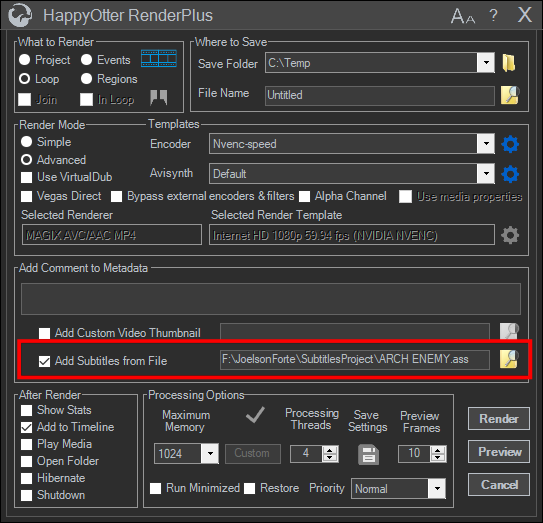
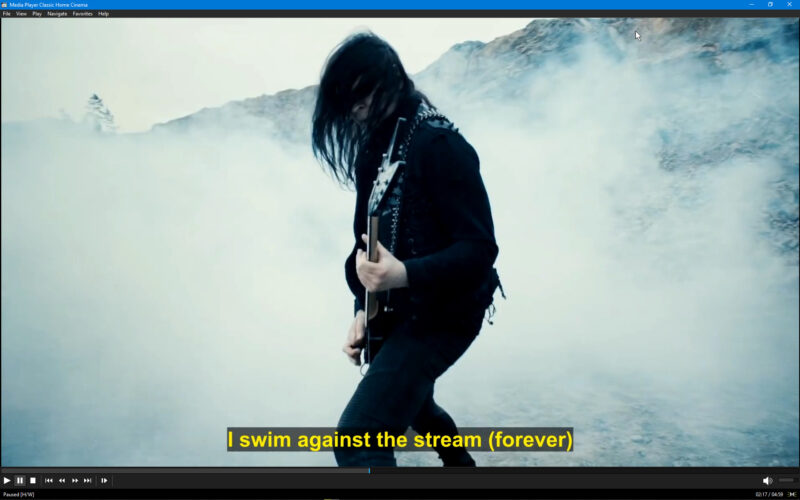
The latest build of HappyOtterScripts now supports hard-coding of both srt and ass subtitles in the RenderPlus tool. Information can be found here. https://tools4vegas.com/ Here’s a screen grab of the dialog plus an example.
-
There is a new tool in HappyOtterScripts that does exactly this called SpeedRamp.
Here’s a link to the demo. https://tools4vegas.com/wp-content/uploads/SpeedRampDemo_TV.mp4
You can find more information about the HappyOtter toolset at https://tools4vegas.com/.