Wayne Waag
 2
COW Coins
2
COW Coins
Forum Replies Created
-

New build 1.0.3.16 is now available.
Change log may be found here. https://tools4vegas.com/wp-content/uploads/HappyOtter-Change-Log.pdf
New Features and Improvements
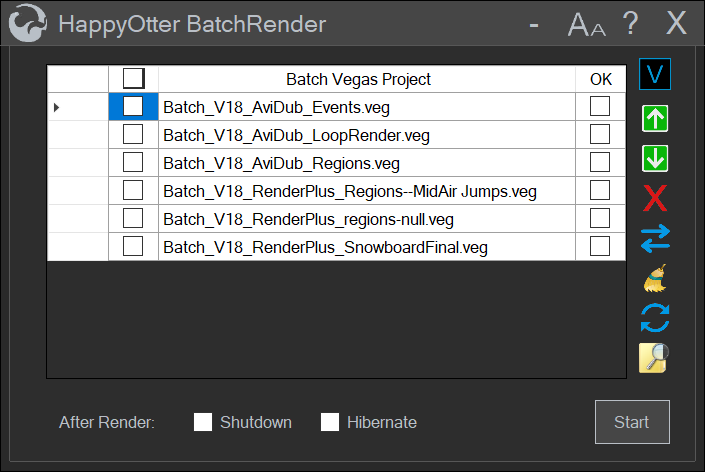
- Batch Rendering
- Batch rendering jobs may now be created for later execution (e.g. o)
- Supported tools include RenderPlus and AviDub
- Project Templates
- Templates may be created which include all filtering, rendering and
- Supported tools include RenderPlus and AviDub
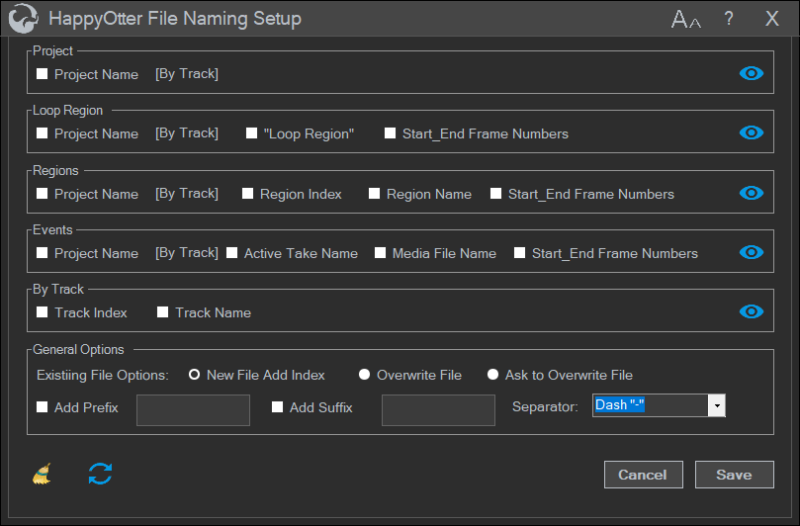
- File Naming Setup
- Custom settings for the names of rendered files
- Supports Project, Loop Region, Regions, Events, and ByTrack renderi
- Options for overwriting or renaming when rendered file with same na
- Supported tools include AudioTrim, AviDub, RenderEvents and RenderPlus
<div>
A demo of new features can be found at https://www.vegascreativesoftware.info/us/forum/happy-otter-scripts-for-vegas-pro–113922/?page=33#ca794618
</div>

-
New build 1.0.3.15 is now available.
Change log may be found here. https://tools4vegas.com/wp-content/uploads/HappyOtter-Change-Log.pdf
New Features and Improvements
- Reduced likelihood of AntiVirus false positives. This has been a recurring issue that is hopefuly fixed. New version and the now infamous OtterActivate.exe both tested clean in using VirusTotal.
- MediaReplacer—check added to insure that replacement file existsOpen Save Folder button added to all “Where To Save” dialogs for quick save folder access.
- Render+–added “by track” option so that loop, regions, and project may be rendered for selected tracks
- SmartVideoTrim—new version
- Improved speed and accuracy of frame matching algorithm using the autotrim option
- Audio remains in sync using both the keep existing and replace audio options
- Options for type of footage (camera vs rendered) and matching algorithm (exact vs closest)
Bug Fixes
- ImportAssist—regression in 1.0.3.14– ac3 only import not working—fixed
- RenderEvents—x264 renders for interlaced projects/media not working—fixed
- Preview not working in AviDub, RenderEvents, and RenderPlus– regression in 1.0.3.14—fixed
- Disappearing Vegas render templates in AviDub, ProxyAssist, RenderEvents, and Render+–fixed
- AviDub—save and use temp file options for direct renders not displayed correctly—fixed
- SpeedRamp—incorrect estimated time for new render—fixed
-
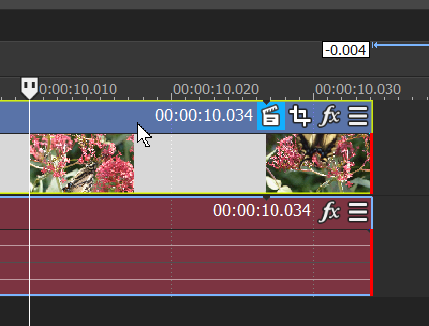
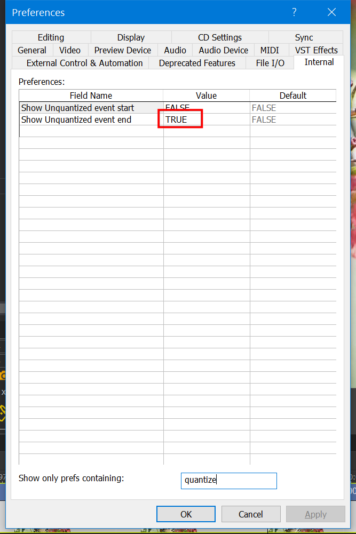
If it looks like the first screen grab, most likely it means that the edge of the event is not on a frame boundary. This can occur if Quantize to Frames is not selected. To show such unquantized frame boundaries at the end of an event, the internal preference “Show Unquantized event end” is set to True as shown in the 2nd screen grab.
-
New build 1.0.3.14 is now available.
Change log may be found here. https://tools4vegas.com/wp-content/uploads/HappyOtter-Change-Log.pdf
New Tool
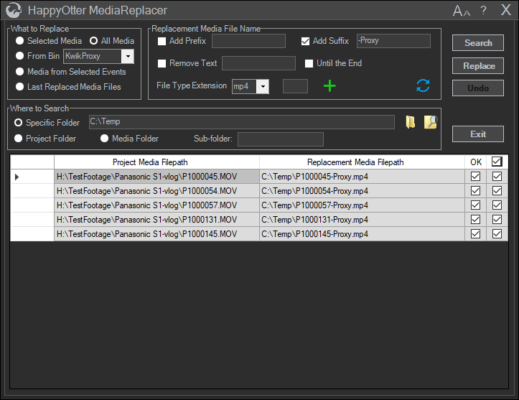
MediaReplacer
- Search and replace project media files with same or different file extensions
- Support for renaming options when searching for replacement files (E.g. added suffix)
New Features and Improvements
ImportAssist
- Added option to import mjpeg media files within an avi containerAC3 (stereo and 5.1)
- import now transcodes to lossless pcm wave file for Vegas 17 and 18AC3 (stereo and 5.1)
- import now transcodes to lossless pcm wave file for Vegas 17 and 18
KwikProxy
- Added option to search subfolders
- Disabled frame rate selection when Vegas Auto option is used
LoudnessToOpacity—added option to add or update just the render loop region
Bug Fixes
- LoudnessToOpacity—added option to add or update just the render loop region
- MediaRenamer—remove text until end not working correctly—fixedOtterBar,
- OtterInfoBar, OtterControl—shortcuts not working correctly for non-English users—fixed
- Toolbars and FrameServer not working for Sony V12—fixed
- ImportAssist
- Layout error adding to timeline when importing multiple 5.1 audio streams—fixed
- Crash for files in which the container’s audiostream preceded the videostream—fixed
- RenderEvents—warning messages not displayed correctly for UHD monitors—fixed
- AudioTrim—track selection for event renders not being honored–fixed
-
Hi Rob,
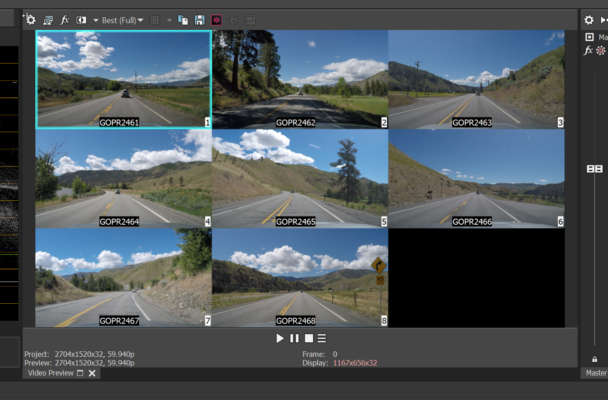
You need to learn about the Vegas multicamera editing feature. In a nutshell, go to Tools, Select, Multicamera and first select ” Enable Multicamera Editing”. Then select your 7 video tracks, go back to Tools|Multicamera and select “Create Multicamera Track”. A track will be created with a videowall containing your 7 tracks. That will at least get you started. I would suggest that you first try it on some test video clips just to learn how it works. Here’s a screengrab of an 8 track multicam project preview window. Good luck.
Wayne
-
New build 1.0.3.13 is now available.
The activation and licensing code has been rewritten in an attempt to reduce the number of false positives that have recently occurred with some AntiVirus apps. (In testing, no issues with Norton 360). Please report any recurring problems along with the files that have been quarantined.
Change log may be found here. https://tools4vegas.com/wp-content/uploads/HappyOtter-Change-Log.pdf
New Features
- AviDub
- 10bit support using Direct Render option with MagicYUV and ProRes intermediate
- Added IVTC script for converting telecined 29.97 footage to 23.976 progressive
- Movable render progress dialogs
- Offline activation now available
- Color Cop—recompiled to support UHD monitors
Bug Fixes
- Import Assist—crashed when entering new filetag for rewrap–fixed
To download, Launch Help from OtterBar, OtterInfoBar, or OtterMenu and click on “Check Now”.
-
Hi Bill,
Glad to be of help. No, I didn’t learn the Shift-Click on my own. It’s fairly common knowledge.
Wayne
-
Hi Bill,
The problem you see is very common with later versions of Vegas (15-18). Starting in V15, Magix introduced a new decoder dll, named S04compoundplug.dll. The new decoder was designed to decode newer camera formats and is evolving to this day. The audio sync problem was very common, especially for certain camera footage including GoPro clips. To use the same decoder that is used in v14 named compoundplug.dll, you need to open the Internal tab under preferences and search for “so4”. To see the Interenal tab, you must hold down the Shift key when clicking on Preferences. You will see 4 entries. Just select the entry of choice (probably the AVC entry) and enter FALSE into the value. Doing so will enable the older compoundplug.dll which is pretty much the same as V14. To confirm and see which decoder is being used, right-click on a timeline event and select properties. Then select the General tab. Scroll down to “Plug-in” and it will show what decoder is being used. Hope this helps.
Wayne
-
As Setiawan posted, Vegas does not support such custom render resolutions for delivery formats such as avc or hevc. You will need an add-on such as HappyOtterScripts or Voukoder. Either of those will render using the same dimensions as your project settings.
-
Just a reminder.
HappyOtterScripts
Black Friday Sales Event–Save 25%
Full license $59
Now through Nov 30.
https://tools4vegas.com/licensing/