Creative Communities of the World Forums

The peer to peer support community for media production professionals.

Activity Forums VEGAS Pro Editing using 6+ video tracks

  • Editing using 6+ video tracks

    Posted by Rob Lindsay on December 21, 2020 at 4:18 pm

    I’m cutting a music video and I’ve synced about 7 tracks of video to a single master audio track of the song. All of the video tracks are lip-syncs of the artist singing the song, so all run in parallel.

    So far, to get to any of the lower tracks to use their scenes for a cut, I have had to “S” cut and slide back all tracks above them for that portion of the track to be viewable and used in the video. is there an easier way to do this?

    Thank you,

    Rob

    Rob Lindsay replied 5 years, 4 months ago 3 Members · 3 Replies
  • 3 Replies
  • Wayne Waag

    December 21, 2020 at 5:29 pm

    Hi Rob,

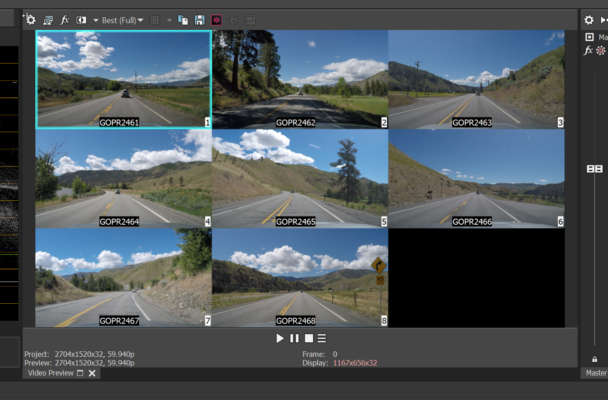
    You need to learn about the Vegas multicamera editing feature. In a nutshell, go to Tools, Select, Multicamera and first select ” Enable Multicamera Editing”. Then select your 7 video tracks, go back to Tools|Multicamera and select “Create Multicamera Track”. A track will be created with a videowall containing your 7 tracks. That will at least get you started. I would suggest that you first try it on some test video clips just to learn how it works. Here’s a screengrab of an 8 track multicam project preview window. Good luck.

    Wayne

  • Michael Legel

    December 21, 2020 at 5:39 pm

    If you search for multi camera editing it should guide you in the process. First make sure the tracts are very well synced. Second make a duplicate of each tract. Third select the each duplicate track make sure all selected at once. Finally tools multi camera editing create multi camera track (this puts all of the duplicated tracks into one new tract this will change preview so you can see a small picture of each. Once you have this display turn on preview play and click on the one you want displayed and it will cut when you click. If you hold down the control button as you click. Auto overlap. No control it is a split cut. Turn off enable multi camera and preview will show the final project. Takes some practice but great skill to put into you bag. Probably could find a YouTube video demonstrating. Here is one I did a few years ago. I think there were 5 cameras included. https://youtu.be/NhK-X0mn_0w

  • Rob Lindsay

    December 21, 2020 at 7:34 pm

    Thank you — these recco’s are terrific. I will learn this !

We use anonymous cookies to give you the best experience we can.
Our Privacy policy | GDPR Policy