Wayne Waag
 2
COW Coins
2
COW Coins
Forum Replies Created
-

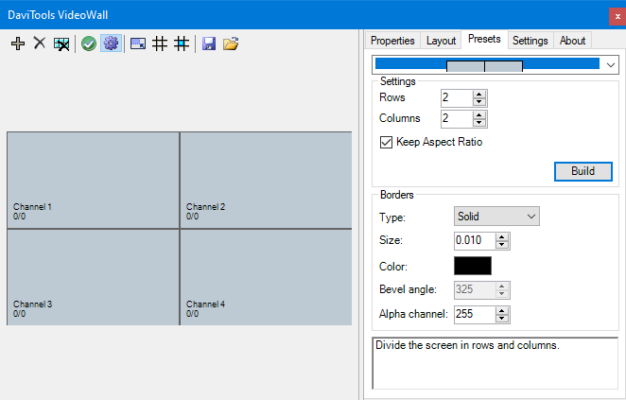
With the author’s permission, I have recompiled DaviTools VideoWall for use in Magix versions of Vegas Pro. This is a very useful dockable extension for easily designing and creating video walls that was originally written for use with earlier Sony versions. Here are a couple screen grabs of the UI.
I’ve added it to the Happy Otter Free Tools library. Here is a direct link where it can be downloaded. https://tools4vegas.com/davitools-videowall-2/

-
The PasteAtMarkers script is now available for download. Here’s the link. https://tools4vegas.com/paste-at-markers/
wwaag
-
It doesn’t use the windows clipboard at all. It simply searches for the first selected video event. Once found, the event is simply “copied” to a new position on the same track that is defined by the position of each marker. It’s really quite simple.
At the moment, it only searches for video events. Audio events could easily be added. The events could then be “grouped”. I’ll give it some additional thought tomorrow. Suggestions are welcomed.
wwaag
-
“PasteAtMarkers” is the little script I just threw together that’s shown in the demo. HappyOtterScripts is a set of tools that is described here https://tools4vegas.com/.
“Question — If you had multiple events selected across different tracks (lots of times titles are layered), OR had grouped events (also across different tracks), and chose “Paste at Markers”, would it paste them all and maintain their relative spacing and track placement? (this is what the traditional “paste” does on the timeline)”
No. At the moment, PasteAtMarkers takes a single event and simply copies it to the marker positions on the same track which sounds like the original request. Obviously, it could be made more complex, but at the moment, it’s quite simple.
I’ll upload it and make it available on my website tomorrow at the Free Tools Library https://tools4vegas.com/library/ since other users may find it useful.
wwaag
-
Are you looking for something like this?
Some contents or functionalities here are not available due to your cookie preferences!This happens because the functionality/content marked as “Vimeo framework” uses cookies that you choosed to keep disabled. In order to view this content or use this functionality, please enable cookies: click here to open your cookie preferences.
wwaag
-
Just uploaded an update to Snapshot Tools with added features. There is now a GUI for tool settings.

There are now options for setting:- Where images files are to be saved
- Selection of image format including bmp, jpg, png, and tiff.
- Selection of quality for jpeg images
- Duration of the image on the timeline for use in the SnapshotToTrack tool
- Option to bypass Fx on the video output bus
- Option to add images to the media pool for the SnapshotSave tool
The new package can be download at https://tools4vegas.com/snapshot-tools/
wwaag
-
Wayne Waag
August 28, 2020 at 5:37 am in reply to: Vegas Pro -Video completely looses focus after being added to the timelineI think I see your problem. In your project settings, your field order is set to UpperFieldFirst which is interlaced. Since your footage is apparently cell phone video, it is progressive.
To correct, change field order to Progressive. Also click on your media file properties and make sure that the field order is also set to progressive.
wwaag
-
New build 1.0.3.6 is now available.
Change log may be found here. https://tools4vegas.com/wp-content/uploads/HappyOtter-Change-Log.pdfNew Tools
- SpeedRamp—enables user to gradually increase/decrease playback speed while maintaining audio sync

Some contents or functionalities here are not available due to your cookie preferences!This happens because the functionality/content marked as “Vimeo framework” uses cookies that you choosed to keep disabled. In order to view this content or use this functionality, please enable cookies: click here to open your cookie preferences.
Note that the source footage was 25P downloaded from YT.- OtterBar2—added second taskbar for users requiring additional space for launching scripts
New Features
- RenderPlus – direct audio render for VCE renders thus eliminating need for remuxing
Bug Fixes
- Folder Browse exception—fixed
- RenderPlus—incorrect Avisynth crop setting icons loaded after crop—fixed
- Better exception handling during FrameServer installation
Last changed by wwaag on 8/16/2020, 2:01 PM, changed a total of 1 times.
wwaag
-
Just uploaded a couple of new tools to the Free Tools library, Playlist Import and Snapshot Tools.
Playlist Import is a script that enables the import of audio playlists to Vegas. Formats supported include m3u and pls in addition to a textfile of filepaths. This enables the import of audio files in any order. Here’s a screengrab of the UI.

Snapshot Tools consists of three scripts designed for creating and saving images of the timeline at the position of the cursor. For example, the script SnapshotToTrack, saves the image to a subfolder of the Project folder, adds the image to project media in a Bin titled “SnapshotsToTrack” and adds the image as a new event to a new track titled “SnapshotsToTrack”.
The script Vegas Render Quality has now been updated to support the latest versions of the DebugMode FrameServer in addition to the previous version.
Tools may be downloaded at https://tools4vegas.com/library/
wwaag
-
Wayne Waag
August 5, 2020 at 6:56 pm in reply to: Need faster way to loop playback of a clip segment followed by same clip segment(reversed)HI Jordan,
“However, it could use a bit of improvement.” Not surprising.–most everything can.
I’ve made a couple of changes and uploaded a new version for you to download and try again. The selection loop now encloses both events and more importantly, it removes the previous events and subclips if you decide to change the selection length and “start over”.
Once you’re happy with the two subclips, you will still need to manually add them (or just the reverse subclip) back to the your original track and adjust the original event.
wwaag