Forum Replies Created

Page 2 of 14
  • Tom Morton

    May 14, 2024 at 6:26 am in reply to: SSD or RAM upgrade?

    I agree Rob, pagefile definitely isn’t a replacement, I was more saying that if you’re in that situation that you’ve maxed your RAM, you’ve still got something which is better than nothing… So if you only expect to max out your RAM on a heavy project a couple of times in a year, then it might not be worth getting more RAM for the few times you’ll need it… very much dependant on what you’re doing though – I just know I’ve found that faster I/O file speeds on a better SSD have a huge impact on RAM dependency in the first place, not to mention generally having a cleaner and more efficient system.

    Also fully agree on your point about Adobe bad usage of RAM! I’ve got a sneaking suspicion that however much RAM you have, After Effects especially will just hog it out of spite… often wonder what optimisation processes it goes through!

  • Tom Morton

    May 13, 2024 at 7:30 am in reply to: SSD or RAM upgrade?

    Interesting, I would have said go for the SSD if I had to choose. With a better / faster SSD, you can increase your paging file, and also use it for fast caching, which while it doesn’t do the same job as RAM, it does reduce your systems dependency on RAM. A better RAM with faster combined i/o speeds will also help computations complete much faster, which will mean that the programs using RAM for any kind of file manipulation will use the RAM for a shorter time, thereby freeing up some capacity.

  • Tom Morton

    May 10, 2024 at 6:35 am in reply to: SSD or RAM upgrade?

    Definitely CPU… adobe programs are CPU hoggers

  • Tom Morton

    April 24, 2024 at 6:28 am in reply to: Custom easing function using expression

    just trying to understand, are you stacking these expressions all on a single property or is each one used separately?

  • Tom Morton

    April 11, 2024 at 1:57 pm in reply to: After Effects Video Example Skipping Frames

    just lots of frame grabs / stills lined up surely?

  • you’ve got the syntax wrong, each expression works fine on it’s own, but they RETURN a value, they don’t modify the existing value.

    var txt = value;
    txt.trim(); // removes whitespaces in front of text and returns the value - doesn't change the value of "txt" variable
    txt.substr(0/37);//limits the ORIGINAL string to 37 signs and returns it again. Expressions uses this as the last returned value

    Therefore you need to do something like this:

    var txt = value;
    txt = txt.trim(); //removes whitespaces in front of text
    txt = txt.substr(0/37); //limits the string to 37 signs
    txt;

    each expression will now update the value of the “txt” variable. hope that helps!

  • Tom Morton

    April 11, 2024 at 11:18 am in reply to: Unsupported GPU Processing Mode

    what version of Resolve? what platform / os / system are you using?

  • It might be easier to mask out the rug altogether and replace it with either a clean plate or a 3D generated alternative. If it’s not the main focus and you blended it in to a good match, it could be so subtle that no one guesses that it’s not the real deal

  • Tom Morton

    March 28, 2024 at 9:09 am in reply to: How to achieve this?

    They seem to follow a standard masking pattern. You could create the mask pattern in photoshop or something and just use an image series as a mask for the colored box graphic. Shouldn’t be too difficult if you know your way around After FX

  • Tom Morton

    March 28, 2024 at 7:57 am in reply to: Camera raw lens correction

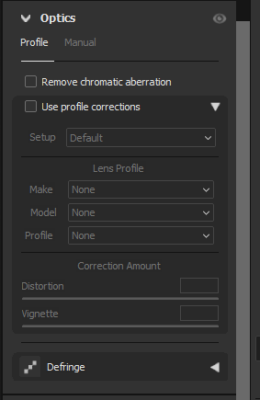
    You can turn lens correction off in Camera RAW for the DNG file – you’ll find it under the Optics section as per screenshot below.

    If lens correction is off for both images, they should composite correctly. Once you’ve composited and got your final image, you can apply Camera RAW as a smart filter to re-apply the lens correction afterwards.

Page 2 of 14

We use anonymous cookies to give you the best experience we can.
Our Privacy policy | GDPR Policy