Forum Replies Created

Page 14 of 14
  • Tom Morton

    September 4, 2023 at 1:28 pm in reply to: xpresso nodes not displaying numerical results

    Arrived here, second result on google.

    Using R20 and getting the same problem, where Result and Spy nodes are blank. Have unlinked them, duplicated them, deleted them, refreshed them, connected to nodes which are working, but no luck as yet.

    Only thing I can think of is that everything was working fine, I did a test render, one Xpresso animated part wasn’t working, dived into the editor to find out why and result nodes are obstinately staying blank.

  • Tom Morton

    March 7, 2023 at 3:17 pm in reply to: First time hiring an actor in the UK

    Thanks Mads, that’s helpful and appreciate your advice. I’ve come across a couple of people on some different websites who have mentioned using TV presenters, but I’m also not sure how to get started with this – I had wondered if it’s as easy as contacting some local news stations near me and asking the question?

  • Tom Morton

    December 20, 2022 at 3:53 pm in reply to: change name / username

    Thanks Brie!

  • Tom Morton

    December 16, 2022 at 4:56 pm in reply to: Delay a loopOut expression?

    I know this is an old post but for anyone else who got here via Google like me… With current versions of AE, this is now possible in a couple of ways:

    Firstly, you can play with the keyframes. When you enable time remapping, you get keyframes added automatically, moving these changes the speed and can add or remove time from the footage.

    The other option is to precompose the footage you’re looping – create a comp that is the correct length including gaps and so on. then simple nest that comp into your main comp and loop that.

    Enjoy!

  • Looks good Andy, I’ll have a look at this later and let you know – thanks!

  • Thanks Andy, appreciate your reply.

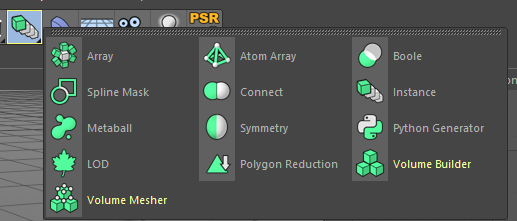
    In visualise I do have a a couple of arrangement tools but quite limited. I have a Array and Atom Array. Array is excellent but limited in that it can only array on a circle, and not a straight line. If I could only create a straight line it would solve most of my problems. See tools attached.

    I’ve been using the Duplicate tool ( Tools > Arrange Objects > Duplicate) which works ok but I find it annoying that I can’t tweak parameters after the event. It creates a bunch of hard copies while Array does it programmatically, allowing me to add or remove copies after it has been applied. Does seem a shame there’s nothing in visualise to array on a spline or at least a straight line.

    I had wondered if I could use Particle Emitter or Array to create the instance copies programmatically and then use Xpresso to manipulate their position. Not sure if that’s possible yet.

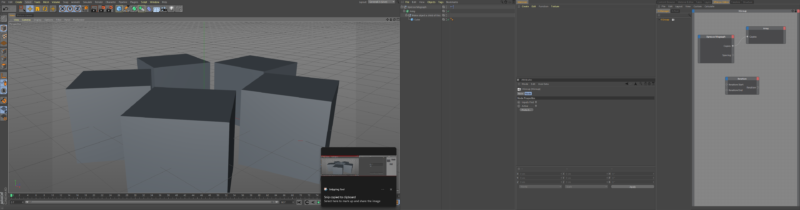
    See second image attached, I’ve got an idea of the process: user data defines how many copies of the object. Link it to the radial array and create these copies. Iterate through the objects and redefine their position according to a formula.

    But a lot of ??? involved – is it possible to iterate through objects that aren’t objects (Array objects don’t appear in the hierachy). Can I change their position even if I can identify them? etc

  • Darn! I do believe you’re right ☹

    My problem is that each animation will be different per project, it’s basically a little right angled feature picker, which follows a point on a video.

    Unless there’s an easier way, I guess I’ll have to import both the video and the feature picker in AE, match them up, export as a new video and import that back to Premiere.

    Regards,

    Tom Morton | Digital Everything

    If it can be automated, let the computer take the load. Creativity leads creativity.

  • Tom Morton

    August 21, 2018 at 7:46 am in reply to: control path length using expressions

    Thanks Dan, that sounds like what I’m looking for. Are the any good tutorials / explanations online showing how to format that expression correctly? I can’t use trim paths because the length of the path will change and I can’t get it accurate enough.

    Regards,

    Tom Morton | Digital Everything

    If it can be automated, let the computer take the load. Creativity leads creativity.

Page 14 of 14

We use anonymous cookies to give you the best experience we can.
Our Privacy policy | GDPR Policy