Forum Replies Created

Page 1 of 3
  • Sean Cole

    September 3, 2024 at 5:20 pm in reply to: Expression doesn’t work with keyframes

    L = C.layer(thisComp.name);<div>
    </div><div>I’m assuming you do in fact have a Layer labelled “Binny_Front_FULL” in your Comp. If not, that would cause non-function. </div>

  • Sean Cole

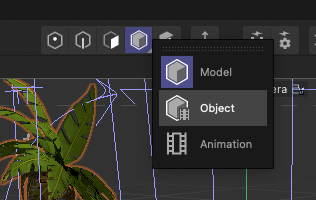
    July 24, 2024 at 3:30 pm in reply to: How do I Scale a model with animation?

    Unbelievable! This just saved me. I thought I was going loopy. “Object Mode”. And I thought that’s what I was in. Perfect – thanks.

  • Sean Cole

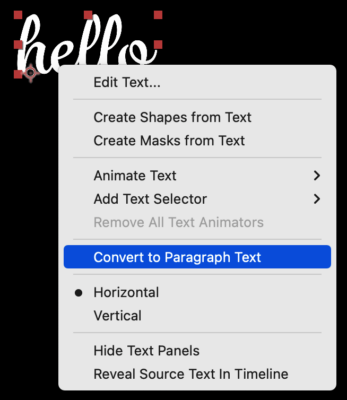
    October 15, 2022 at 2:21 pm in reply to: Fixed size for text bounding box.

    Thanks for that, Walter. I notice that sometimes, like if you don’t have a layer selected, that you may need to right-click the layer twice for the ‘convert to paragraph/point text’ pop-out menu to show.

  • Sean Cole

    October 14, 2022 at 5:43 pm in reply to: Fixed size for text bounding box.

    Hi Matt,

    Two ways to create a text layer from the workspace are to click or click and drag. If you click and drag you create a fixed-size text layer. When you want to adjust the size of the box after leaving the text layer, double-click the layer or its name in the timeline. As far as I know you have never been able to convert a standar text layer into a fixed-size layer. There is also no way that I know of to animate the size of the text layer box.

  • Sean Cole

    March 12, 2017 at 4:17 pm in reply to: LMB-click and drag in viewport is scrubbing time. Why?

    Thanks Jim. That was my first thought too but I checked the keyboard which was working ok. It didn’t matter if I was holding down J or not. I thought perhaps my MagicPrefs trackpad augmenting app might be the cause of it but that was not the case either. I trashed the prefs, restarted the Mac twice and gave it another go and it seems to have gone away now. Must just have been some glitch, but odd as killing the app and restarting it made no difference to its behaviour. Hey ho, it’s gone now. It’s just a shame that no-one else will be able to know what’s causing it and how to fix it.

    Sean
    Pi Digital

  • Its driven me crazy all night. Please someone help

    Sean
    Pi Digital

  • On its way

    Sean
    Pi Digital

  • Sean Cole

    December 30, 2011 at 12:38 am in reply to: Free FCPX CineStyle Effect – wvl_Cine

    Check out CoreMeltItFREE. It has a plugin called ‘RGB Levels and Curves’. Works just as we need it within FCPX. I’m using it for some LogC footage from an Alexa. We used a macbeth to calibrate from on the shoot and set up some characteristics from that. But easy to set up by eye roughly (and with built in scopes).

    https://www.coremelt.com/products/coremeltfree.html

    Pi

    Sean
    Pi Digital

  • You’re 30fps footage is always going to look a bit choppy when playing it back on a 24fps timeline because it’s going to be skipping frames or trying to blend them. It’s never 100% perfect.

    Well, I say that. There are ways around it but, depending on the style of footage, you can get pretty good results using a convertor with motion estimation or some kind of pixel flow calculation. In Compressor in the Frame Controls section (You may have to turn it on by clicking the little cog button) there is a group called Retiming Control . In that group change the Rate Conversion to ‘Best (High Quality Motion Compensation)’ and check the radio button that says ‘so source frames play at ##.## fps’. The FPS are set in the Encoder settings.

    Sean
    Pi Digital

Page 1 of 3

We use anonymous cookies to give you the best experience we can.
Our Privacy policy | GDPR Policy