

Activity › Forums › Adobe After Effects › Fixed size for text bounding box.
-
Fixed size for text bounding box.
Posted by Matt Barber on October 14, 2022 at 5:21 pmHi, is it possible to set the size of the text bounding box in AE?
I thought it used to be. Many thanks!Sean Cole replied 3 years, 11 months ago 3 Members · 3 Replies -
3 Replies
-

Sean Cole
October 14, 2022 at 5:43 pmHi Matt,
Two ways to create a text layer from the workspace are to click or click and drag. If you click and drag you create a fixed-size text layer. When you want to adjust the size of the box after leaving the text layer, double-click the layer or its name in the timeline. As far as I know you have never been able to convert a standar text layer into a fixed-size layer. There is also no way that I know of to animate the size of the text layer box.
-

Walter Soyka
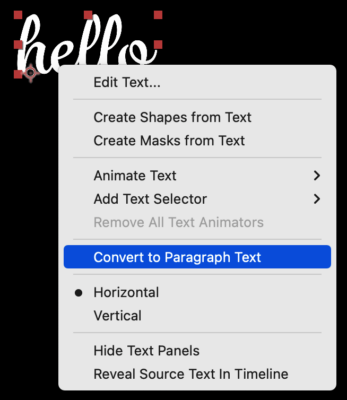
October 14, 2022 at 5:51 pmIf you right-click a standard text layer (called “point text” in Ae) with the Text tool active (not the ‘V’ move tool!), you can convert it to paragraph text. You can convert paragraph text back to point text this same way.
You’re right that you can’t animate the bounding box of paragraph text, but Filip Vandueren has a great technique that lets you rescale the paragraph box while keeping the text the same apparent size (forcing it to reflow):
https://creativecow.net/forums/thread/text-shall-move-to-another-place-and-with-another-wrapping/ -
Sean Cole
October 15, 2022 at 2:21 pmThanks for that, Walter. I notice that sometimes, like if you don’t have a layer selected, that you may need to right-click the layer twice for the ‘convert to paragraph/point text’ pop-out menu to show.

Reply to this Discussion! Login or Sign Up