Forum Replies Created

Page 6 of 8
  • Rob Ainscough

    December 21, 2023 at 5:29 pm in reply to: Premiere pro GPU

    Hi Dennis,

    It’s been over a year since I worked with Adobe CC suite (sorry moved onto DaVinci Resolve as it’s a much better platform), but a couple of things to recommend so that you can use the GPU in Pr:

    1. Disable the embedded CPU’s graphics unit via your BIOS/EFI settings. You should be able to boot into your laptop EFI/BIOS and locate the embedded graphics setting and set it to disable. This will ensure that the ONLY GPU Pr can use will be your nVidia 3060. However, it’s still not a guarantee it will and might fallback to software rendering (see #2 below).

    2. Manually download the nVidia 3060 “Studio” drivers (important, do NOT get the GRD – Game Ready Drivers). Get DDU from Guru3D. This will remove all vestiges of nVidia drivers but needs to be run in Windows safe mode and you need to disconnect NIC or turn off Wifi so as to avoid Windows trying to find and install a driver. Once you’ve completed DDU process and booted back into “normal” windows mode (with network still disabled), then run the nVidia 3060 “Studio” driver install. Once installed, then reboot and connect back to your network (NIC/Wifi).

    You’re probably reading this going OMG what a pain in the as_ … and yes it is a pain. But it’s the best method to try to resolve your issue with Pr not using the GPU.

    Cheers, Rob.

  • Rob Ainscough

    December 21, 2023 at 5:13 pm in reply to: Upgrading??

    I dropped Adobe CC suite about a year or so ago and moved to DaVinci Resolve/Fusion and my workflow has improved and I’m getting more done and far fewer bugs with excellent stability and performance. Performance is significantly better.

    Since I moved to DaVinci Resolve I also started buying Black Magic Designs equipment for Color grading, Mixing, fast editing and because the hardware is tied directly into Resolve/Fusion there is no latency and stability is top notch and I don’t have to worry about key mappings as it’s natively connected.

    With Adobe I found myself buying many plug-ins (like Boris FX, Mocha, etc.) … especially for tracking since Adobe Pr/Ae is terrible at native tracking (which further increased my workflow). Resolve’s built in tracking support is excellent and very easy to use and I have NO need to buy additional tracking plug-ins.

    The biggest change/learning was moving away from Adobe’s “layers” to Resolves “nodes” … IMHO nodes are far more powerful than layers and visually make it easier to see workflow. Another change was operating in distinct “modes” under Resolve … Cut, Edit, Color, etc. … which turned out to be a very efficient way of working on a project … it’s better than using Adobe’s “Workspace” concept and fiddling with windows that often never stayed in the correct locations.

    DaVinci Resolve focus is on “creation”. DaVinci Fusion is free (well comes with the Resolve license not a separate purchase) but is a separate download … Fusion is essentially the same as After Effects only better IMHO.

    I know a lot of editors both professional and hobbyist that have moved away from Adobe to DaVinci Resolve/Fusion. For photo editing/processing, I use Affinity Photo 2 which very much as powerful as Photoshop and very similar layout so learning curve was minimal. I never had any issues with working DLog or SLog RAWs in Affinity Photo 2 nor DaVinci Resolve.

    About the only other tools I have in my arsenal is Topaz Photo AI and Video AI to work on low quality or mistake ridden content.

  • Rob Ainscough

    December 8, 2023 at 2:59 pm in reply to: Can’t Install 22 version of Premiere!!

    This and many other reasons is why I moved away from Adobe … can’t install C24 on Windows 10. I moved to DaVinci Resolve and Fusion and haven’t found a need to use Adobe. Tracking in Resolve is so easy and doesn’t require 3rd party plug-ins.

    With that said, the only way I was able to use C22 was on an old PC that had gone thru upgrade cycles over the years … you have a backup anywhere?

  • Rob Ainscough

    November 6, 2023 at 6:28 pm in reply to: Premiere Pro & S-Log3

    Completely understand Michael. The biggest adjustment for me when moving from Adobe Pr to Resolve/Fusion was node vs. layer. But like you, I just got fed up of getting bogged down in Adobe workflow details that I felt I shouldn’t need to know.

    Sorry I can’t help with your issue, has been about a year since I touched Adobe Pr/Ae.

  • Rob Ainscough

    November 6, 2023 at 5:37 am in reply to: Premiere Pro & S-Log3

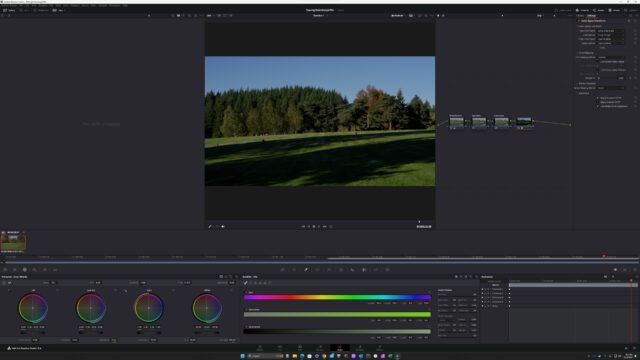
    Probably not what you want to hear … if you’re using a Sony A7 series (I’m using A7RV) I would highly recommend you go with DaVinci Resolve 18.x for S-Log3 and use the Sony LUT that’s included in DaVinci Resolve. I use BlackMagicDesign mini panels for color control and much more, it just works, no fuss. As you can see from the attached image, drop footage into the timeline, add 4 nodes (these are like Adobe layers only more flexible) White Balance, Saturation, Luminance, Last is the color space transform and select Color Space and Gamma for Sony.

    For Adobe Pr, it’s a pain … you’ll need to download the LUT from Sony. Once done, put you footage in the timeline and add FX Lumetri Color in Pr and set the Input LUT to the downloaded Sony LUT files (.CUBE) … I think you want ToLC709.cube (you may have options here). Then use the Lumetri FX controls to adjust Light and Color … where it get VERY tedious in Adobe Pr is if you want to adjust specific areas (i.e. light up a shadows on subjects face because they’re wearing a hat) then you go the mask route and setup tracking etc. … in DaVinci Resolve this process is super easy and tracking just works and very easy to quickly adjust.

    IMHO, if S-Log is your thing, don’t use Adobe as the workflow is horribly time consuming (when it works).

  • Rob Ainscough

    March 18, 2022 at 5:04 am in reply to: 4K HDR VRR capture cards?

    Awesome, thank you! I’ll check it out.

  • Yes, the Win10 and now Win11 platform with HDR10 option and graphics drivers (SD vs GRD) that don’t always handle HDR correctly along with all the variants in HDR specifications … and then there is the connection type HDMI, DisplayPort and the cable type required to support higher bpc at a given refresh rate … it really is a crap shoot on how something will look from PC to PC even if the same monitor is used.

    I have a Samsung G9 that is supposed to be HDR with 10bit support at 60Hz. But when I enable HDR it looks more like they just increased the Gamma than actually meeting the specifications. And then I test on a 12 bpc OLED TV and it looks completely different than my Sony OLED TV.

    I had someone telling me that you don’t need 10 bpc support on the monitor to use HDR10?

    Not even going to talk about HDR10+ and Dolby Vision … it’s a hot mess and I was hoping Win11 would sort it out, but that doesn’t appear to be the case.

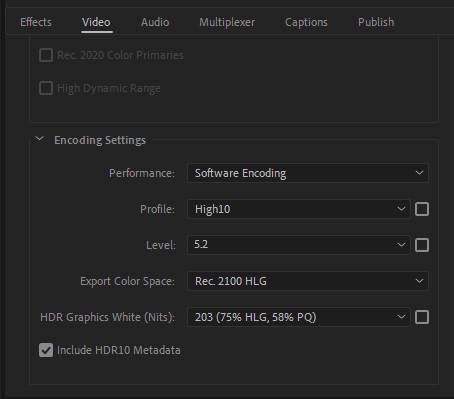
  • I had the same problem with my HDR content … I made these adjustments to the export to solve my similar problem. You might want to experiment … I did have to give up CUDA accelerated rendering and use Software..

    Cheers, Rob.

  • Welcome to Adobe Pr … this has been a major issue for many of us for years (ever since CC 2017). In most cases many recommend converting your source files into some other codec like ProRes. I found this to be too time consuming and often didn’t resolve the performance problems with Pr and used up my 80TB of storage rather quickly.

    To work around the poor codec reliance that Adobe have, I do the following:

    1. Convert all ingested media to Proxies (either Medium or Low res but suggest you use same H.265/H.264 or PreRes422 if you have the space )

    2. Enable Proxies in Pr when working on a sequence

    3. Never import Ae projects, always convert them to a video and import the video

    4. Under preference, Memory, set to “Performance” (this doesn’t make much difference especially with 64GB or 256GB)

    As far as your hardware, I wouldn’t consider that “sufficient”. Disk I/O performance is NOT the issue with Pr … I’ve used very fast M.2’s and SSDs and RAID no RAID … makes no difference so long as the I/O device can work at 300MB/s or better.

    I have an AMD 5950X (16C/32T) and Titan RTX 24GB and Samsung EVO 980 Pro M.2’s … and Pr is still SLOW if you don’t use steps 1-4 above.

    One other thing is to enable CUDA (GPU Acceleration) rather than Software … when GPU acceleration works it’s much faster but be warned that some Effects might trigger render failures with GPU Acceleration enabled (my Boris FX Continuum does). You can also get the latest CUDA drivers here: https://developer.nvidia.com/cuda-downloads … but IMHO your 1030 is far too weak a GPU to do GPU Acceleration well, so I’d turn GPU Acceleration OFF or get a better GPU.


    Cheers, Rob.

  • Rob Ainscough

    October 5, 2021 at 5:11 pm in reply to: Network speed

    Yes, getting a 3090 “at retail” price is very difficult, took me 11 months to get ONE EVGA 3090 and I signed up on their waiting listing the day they became available. I refuse to pay scalper prices and even some of the pre-built system markups.

    I’m currently running one Titan RTX 24GB on a AMD 5950X and it’s MUCH faster than my backup render PC (7900X with Titan X (pascal)).

    If you haven’t already, be sure to get the latest CUDA support from nVidia here: https://developer.nvidia.com/cuda-downloads

    Cheers, Rob.

Page 6 of 8

We use anonymous cookies to give you the best experience we can.
Our Privacy policy | GDPR Policy