Forum Replies Created

Page 7 of 8
  • Rob Ainscough

    October 5, 2021 at 4:23 am in reply to: Network speed

    Do you have an existing USB-C or Thunderbolt port? If yes, you can connect an external 10Gbps network adapter.

    Cheers, Rob.

  • Rob Ainscough

    October 3, 2021 at 6:28 pm in reply to: Network speed

    Depends on how fast the “2nd PC as a render node” can render.

    For reference:

    1 Gbps = 125 MB/s

    10 Gbps = 1250 MB/s

    100 Gbps = 12500 MB/s

    M.2 NVMe (980 Pro local) = 7000 MB/s

    Latency will be much higher in any Network environment vs. local M.2, but latency will not be relevant to the task of rendering output to file.

    The bottleneck will primarily be the CPU cores hence the dependency of “how fast” is your render node at the CPU level … in my experience “render to file” (or stream) on a very fast PC can generate about 300 MB/s I/O load.

    Without knowing much about your “2nd PC”, I would still suggest that 10 Gbps should be sufficient I/O performance.

    You’ll need 10Gbps LAN cards, 10Gbps switch, Cat 6 or higher cable, and your cable run length is limited to about 50m (164ft).

    Cheers, Rob.

  • Rob Ainscough

    September 15, 2021 at 6:24 pm in reply to: Voice-Over — how to match Mic differences?

    Hi Chris,

    I ended up using Reverb, Noise, and EQ to get “close” … izotope rx (Dialog Match) would probably make it perfect, but it’s outside my current budget at $999.

    Cheers, Rob.

  • Rob Ainscough

    September 15, 2021 at 6:20 pm in reply to: Dynamic links to AE projects randomly disconnect

    I have a QNAP also but I never link to it directly, just too slow even across 10Gbps LAN.

    I keep 20TB RAID local for fast I/O, I wouldn’t recommend linking anything directly to a NAS. I know it’s done frequently but not advisable … use intermediary and then sync to NAS as needed.

    Anyway, that aside, your QNAP drives will go into sleep mode and make take a few seconds to fire back up when being accessed, those few seconds could be why Ae thinks the drives are disconnected.

    Do you have QTier enabled for any SSD drives you may have in your QNAP? Since SSDs don’t spool down they will always be ready for access.

    With that said, if you are mapping a drive letter to the QNAP then you will need to add entry in your registry:

    Computer\HKEY_LOCAL_MACHINE\SOFTWARE\Microsoft\Windows\CurrentVersion\Policies\System

    Add or edit entry “EnableLinkedConnections” (DWORD 32bit) and set value = 1 (Hex). This might help keep links active.

    Cheers, Rob.

  • Sadly Pr is NOT very efficient. I know a software engineers at Adobe that works on the capture features of Pr. He’s a brilliant software engineer but has warned me about encoding/decoding problems they continue to encountered.

    I’ve asked him several times why Adobe doesn’t leverage more RAM usage and he indicated there is “less risk” with less RAM usage, hence why Pr is still heavily I/O reliant. Regardless, the performance issues with Adobe are all about the encoding/decoding and the types of codecs used. Even “proxies” will not save the day.

    I inquired about the usage of AVX instructions and he indicated they don’t use AVX (which seems odd to me). I haven’t confirmed but you can test for AVX usage by dropping the AVX offset in your BIOS/EFI (to some much lower value like 7 — 700Mhz slower when AVX is used) … disable speedstep so the CPU frequency is constant and note your “normal” frequency (i.e. 4.0Ghz). Run HWINFO64 and monitor CPU core frequency. Now run Pr and monitor HWINFO64 CPU frequency, if you see momentary CPU drops to 3.3 Ghz then you know AVX is being used, if no drops then AVX is not being used.

    The performance problems I’ve noted with Pr:

    1. Software bound (CPU side) and GPU usage is minimal and only helps in very specific use cases

    2. Doesn’t use RAM efficiently … there is absolutely no need to have more than 64GB RAM (I have 128GB RAM which was a complete waste even for very large projects)

    3. Doesn’t leverage AVX instructions

    4. Encoding/Decoding isn’t optimized (Adobe seem lost in various codecs)

    The only way I’ve been able to “marginally” tackle the performance problems with Pr is to:

    a. Use proxies

    b. Convert all my source to a format/codec that works well on my specific PC (you’ll have to experiment because it’s NOT the same for everyone)

    I’ve tried tossing hardware at Pr and it made very little difference, very high speed M.2 drives, RAM drives, more RAM, better GPUs, faster RAM, different CPUs. The single key significant performance problem is Adobe’s encoding/decoding which they seem unable or unwilling to solve.

    Cheers, Rob.

  • Rob Ainscough

    May 30, 2021 at 6:05 pm in reply to: Sony Alpha 7 s III XAVC S 4K 4:2:2 10 bit

    Can you be more specific in regards to “freezes”? Does ME just stop responding or does your entire PC stop responding?

    Cheers, Rob.

  • Rob Ainscough

    May 24, 2021 at 4:26 pm in reply to: Can we talk 4K/60p camcorders

    Excellent! Very helpful links.

    Thank you Joe.

  • Rob Ainscough

    May 24, 2021 at 4:05 pm in reply to: Can we talk 4K/60p camcorders

    To all,

    Has anyone used a Sony A7S III with a Master series lens at night and/or very low light … a shared video sample would be wonderful!

    I read (but not seen) that the A7S III with the right lens will have very low noise/grain even at ISO 12800 F1.4 1/50 S-LOG 3 (camera spec is 40-409600 ISO) … apparently it’s “switch over to another ISO method” (dual ISO but not dual ISO??) and this varies based on the profile selected. Found a great video here:

    https://www.youtube.com/watch?v=QmWujsJbzDw

    However not actual night time footage? Ugh! I persisted and found this video:

    https://www.youtube.com/watch?v=-4MqLTAOsTA at the 5:37 min mark and I think I’m sold!

    S-LOG 3 ISO 12800

    It can also shoot 60 mins continuous video and goes up to 120 FPS 4K with 10 bit color 4:2:2.

    Of course the price bump is pretty significant where I’m looking at about $6000 with one Master series lens (maybe a little less with a Sigma lens).

    Any Sony A7S III users?

    Cheers, Rob.

    Some contents or functionalities here are not available due to your cookie preferences!

    This happens because the functionality/content marked as “Google Youtube” uses cookies that you choosed to keep disabled. In order to view this content or use this functionality, please enable cookies: click here to open your cookie preferences.

  • Rob Ainscough

    May 19, 2021 at 6:54 pm in reply to: PC Specs for Premiere

    I’ll have to disagree with you Eric … watch this review and breakdown of a Dell:

    https://www.youtube.com/watch?v=4DMg6hUudHE

    Not only does Dell add charges claiming something is free and attempting to hide those extra charges, but the also provide extremely LOW quality components and poor overall design.

    I agree that “some” pre-Built PCs might be “ok”, but I would avoid Dell, HP and go with a builder that provides non-proprietary components so that upgrading is easy.

    Cheers, Rob.

    Some contents or functionalities here are not available due to your cookie preferences!

    This happens because the functionality/content marked as “Google Youtube” uses cookies that you choosed to keep disabled. In order to view this content or use this functionality, please enable cookies: click here to open your cookie preferences.

  • Rob Ainscough

    May 19, 2021 at 6:24 pm in reply to: PC Specs for Premiere

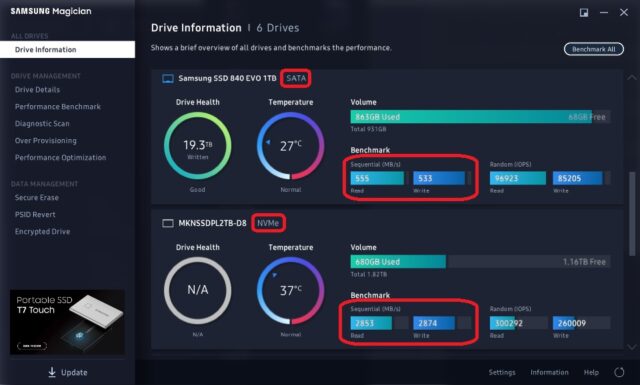
    In addition here are the difference in performance of standard SATA vs. NVME:

Page 7 of 8

We use anonymous cookies to give you the best experience we can.
Our Privacy policy | GDPR Policy