

Activity › Forums › Adobe Premiere Pro › PC Specs for Premiere
-
PC Specs for Premiere
Posted by Laura Shayler on May 19, 2021 at 11:51 amI’ve been looking at a new PC, which will need to meet or exceed the recommended (rather than the minimum) specs for Premiere Pro CC and it’s been mentioned to me that the published specs on the website are probably a bit dated.
Can anyone advise what the more current recommended specs might be, and/or what I should be looking for above and beyond those specs to perhaps future proof any system I might consider buying?
Thanks
Rob Ainscough replied 5 years, 4 months ago 3 Members · 6 Replies -
6 Replies
-

Eric Santiago
May 19, 2021 at 1:48 pmWhat kind of editing?
Specific format/codec you are working with?
Your budget?
I checked the Adobe site and it’s pretty up to date.
However, there are many experienced PC users here that will guide you in the right direction but we still need to know the earlier questions.
An example is if you stated you are only working with RED files or ARRI PRO RES or worse h264/AVC video.
If you all of the above then get some beef hardware you will need it.
-

Laura Shayler
May 19, 2021 at 2:38 pmHi Eric,
Thanks for your reply.
I mostly work with HD. I shoot on Canon XF105s, occasionally a 5D and
DJI Osmo – so a little bit of 4K creeps in from time to time, I’m sure
that will increase in the future but it’s not 4K heavy at the moment.
Anything shot remotely is usually similar. A variety of work comes my
way, from corporate interviews to school productions and zoom chats to
weddings.Budget is a tough question at the moment because I’m not sure what kind of system will meet/exceed the recommended spec and, as you say the usage is a factor. Obviously the priority is finding something fit for purpose first and seeing if I can work a budget to suit. I looked a pc builder site and punched in everything that seemed to suit the recommended specs from adobe (plus 2TB HD and 1TB SSD) and it came in at under £1300 which I thought was pretty reasonable.
I’m not sure where I should go from there in terms of, should I be looking a particularly exceptional graphics card, or would a better cooling system be worth it etc etc. It’s those tweaks I’m having trouble with. There’s also the Intel/AMD debate which goes right over my head!
At the moment, I’m using CS6 on an Intel i5 with 6GB RAM – it’s served me very well for a decade, but it’s time to part ways!
-

Rob Ainscough
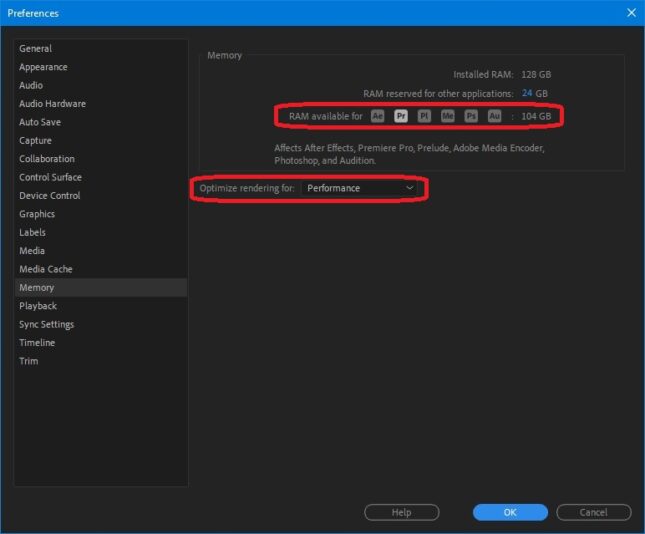
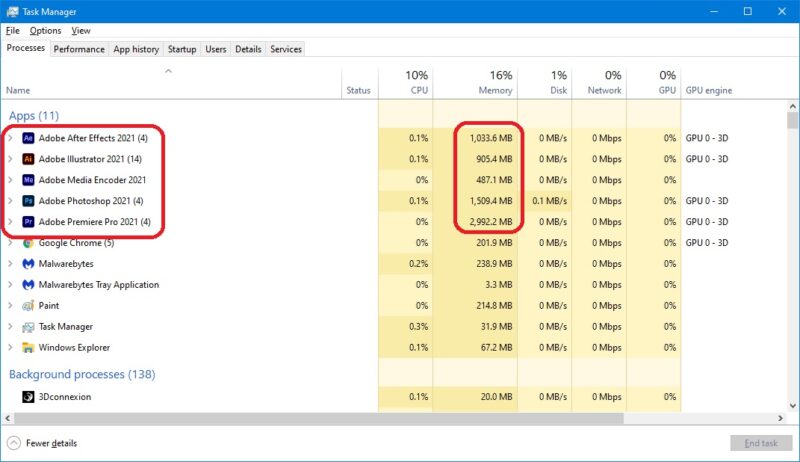
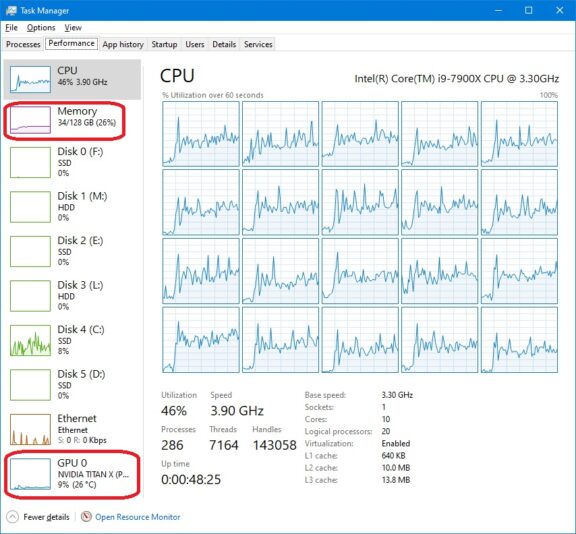
May 19, 2021 at 6:19 pmAdobe Premiere doesn’t use much RAM contrary to popular belief regardless of what you allow it to use via preferences. Adobe Pr doesn’t appear to be using AVX at all (which might be one reason it’s so slow) and even though I have GPU acceleration enabled it’s barely being used.
My recommendation:
AMD 5950X (16C/32T) has fastest single core and multi-core operation
64GB RAM
M.2 NVME 2TB drives (several) for “working” project data (archive to NAS when done)
GPU (take your pick, none of them seem to do anything in terms of improving Pr render performance) … I’ve tested with a Titan XP, Titan RTX, 1080Ti, and a few others and render results were almost identical.
The biggest challenge you’ll have is actually finding the CPU/GPU at “reasonable” prices due to Crypto-miners and Scalpers. I would NOT recommend buying a pre-Built PC, especially not in the current electronics shortage problem … they will put in all kinds are low quality parts as nothing else is available.
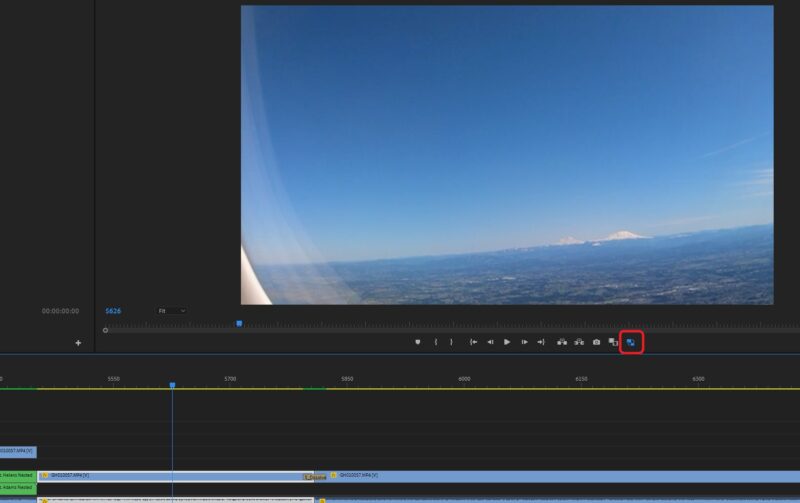
But as you can see from my screen shots with Pr, Ae, Ai, Me, Ps all open with projects and Pr rendering 6 video track project in 4K with Proxies, nested sequences, Mocha Pro, BCC, etc … never got close to 64MB RAM usage.
Compression will slow Pr down but even HiRes or other less compressed format it’s still slow, low Res Proxies Pr is the best option but that’s also still slow.
Cheers, Rob.

-
Rob Ainscough
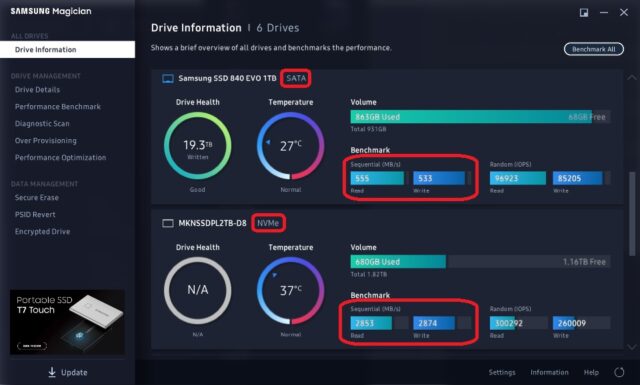
May 19, 2021 at 6:24 pmIn addition here are the difference in performance of standard SATA vs. NVME:
-
Eric Santiago
May 19, 2021 at 6:27 pmIMHO a pre-built from the right vendor will save you headaches.
Of late, there are some reputable local shops that’s beating out the best of them due to gaming and of course this recent fad of bitcoin 😉
I for one use pre-built HPs/Dells/BOXX for CGI work.
Had a decent time with an HP 840 using Premiere/AvidMC and Resolve (color not edit) but that was a few 8K RED projects. Peace of mind that unit.
My day-to-day tools are 2013/2019 Mac Pros.
I work in Premiere/FCPX/AvidMC for editing so no problems there. -
Rob Ainscough
May 19, 2021 at 6:54 pmI’ll have to disagree with you Eric … watch this review and breakdown of a Dell:
https://www.youtube.com/watch?v=4DMg6hUudHE
Not only does Dell add charges claiming something is free and attempting to hide those extra charges, but the also provide extremely LOW quality components and poor overall design.
I agree that “some” pre-Built PCs might be “ok”, but I would avoid Dell, HP and go with a builder that provides non-proprietary components so that upgrading is easy.
Cheers, Rob.
Some contents or functionalities here are not available due to your cookie preferences!This happens because the functionality/content marked as “Google Youtube” uses cookies that you choosed to keep disabled. In order to view this content or use this functionality, please enable cookies: click here to open your cookie preferences.
Reply to this Discussion! Login or Sign Up