Forum Replies Created

Page 8 of 8
  • Rob Ainscough

    May 19, 2021 at 6:19 pm in reply to: PC Specs for Premiere

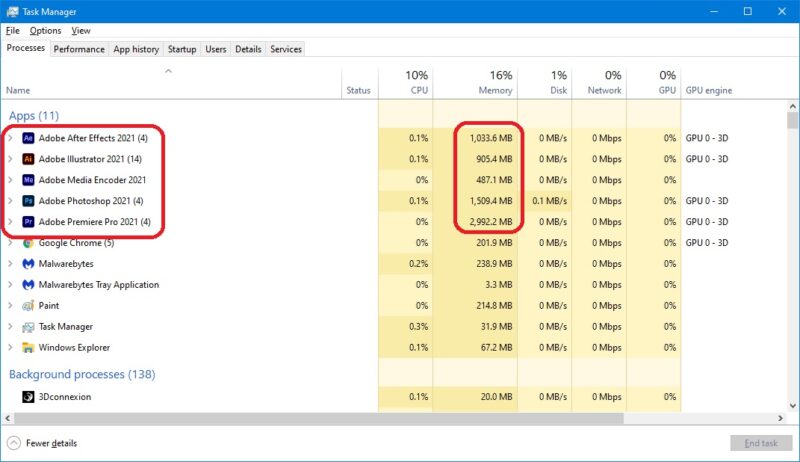
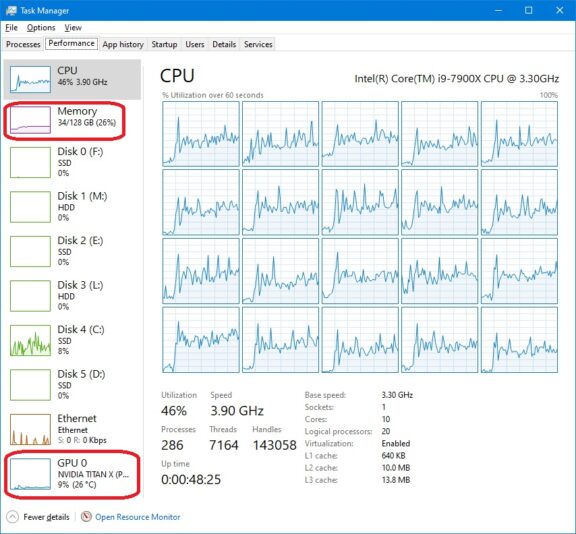
    Adobe Premiere doesn’t use much RAM contrary to popular belief regardless of what you allow it to use via preferences. Adobe Pr doesn’t appear to be using AVX at all (which might be one reason it’s so slow) and even though I have GPU acceleration enabled it’s barely being used.

    My recommendation:

    AMD 5950X (16C/32T) has fastest single core and multi-core operation

    64GB RAM

    M.2 NVME 2TB drives (several) for “working” project data (archive to NAS when done)

    GPU (take your pick, none of them seem to do anything in terms of improving Pr render performance) … I’ve tested with a Titan XP, Titan RTX, 1080Ti, and a few others and render results were almost identical.

    The biggest challenge you’ll have is actually finding the CPU/GPU at “reasonable” prices due to Crypto-miners and Scalpers. I would NOT recommend buying a pre-Built PC, especially not in the current electronics shortage problem … they will put in all kinds are low quality parts as nothing else is available.

    But as you can see from my screen shots with Pr, Ae, Ai, Me, Ps all open with projects and Pr rendering 6 video track project in 4K with Proxies, nested sequences, Mocha Pro, BCC, etc … never got close to 64MB RAM usage.

    Compression will slow Pr down but even HiRes or other less compressed format it’s still slow, low Res Proxies Pr is the best option but that’s also still slow.

    Cheers, Rob.

  • Rob Ainscough

    May 15, 2021 at 12:02 am in reply to: Can we talk 4K/60p camcorders

    Excellent information, many thanks!

    Some more questions:

    1. Does the DVX200 provide for zoom speed adjustment?

    2. How is AF during motion tracking?

    3. For manual focus, is a secondary display required?

    4. What is needed as a good base for “add-on” hardware, i.e. microphone (I typical use R0DE shotgun mic), power packs, storage, etc.

    5. Mount support?

    Cheers, Rob.

  • Rob Ainscough

    May 13, 2021 at 5:46 pm in reply to: How to make Premiere Pro 15.2 faster?

    Footage formats/codecs vary, but the ones I use the most are:

    Type: MPEG Movie

    File Size: 2.93 GB

    Image Size: 3840 x 2160

    Frame Rate: 29.97

    Source Audio Format: 48000 Hz – Compressed – Stereo

    Project Audio Format: 48000 Hz – 32 bit floating point – Stereo

    Pixel Aspect Ratio: 1.0

    Alpha: None

    Video Codec Type: MP4/MOV H.264 4:2:0 (Full Range)

    ———-

    Type: MPEG Movie

    File Size: 1.48 GB

    Image Size: 3840 x 2160

    Frame Rate: 29.97

    Source Audio Format: 48000 Hz – 16-bit – Stereo

    Project Audio Format: 48000 Hz – 32 bit floating point – Stereo

    Pixel Aspect Ratio: 1.0

    Alpha: None

    Video Codec Type: MP4/MOV H.264 4:2:0

    ———–

    Type: MPEG Movie

    File Size: 210.51 MB

    Image Size: 1920 x 1080

    Frame Rate: 29.97

    Source Audio Format: 44100 Hz – Compressed – Stereo

    Project Audio Format: 44100 Hz – 32 bit floating point – Stereo

    Pixel Aspect Ratio: 1.0

    Alpha: None

    Video Codec Type: HEVC 4:2:0

    Variable Frame Rate Detected

    ———–

    I have tried various Apple ProRes 422 (and Proxy) which works well for timeline manipulation and basic editing, but when it comes to rendering in/out FX that’s where it takes a long time and doesn’t seem to matter what format I convert to.

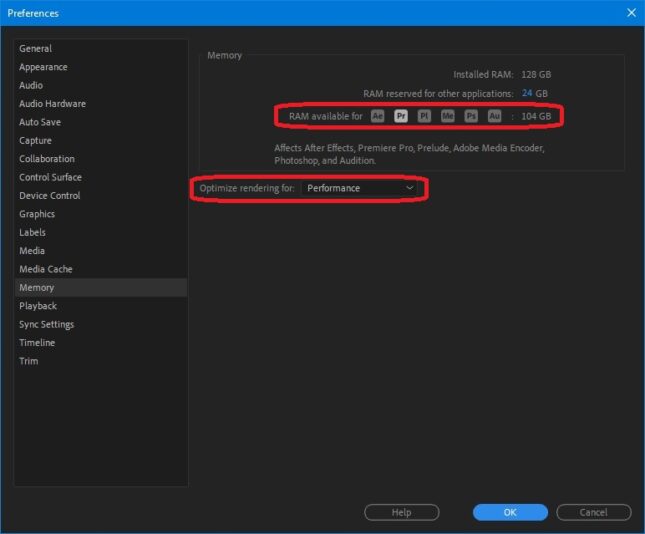
    I have Pr set to use 104 GB RAM (system total is 128GB). But Pr never seems to use more than about 4GB RAM … my project footage could ALL be loaded into RAM but Pr seems pretty brain dead about memory usage (just keeps paging it from my M.2 NVMe). Optimize Rendering is set to “Performance”. Audio is set for MME (but ASIO is available). H264/HEVC (Nvidia) hardware accelerated decoding and encoding is checked/enabled. Media Cache is set to my fastest M.2 NVMe drive.

    Cheers, Rob.

  • Rob Ainscough

    May 13, 2021 at 5:19 pm in reply to: Can we talk 4K/60p camcorders

    Both and anything in between.

    Cheers, Rob.

  • Hi Tim,

    Hmmm … my video capture process is usually not tied to a particular editing suite/product. For example, I capture from HDMI 2.1 to another PC with a Magewell 4K Pro capture card using freeware capture tools like OBS or I may capture using Premiere Pro. But, the hardware and capture side aren’t necessarily tied to my video editing side … I may even capture through a mobile unit and then transfer data to my editing software (which in most cases is Adobe Premiere Pro for Windows).

    In fact, one of the questions I have and don’t really know where to post it is:

    Looking for a multi-HDMI 2.x capture card that can do at least three 4K 30fps (one being HDR10) inputs simultaneously. Most cards I’ve seen can only do one 4K 60 HDR10 and two 2K 60. I know there are many options out there and I’m looking for anyone with experience.

    Right now the cheapest solution appears to be buy three Elgato 4K 60 Pro HDR MK.2 capture cards and use OBS but I’m not sure of what CPU/GPU I might need to support this much processing simultaneously.

    So that’s my question and I really don’t know where to post it?

    Cheers, Rob.

    Rob Ainscough
    Sim Horizon LLC

Page 8 of 8

We use anonymous cookies to give you the best experience we can.
Our Privacy policy | GDPR Policy