

Activity › Forums › Adobe Premiere Pro › Premiere Pro 2022 – horrible colours and contrast on exported footage.
-
Premiere Pro 2022 – horrible colours and contrast on exported footage.
Posted by Laurence Loz on October 29, 2021 at 1:33 pmJust updated mid-project to premiere 2022 (terrible decision)
In the export dialogue, my footage looks terrible, overly saturated and contrasty. Absolutely no problem in the previous version of Premiere pro, so what’s changed?
The footage I’m working with is Sony a7C footage (HLG3 + BT.2020)
Any help is appreciated!
 Lyle Aspinall replied 4 years, 8 months ago 5 Members · 7 Replies
 -
7 Replies

-

Rob Ainscough
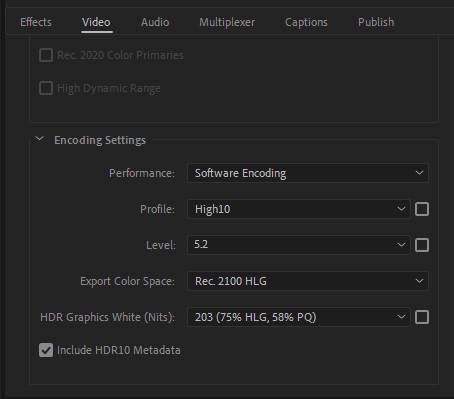
October 29, 2021 at 4:55 pmI had the same problem with my HDR content … I made these adjustments to the export to solve my similar problem. You might want to experiment … I did have to give up CUDA accelerated rendering and use Software..
Cheers, Rob.
-

Rich Rubasch
November 1, 2021 at 4:38 pmI’m finding I have to watch colors like a hawk these days with OS updates and CC updates. It depends on the app, but the worst is when Media Encoder looks completely different from the record window! I have an HP Dreamcolor that is calibrated and I trust it, but when the same clip looks different in four different places it scares me!
-
Rob Ainscough
November 1, 2021 at 6:02 pmYes, the Win10 and now Win11 platform with HDR10 option and graphics drivers (SD vs GRD) that don’t always handle HDR correctly along with all the variants in HDR specifications … and then there is the connection type HDMI, DisplayPort and the cable type required to support higher bpc at a given refresh rate … it really is a crap shoot on how something will look from PC to PC even if the same monitor is used.
I have a Samsung G9 that is supposed to be HDR with 10bit support at 60Hz. But when I enable HDR it looks more like they just increased the Gamma than actually meeting the specifications. And then I test on a 12 bpc OLED TV and it looks completely different than my Sony OLED TV.
I had someone telling me that you don’t need 10 bpc support on the monitor to use HDR10?
Not even going to talk about HDR10+ and Dolby Vision … it’s a hot mess and I was hoping Win11 would sort it out, but that doesn’t appear to be the case.
-

Laurence Loz
November 2, 2021 at 11:05 amThank you gents.
I should have mentioned that I’m only shooting in HLG to benefit from the added dynamic range in grading, not to create HDR content. Having made sure my working colour space was rec.709 and double-checked my export settings, I’ve got it matching.
Having used Filmconvert Nitrate with the HLG2 profile, the footage looks good.
Premiere still seems to be very unreliable with frequent restarts. I’ve also noticed that mask tracking isn’t working; Adobe is getting back to me on that!
Eight years of using Premiere Pro, and eight years of stress! Lol!
Ready to jump to Davinci resolve, I think!
-

Lyle Aspinall
December 30, 2021 at 3:34 pmI had the same issue with some smartphone footage, and this solution fixed it. Thank you. Ultimately it was a matter of matching the color space in the export to the color space in the sequence, the latter of which had been auto-generated from the originating clip.

Reply to this Discussion! Login or Sign Up