Forum Replies Created

Page 1 of 2
  • Philippe Verdoni

    April 17, 2025 at 7:01 am in reply to: Export impossible

    Hi Mary, yes I rendered my project before trying to export it, fortunately the export has only been possible after I had copied all rushs into a new sequence. The question is why is the export working into this new sequence. Thank you for your advice about PP V25; I will try this new issue ofPP. Have a good day

  • Philippe Verdoni

    April 16, 2025 at 5:08 pm in reply to: Export impossible

    The settings of both sequences are identical except the “Automatic mapping of medias tones” that is uncheked for the sequence which works fine; however unchecking this parameter in the bad sequence does’nt solve the problem.

  • Philippe Verdoni

    April 16, 2025 at 4:14 pm in reply to: Export impossible

    Hi Dennis,

    in the yellow line sequence (the one which was working fine) I have launched the command “Sequence/ Rendering from the beginning to the end”. The export works correctly as before.

    I have launched the same command in the green line sequence (the one which was not working) the export did not work as before.

  • Very nice Ivan, I had not noticed this tool before. Have a good sunday.

  • Thank you Ivan, I have a difficulty to find the icon in the middle of the ones that are on the upper left part of the sequence panel, could you be so kind as to provide a screen copy showing this icon.

  • Philippe Verdoni

    March 7, 2021 at 8:08 am in reply to: Resizing the user interface

    Bonjour David,

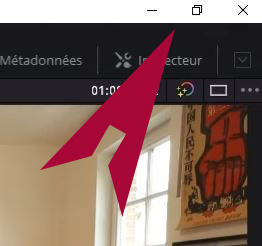
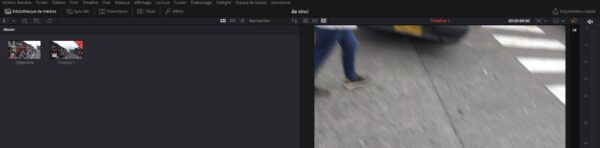
    ce qui manque aussi bien dans la version anglaise que dans la version française c’est la barre grise qui apparaît au dessus de la barre de Menu sur les videos Youtube consacrées à Revlove (voir image jointe). Je peux -bien sur- fermer Resolve en utilisant la commande “Quitter Da Vinci Resolve ” du Menu. Je ne peux pas iconiser l’application en utilisant l’icone Resolve de la barre des taches Windows car celle-ci est masquée par l’écran de Resolve. De plus l’icone de Resolve dans la barre des taches ne comporte pas d’option pour iconiser l’application. L’iconisation permet d’ouvrir provisoirement une autre tache sans fermer Resolve.

    Translation: What is missing in both the English and the French versions is the gray bar that appears above the Menu bar on the Youtube videos dedicated to Revlove (see attached image). I can -of- close Resolve using the “Quit Da Vinci Resolve” command from the Menu. I cannot iconize the application using the Resolve icon in the Windows taskbar because it is hidden by the Resolve screen. In addition, the Resolve icon in the taskbar does not include an option to iconize the application. Iconization allows you to temporarily open another task without closing Resolve.

  • Philippe Verdoni

    March 6, 2021 at 7:58 am in reply to: Resizing the user interface
  • Philippe Verdoni

    March 5, 2021 at 8:54 am in reply to: Resizing the user interface

    my Resolve version is V16.1.0.55

  • Philippe Verdoni

    March 5, 2021 at 8:46 am in reply to: Resizing the user interface

    Hi David, I am using a i7-8700 CPU@3.2 GHz – 32 Go RAM – Windows 10 19041.804

    Displays: 2 screens @1980 x 1080 – 1 screen @ 1280×1024

    Whichever screen is used as primary display, the grey bar on which the icons should be in the upper right corner does not appear.

    Resetting the UI layout does not improve the situation.

  • Philippe Verdoni

    June 15, 2020 at 10:01 pm in reply to: Audio mixing table

    Thank you everybody for your help and the references given in your answers , I also have received a link to a Youtube video related to the Korg NanoKontrol Studio device which seems easy to use provided its setttings be implemented as describded in the video
    https://www.youtube.com/watch?v=fyFbhWW5xs0
    The price (150 US$) is reasonnable.
    Any comment about the use of the Korg NanoKontrol Studio withe Adobe Premiere will be very welcome.

    Some contents or functionalities here are not available due to your cookie preferences!

    This happens because the functionality/content marked as “Google Youtube” uses cookies that you choosed to keep disabled. In order to view this content or use this functionality, please enable cookies: click here to open your cookie preferences.

Page 1 of 2

We use anonymous cookies to give you the best experience we can.
Our Privacy policy | GDPR Policy