Forum Replies Created

Page 24 of 36
  • Question, would you like to use the transitions between photos at the same time or some of them at different time? Would like to know how you wish to put them all together? I would say also to make a college of many of these photos in a seperate application like Photoshop or even MSPaint and then put them as a collage already made in Sony vegas afterwards so you can transition many photos between each other at the same time. Would like more info on this tho. Hope to hear from you soon.

  • That is rather strange, I thought there was no limits of how long you can animate a progress bar timing, did you tried closing and restarting the application and then raising the number on the progress bar duration is done? Maybe some computer specs may he holding it or something. Good to test everything so you may get closer to finding out whats the culprit of this stalling after duration exceeds 5000 in the coding.

  • Hector Vera

    October 2, 2023 at 10:37 pm in reply to: Time remap control by a drop menu?

    Keyframing a drop menu? You mean like making a frame by frame animation of the drop menu going from down to up to show the option? is that what you are trying to animate? Let me know cause I am trying to see if I understand what you are looking for.

  • Hector Vera

    October 2, 2023 at 10:32 pm in reply to: Sharepoint cloud storage

    Well I have been archiving all sorts of files, especially many of my video files on Dropbox for a several years now and so far all my files were pretty safe there and encrypted. Always good to have a 2FA on your Dropbox account so hackers does not easily have access to your account. Always use common sense and avoid sharing others personal details, keep them private in your cloud storage but when it comes to backing up files offline when internet is not around, external offline drives are still the way to go! 🙂 Dropbox is convenient cause I can check my files easily on my smartphone any time, anywhere. 🙂 Hope this helps!

  • Hector Vera

    September 28, 2023 at 10:42 pm in reply to: Imagine Products PreRoll Post database errors

    One question, are these groups of LTO Tapes part of a RAID or something? Where you are trying to allocate all 146 Tapes like if they are part of a RAID where one backups another incase any single point of failure happens? Hope to hear from you soon!

  • Have you tried scaling the video clip image to crop the glitchy lines on the right? And also maybe an effect you applied on the image could be causing it as well. Also maybe try rendering the video as it is and then edit that same video and then crop out the glitch again to see if that glitch can disappear cause once you render a video, the glitch becomes part of the video and if the new glitch does not show up as you edit the video, you can scale zoom the video in to crop that glitch out, just slightly of course. Hope these ideas would help you.

  • Hector Vera

    September 28, 2023 at 10:20 pm in reply to: Wrong white values after export

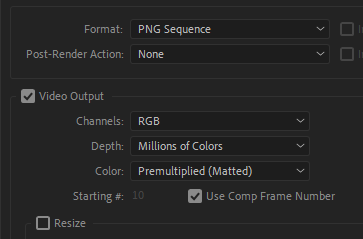
    That is rather strange because each transitions made in AE should have the exact same color values in After Effects. I found a link where they seem to be talking about something similiar to a topic you are talking about. Here is the link: https://community.adobe.com/t5/adobe-media-encoder-discussions/after-effects-why-does-my-background-revert-to-black-when-i-export/td-p/5706247 Perhaps you can find something useful that can help you figure out why values slighty change when importing from AE to Premiere Pro.

  • Hector Vera

    September 26, 2023 at 8:25 pm in reply to: Adobe After Effects on my PC

    The minimum requirements to run the latest Adobe After Effects is actually 16GB of RAM, any less than that, it could maybe run but be very laggy. I recommend at minimum intel Core i7 if you want full performance, you could run it on an i5 but it may lag too since my PC has an i5 and plan to upgrade to an i7 later this year.

    For more info, here are the minimum specs to run After Effects in general: https://helpx.adobe.com/after-effects/system-requirements.html

  • Hector Vera

    September 26, 2023 at 12:57 am in reply to: Hotkey to extension field

    It should be possible but since I mainly have experience with customizing panels within Premiere Pro and Sony Vegas to some extend, I found a video that shows how to undock panels and moving them anywhere you wish. Let me know if it helps: https://www.youtube.com/watch?v=eiJW2Aegqmw

    Some contents or functionalities here are not available due to your cookie preferences!

    This happens because the functionality/content marked as “Google Youtube” uses cookies that you choosed to keep disabled. In order to view this content or use this functionality, please enable cookies: click here to open your cookie preferences.

  • Hector Vera

    September 26, 2023 at 12:51 am in reply to: Trying to replicate negative blobs

    This is also new to me as well. I was looking up information of something related to it and I found something involving sticky blobs. Maybe this can help a bit?

    https://www.youtube.com/watch?v=M4qnk40aBls

    Let me know if you need any specifics on what you need so maybe I can help you search what you are looking for.

    Some contents or functionalities here are not available due to your cookie preferences!

    This happens because the functionality/content marked as “Google Youtube” uses cookies that you choosed to keep disabled. In order to view this content or use this functionality, please enable cookies: click here to open your cookie preferences.

Page 24 of 36

We use anonymous cookies to give you the best experience we can.
Our Privacy policy | GDPR Policy