Forum Replies Created

Page 48 of 126
  • Hey Çağan,

    Could be an fields issue (even back at camera imaging chip capture)?
    What are your settings for the sequence?

    Maybe for a quick test pop the footage through media-encoder and import as ProRes – do two files, one interlaced and one that is progressive.
    ProRes in HQ will be a better “container” for something possibly encoded in Long GOP.

    Adding to Rob’s great suggestions, my 1st thought was the cable.
    <div>Do you have other option out like HDMI?</div>

    Atb
    Mads

  • Hey Esther,

    There are several plugins that can emulate that effect or make it better.

    A few places to look, which I use myself and all which can be accessed from within Premiere Pro:
    Cinepunch (buyout regular or extended)
    https://videohive.net/item/cinepunch-video-creation-suite/21485487

    BorisFX Continuum (monthly/annual/perpetual deals):
    https://borisfx.com/products/continuum/

    MotionArray (monthly/annual):
    Templates:
    https://motionarray.com/browse/premiere-pro-templates
    PPro Presets are often overlooked, worth a search:
    https://motionarray.com/browse/premiere-pro-presets

    Hope that this helps.

    Atb
    Mads

  • Mads Nybo jørgensen

    June 5, 2024 at 11:36 am in reply to: Convert to MXF

    Hey Najeb,

    Sounds like that you have fixed the problem.

    Just want to add to the above, MXF is just a “wrapper” for the video, like .mov.
    Even if you render it out in interlaced, the video if coming from progressive, will always look progressive (unless you use software to create interlaced fields, which would be pointless in most instances).

    Judging from “upper-field first” and 25fps, that sounds like a “Pal” playback, even if in HD (some manufacturers calls it 50i).
    The specs for delivery is most likely tied into what the client knows their play-out system can handle.

    Next time, unless you already did this, export a master file from After Effects.
    Then take it to Adobe Media Encoder or similar and cross conver to what-ever format the client asks for.
    Maybe import in to PPro, and do a confidence watch there. Or as suggested, view it on a TV set the way it will show up for the TV audience – not always possible to do, but certainly better than vlc.

    Atb
    Mads

  • Mads Nybo jørgensen

    June 1, 2024 at 12:25 am in reply to: Underexposure?

    Hey Robert,

    If it looked good on the monitor on set, then you should be able to make it look good in the editing suite too.

    Using the Log or RAW codec really depends on where you go next with the film, and whether your editing system can handle the file-size and processing.

    If you don’t have the knowledge of doing a grade inside Premiere Pro, it is going to be difficult to even give you even a basic introduction apart from the one in my previous post. Not least, as if you don’t have a calibrated monitor, colours won’t really matter when it comes to the export of the master.

    When I say “exposure”, that might say “brightness” just under your hue setting in the Lumetri panel.

    I recommend that you go here for a crash course:
    https://helpx.adobe.com/uk/premiere-pro/using/color-correction-adjustment.html

    Short answer: When doing all this, keep “the end” in mind for the grand opening of your film!

    Will you be relaxed, or will your toe-nails make a high-pitched noise across the floor in the darkness?
    (Don’t worry, your toe-nails will make that noise no matter how perfect your film is, as that is their job).

    Good Luck!
    atb
    Mads

  • Mads Nybo jørgensen

    May 31, 2024 at 11:25 pm in reply to: WAV Export Missing ch3+4 audio

    Hey David,

    The quick way is to mute the other tracks, and export each Wave as an ISO file.
    If client can use it, you could also give them an AAF file.

    Premiere Pro has always been a dog at exporting multi-tracks. It depends on what “codec” you are using for the Sequence and there is several places where you can route them out to the right track, whilst still not do it.

    Slightly older solution, but looks like what I would use today + Jarle walked in on this one, so you should be OK:
    https://community.adobe.com/t5/premiere-pro-discussions/exporting-multichannel-audio-panned-left-and-right/m-p/9976680

    Hope that this helps?

    Atb
    Mads

    Edit: PS: When I check my multitrack exports, I re-import into PPro and add to copy of timeline at the end of it.

  • Mads Nybo jørgensen

    May 31, 2024 at 11:18 pm in reply to: Underexposure?

    Hey Robert,

    Film making is fun, and laborous, right?

    “with the standard rec709 LUT applied“

    Why are you applying a LUT?

    And, more to the point, why use a rec709 LUT?

    If you shot either RAW of LOG in 4K, maybe a rec2020 LUT would be better?


    Setting that aside, the professional LUT is not really desinged to change the basic “exposure” of a shot.

    Which raises the question: Who was in charge of the camera and its output?
    The DP or the Camera Operator?
    How did image look on set when you were shooting, and playing back?

    As Tod suggests above, without the actual file info, there is not much anyone can do in form of suggestions. Some cameras will shoot 3 different file formats simultaniously (Proxy MP4, LOG whatever and RAW). If your operator has not transferred all of tem, you might be on the road to nowhere.

    But rather than listening to your operator, I would bring the DP back in the room for a couple of hours grade – he might even have shot a color-chart, or know what LUT he had in mind (maybe invite the operator too just to make fly-on-the-wall film on that discussion – you won’t see either of them again if one blames the other 😉).
    Bring out the scopes.
    Push the exposure up as far as you like it to be, and a bit more.
    Pull down highlights.
    Pull down shadows (black).
    even out in the midtones.
    Go back and adjust other levels as you see fit.
    And, you might find something that you are much happier with.

    Hope that this helps?

    Atb
    Mads

  • Mads Nybo jørgensen

    May 29, 2024 at 9:06 am in reply to: Novation Launch Control Premiere Pro

    Hey Apostolos,

    Must admit that I was surprised to find that Audition does not have midi control, which would have been an obvious step.

    As Hector suggested, check out the Mackie connection interface.

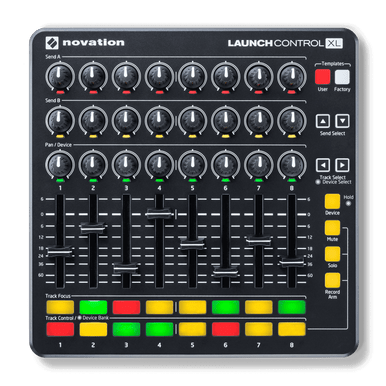
    Reading up on the Novation Launch Control specs, at the bottom of the “small print” it says:
    “Control Cubase, Logic Pro and Pro Tools – full support for Mackie’s HUI
    protocol allows you to control other DAWs with Launch Control”

    So you should be fine to go.

    Atb

    Mads

    https://novationmusic.com/products/launch-control-xl-refurbished

  • Mads Nybo jørgensen

    May 28, 2024 at 3:34 pm in reply to: New monitor/color correcting

    Hey Mary,

    Thank you.

    You’ve got a big monitor, at a competitive price.

    Have you checked the calibration sheet for the monitor?
    “【ΔE <2 Color Calibration & TUV
    Authentication & Blue Light Reduction】Each INNOCN monitor coming
    with color calibration report, the ΔE <2, deeply restore the true
    nature colors. Low blue light technoilogy ensure the comfot when long
    time watching or playing, INNOCN monitors are TÜV Rheinland certified.”

    Although at least one review complains about the red colour, it might already be calibrated for you.

    Have not checked how PPro reacts, but have recently by remote been involved in a job where the monitor did not appear to give the same out-put as the final file. This was on Davinci – the conclusion so far (might change), that the output of the Computer was not compatible with a HD signal.

    There are a few other reasons for why that could happen. But we are currently investigating inserting a BlackMagic Design UltraStudio Monitor 3G mini between the computer and the monitor. And, then use Callibration device to line up the screen.

    Should add that the Ultrastudio Monitor 3G has both HDMI and SD/HD-SDI. This will allow you to confidence check on a Broadcast monitor, if you still have that access?
    But don’t think that it will do both HDMI and SDI out simultaniously.

    Apart from the 500 nits being a bit “low”, there is nothing else that stands out on your choice of monitor. If anything, it is a very recent release.

    Hope that this helps?

    Atb

    Mads

  • Mads Nybo jørgensen

    May 28, 2024 at 2:38 pm in reply to: Need help on a personal AE project.

    Hey Jarrod,

    You can also post on the job board here on Creative Cow:
    https://jobs.creativecow.net/post-job-offer/

    You may find that the “farmer” looking after the barn, might put it in their news letter, which is shared widely across the globe, and intergalatic.

    Atb
    Mads

  • Mads Nybo jørgensen

    May 28, 2024 at 2:25 pm in reply to: New monitor/color correcting

    Hey Mary,

    What LED monitor are you using?
    And, what resolution are you working at?

    Took far too long to find the specs, but looks good as they have rec 2020 included:

    𝗖𝗨𝗦𝗧𝗢𝗠 𝗖𝗔𝗟𝗜𝗕𝗥𝗔𝗧𝗜𝗢𝗡
    𝗙𝗘𝗔𝗧𝗨𝗥𝗘𝗦: For users wanting more advanced calibration features,
    X2 Elite includes Video & Cinema Targets (Rec. 709, Rec. 2020);
    Advanced Display Mapping & Analysis; Unlimited Calibration Settings;
    Soft Proofing; and Studio Match for multiple monitor calibration.

    And, it is on offer right now (UK).

    But if you are aiming for HEVC, they suggest the X2 Ultra to be a better choice:

    Dаtасоlоr Ѕруdеr Х Ultrа 2 Кеу Fеаturеѕ:

    Аdvаnсеd соlоurіmеtеr fоr саlіbrаtіоn оf dіѕрlау соlоur ассurасу

    Мах lumіnаnсе mеаѕurеmеnt оf 2000 nіtѕ, реrfесt fоr НDR dіѕрlауѕ

    Ѕtudіо Маtсh аllоwѕ fоr сrоѕѕ-dіѕрlау соnѕіѕtеnсу wіth thе саlіbrаtіоn оf 3+ mоnіtоrѕ

    Rаngе оf fеаturеѕ thаt аnуоnе frоm bеgіnnеrѕ tо ехреrtѕ wіll аррrесіаtе

    Wоrkѕ wіth dеѕktор mоnіtоrѕ, аll-іn-оnеѕ, lарtорѕ аnd рrојесtоrѕ

    Dіѕрlау аnаlуѕіѕ аnd mарріng fоr а соmрlеtе rundоwn оf dаtа

    Вuіlt fоr uѕе іn brіght lіght ѕеttіngѕ ѕuсh аѕ оutdооr dіѕрlауѕ

    Ѕоft Рrооfіng fеаturе fоr іn-dіѕрlау соlоur рrоfіlе ѕіmulаtіоnѕ

    UЅВ-С соnnесtіvіtу wіth UЅВ-А аdарtеr fоr оldеr ѕуѕtеmѕ

    Fіvе bасklіght орtіоnѕ fоr dіffеrеnt lіghtіng ѕсеnаrіоѕ

    Іdеаl fоr рhоtоgrарhу аnd vіdео соlоur grаdіng

    Ѕuрроrtѕ Rес.709 оr 2020 соlоur ѕрасе tаrgеtѕ

    ОЅ соmраtіbіlіtу wіth Wіndоwѕ аnd МасОЅ

    Hope that this helps?

    Atb
    Mads

    PS: After writing this post I did further research. If you in the future are looking at 10,000 nits and/or want to calibrate and OLED screen. For little more, you may want to consider the Calibrite Display Plus HR:

    https://calibrite.com/product/display-plus-hl/

Page 48 of 126

We use anonymous cookies to give you the best experience we can.
Our Privacy policy | GDPR Policy