Creative Communities of the World Forums

The peer to peer support community for media production professionals.

Activity Forums Adobe After Effects Convert to MXF

  • Hector Vera

    June 4, 2024 at 2:13 pm

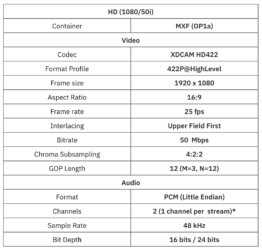
    When I viewed it on my 21 inch computer monitor, it looks pretty sharp and crisp to me. It does not look much blurry at all. Its pretty clear to me so I would assume that it would look decently well on a TV as well in this case. MXF format should be able to scale it to 1920×1080 since that format is made for HD Videos. But I do notice in the specs that it says 25 fps so its probably why its not running in full smooth speed as something of an 60 fps will run. All my new videos these days are at MP4 format after I edit my .MOV files in Sony Vegas and it runs at 60fps.

    Here is an example if you are wondering of a video I made: https://youtu.be/nYe73bZC0Xg?si=HbjOdewlqf2MdqNI

    Some contents or functionalities here are not available due to your cookie preferences!

    This happens because the functionality/content marked as “Google Youtube” uses cookies that you choosed to keep disabled. In order to view this content or use this functionality, please enable cookies: click here to open your cookie preferences.

  • Walter Soyka

    June 4, 2024 at 8:35 pm

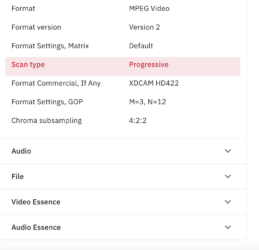
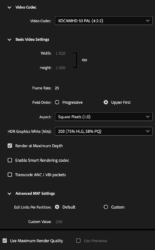
    If you are required to deliver interlaced video, you will get better results if you render interlaced video from After Effects.

    After you add your comp to the render queue, click its render settings (“Best Settings,” by default) and change the “Field render” option from “Off” to “Upper field first” to match your delivery requirements.

  • Najeb Albakar

    June 4, 2024 at 9:55 pm

    I watched the videos again on PC and it was much better than VLC on MAC so this might be clue that it might look better on TV as mentioned in Hector reply. I re-rendered it again with best setting and I could reach someone on TV and I sent the video for quality check and I am waiting for their answer. Thank you guys!

  • Mads Nybo jørgensen

    June 5, 2024 at 11:36 am

    Hey Najeb,

    Sounds like that you have fixed the problem.

    Just want to add to the above, MXF is just a “wrapper” for the video, like .mov.
    Even if you render it out in interlaced, the video if coming from progressive, will always look progressive (unless you use software to create interlaced fields, which would be pointless in most instances).

    Judging from “upper-field first” and 25fps, that sounds like a “Pal” playback, even if in HD (some manufacturers calls it 50i).
    The specs for delivery is most likely tied into what the client knows their play-out system can handle.

    Next time, unless you already did this, export a master file from After Effects.
    Then take it to Adobe Media Encoder or similar and cross conver to what-ever format the client asks for.
    Maybe import in to PPro, and do a confidence watch there. Or as suggested, view it on a TV set the way it will show up for the TV audience – not always possible to do, but certainly better than vlc.

    Atb
    Mads

We use anonymous cookies to give you the best experience we can.
Our Privacy policy | GDPR Policy