Forum Replies Created

Page 38 of 126
  • Hey Scott,

    16GB is not that big, depending on how you are going to use it?

    I frequently deliver 30GB masters (24 mins) for Broadcast, even when I know that the Broadcaster will “smash it to pieces” and turn it into a 100-200MB file for broadcast…

    As you have done all that hardwork, I suggest that you export to the 16GB file.
    Check your master if there any strobing or similar in your master video.
    Then convert to a format of the size that you need it to be.

    But 14 mins at that resolution is always going to be big.
    And, unless you can “copy” your edits into a timeline that is of a smaller size, then it is faster to export out -> down-convert.

    Hope that this helps.

    Atb
    Mads

  • Mads Nybo jørgensen

    August 29, 2024 at 11:54 am in reply to: Right Click no longer gives the dialog box

    Hey Richard,

    I was having similar problems yesterday, on Windows 11 (PC – obviously).
    Changed the font size so I could have the whole right-click menu on the screen.
    This is on a 2-screen setup where the laptop screen is the smaller one.

    But had several freezes where only a reboot of Premiere Pro would fix it.

    Atb
    Mads

  • Mads Nybo jørgensen

    August 29, 2024 at 11:46 am in reply to: Adobe TOS

    Hey Jeff,

    Totally agree – also on the sudden rush of changes to T&C’s from Microsoft, Google and just about every other company…

    But Adobe is leading the way down-wards.

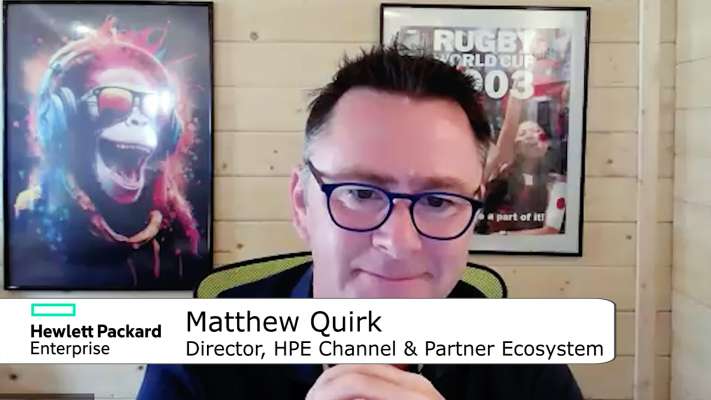
    However, a client of mine have just published this Zoom interview that they did with HPE about A.I. (Full disclosure: I did the video edit):
    https://advanced-television.tv/index.php/video/293/hpe-august-2024/

    Matt talks about Generative A.I. and how it is often misunderstood in how much that it can deliver. Really interesting.

    Atb
    Mads

  • Hey Christopher,

    I feel for you, I really do – and there is soo many wrong answers, and very few right ones.

    My suggestion is to closely read all sales materials, emails, and contracts through.
    If your contractor at any point has represented that they have done similar work before, then that should be your starting point.

    You should also look at the structure of decision making?
    Did they ever contact you before ordering the panels?
    Who was the person in charge of the contruction?
    And, who was in charge of purchasing.

    Start from there and see where it takes you.

    Don’t hesitate to reach out in private to discuss.

    Atb
    Mads

  • Mads Nybo jørgensen

    August 15, 2024 at 11:58 pm in reply to: Adobe TOS

    Hey John and Hector,

    I think that Adobe has lost the plot, and run out of ideas.

    Yes, they would like to mine our creativity – if someone was to lift the lid on that can of worms, it is likely that they’ve already been doing it for years, through this thing called “Machine Learning”.
    Neither should one discount the Adobe Marketing Cloud, which has one of the the largest collections of data-points.

    My bigger problem with Adobe is that it for the last 3 years has actively used earnings from their core userbase, to create “A.I.” tools that is intended for non-professionals to use, so those users of new tools will no longer have to hire professional Adobe users.

    That is a bit simplified, but that is what adobe has been doing + cutting away services from freelancers and SME’s so we no longer can use the Cloud in Creative Cloud.

    And that is before talking about the buggy software. Premire Pro was useless in my last edit. Kept on freezing up. I spent more time opening and closing the software, than editing.

    All because the CEO of Adobe has lost the plot and is no longer in control of the monster that he turned it into being.

    Hopefully someone can inject him with a dose of reality, find a replacement.

    But here goes:

    IMHO part of the reason that NASDAQ recently had a wobble, was that the investors realised that A.I. is all talk and no play – even NVidia’s head started selling his shares…
    But there is also legislation on the way, as creeping through the courts, where A.I. gengerated art can not claim copyright.
    https://www.reuters.com/legal/ai-generated-art-cannot-receive-copyrights-us-court-says-2023-08-21/

    Then there is also legislation dealing with fake-video sites coming in to force.

    After all of this, an Adobe A.I. user that find themselves using A.I. in everything, will get hooked on that cheap drug, and suddenly find themselves of having to buy extra credits from Adobe to make extra A.I. creations.
    And after using all those credits, the plc/inc CSR team come knocking and ask how much electricity was used by that department? This is where even Google has been caught out by the rising electricity cost of offering A.I. To such an increase where Google is no longer a green company when it comes to their data processing centres.

    Yes, Adobe can change their terms.
    My next move is a mix of Davinci and Avid.

    This is already happening for me.

    Would I like to stick with Adobe, yes.
    But when they release software versions so bad that they’re not ready for professionl use, and is going out of their way to sabotage their professional users by throwing development cash at consumer/pro-sumer products, then it is difficult to remain loyal.

    Just an opinion…

    Atb
    Mads

  • Mads Nybo jørgensen

    August 15, 2024 at 11:18 pm in reply to: Welcome to the Creative COW Blender Forum!

    Hey Brie,

    This is great, thank you!

    Several of the online schools for Blender have started to create blender courses for VFX and Motion Graphics.

    With this forum we’ll have an opportunity to share and learn.

    Atb
    Mads

  • Mads Nybo jørgensen

    August 15, 2024 at 10:31 pm in reply to: Ingesting footage and batch renaming

    Hey Mark,

    I never used Prelude, as most of my projects have been limited to short-form, or long-form with contineous inteview rushes (1 for each camera).

    Have you looked at Adobe Bridge?

    https://helpx.adobe.com/bridge/using/bridge-and-premiere-pro.html

    Might be able to do something similar to Prelude.

    There are other options out there, some which is tied in to Storage systems and/or Cloud services.

    Atb
    Mads

  • Hey Lucas,

    A special Adobe feature…

    I recently got 128 GB PC running Windows 11 – kid you not, on even a basic render from the smallest of smallest projects, I’ve had PPro telling me I was out on memory whilst rendering out the edit.

    Adobe had many excuses, but no answers.

    Don’t get angry yet – wait till you find out that the Cloud in Creative Cloud does not work for single licence users Adobe professional video tools – in other words, if you want to transfer your Adobe Rush iPad project to your PC PPro, you can not do that using Creative Cloud.

    Sorry, did not answer your question, but add to the list of concerns…

    Atb
    Mads

  • Mads Nybo jørgensen

    August 7, 2024 at 12:40 am in reply to: AAF Error Message

    Hey Robert,

    With regard to FCP XML, that really depends what the Audio editor is working on?

    If editing on AVID Pro-Tools: I know systems out there which does a great job. But is not connected to the internet and has not seen an upgrade for 5-years or more.

    Hence why AAF is a great format as it is compliant, but at the same time can give you trouble as you have deliver a working file within the constraints of the format.

    I am more concerned that you might be out of sync?
    Obviously I don’t know your project, but if that is the main problem I would suggest that rather than exporting to AAF, that you find an audio editor who can do the job for your in Premiere Pro?

    Just for speed, and in case you are in a chain where you might be asked to open the edit again. You’ll have more freedom. As opposed to if you lock the edit, it can time consuming = expensive.

    In any case, you could export out the whole movie as a MP4 with Burned in Timecode for viewing.
    And, then give the audio editor a 3 or 5 minute chunk to test the AAF transfer with.
    Unless you have already hired the audio editor, I would suggest that you don’t want to hand them the whole project, and at the same time they would not want to go through all of that work unless there is money agreed.

    Before starting out, you can ask what their preferred solution would be to fix the files that gives you export problems? In which case they’ll take ownership of the problem too.

    Just an opinion.

    Atb
    Mads

  • Mads Nybo jørgensen

    August 6, 2024 at 11:30 pm in reply to: Popping with Sennheiser Lav

    Hey Zeke,

    That popping can be a lot of things.

    The popping is quite loud, in comparison to the person speaking.
    Could be that your levels are not high enough on the microphone itself, and that when you use gain on the mixing desk, any small pops, becomes large pops.

    Additionally:

    I would investigate loose connections?

    Also, check if the person wearing it has anything that microphone itself rubs up against (unlikely)?

    It does not sound like mobile phone interference, but it could be something that interrupts the signal either by the microphone, or the mixing deck?
    It sounds silly, could even be metallic item that is held up (my own fridge at home do from to time create interference with phone-calls).

    And, maybe program the microphone to use another frequency, to see if that resolves the problem?

    As said, it can be many things, but most likely to be the simplest of all if the system work in pre-service tests.

    Hope this helps?

    Atb
    Mads

Page 38 of 126

We use anonymous cookies to give you the best experience we can.
Our Privacy policy | GDPR Policy