Forum Replies Created

Page 10 of 51
  • Kouraib Abdmalek

    September 9, 2025 at 7:26 am in reply to: C4D Hair selection tags

    I was also talking about the viewport so everything seemed fine to me, so your problem appears after rendering, I have no idea now why that happened but I will try rendering it in a different way and see what I get.

  • Kouraib Abdmalek

    September 8, 2025 at 9:04 am in reply to: C4D Hair selection tags

    Hi Ian,

    In your file there are two hair object, one on the torso and the other on the abdomen, and the hair is distributed over the entire two area in a regular manner. Everything seems fine.

  • Kouraib Abdmalek

    September 8, 2025 at 8:34 am in reply to: HQ noises and X-particles don’t match

    Hi Wilson,

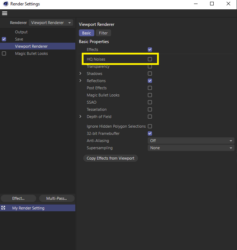
    I think you need to enable the HQ noises in the rendering settings as well as in the attached screenshot, I hope this helps you.

  • Kouraib Abdmalek

    September 6, 2025 at 10:06 am in reply to: Bake color effector to keyframes for FBX export

    Hi Josh, I downloaded your file hours after your post and I worked on it for a long time but nothing worked for me. However, I keep going back to it whenever I get a chance. I had an idea but never got around to working on it. I had a suggestion to put the drone group under the cloner (instead of one drone and then copy it with cloner), make a material for each drone, and then use a bake material tag for each one of the materials. You will get a texture group that scale the material change during the animation. Then you could use multi shader on the materials and link the textures for each material. This will work in Cinema by replacing the shader effector with textures for each material, but the question remains: will it work after export? I don’t have idea about the Path file you want to export to However, I thought that having the material textures would make it easier, as you might only need to relink the textures to the materials, for example, after exporting or something like that, . Let me know what you think about this and if it works for you. I will let you know from my side if I come up with anything else.

  • Hi Brian,

    I think the tutorial below will be useful to you, and you will find in his channel other videos about this new feature in cinema 4D.

    https://youtu.be/FmI2sllgqS8?feature=shared

    Some contents or functionalities here are not available due to your cookie preferences!

    This happens because the functionality/content marked as “Google Youtube” uses cookies that you choosed to keep disabled. In order to view this content or use this functionality, please enable cookies: click here to open your cookie preferences.

  • Kouraib Abdmalek

    August 30, 2025 at 9:49 am in reply to: Constraint Tag resetting itself automatically

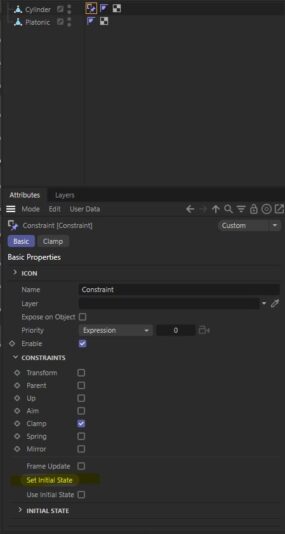
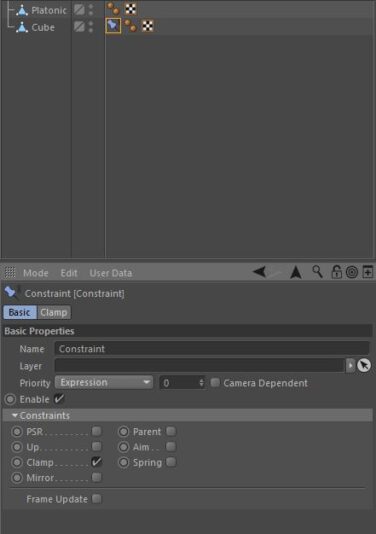
    Thank you Adrian for your comment, the original post was from 7 years ago and it talked about the issue with the R19 version and the feature you mentioned is not available on that version as in the screenshots below, I did the same thing on the R19 version then closed and opened the program and everything remained fine, so it might be related to a bug as they stated and it was fixed in the same version or there was something in his file settings that caused the issue.

  • Kouraib Abdmalek

    August 20, 2025 at 1:44 pm in reply to: How should I approach ocean simulation?

    Hi Branden,

    If you want to do the simulation on Cinema 4D, it will be difficult to achieve such a scene and get a satisfactory result without using a plugin, I think using Realflow is great for such scenes. I have put a link for you below to a tutorial that shows the same working principle that you will need. If you cannot get a paid plugin for your project, there is a free plugin I think Hot 4D may help you in the work, but it’s not as good as Realflow. I hope this is useful to you.

    https://youtu.be/-Hl0F5nJDpo?feature=shared

  • Kouraib Abdmalek

    August 19, 2025 at 1:17 pm in reply to: New C4D Symmetry issue

    You’re welcome, Fred! glad you found this helpful, and I hope with you this deficiency will rectified soon.

  • Kouraib Abdmalek

    August 19, 2025 at 8:38 am in reply to: New C4D Symmetry issue

    You are welcome, Fred! You could fix this by playing with the tolerance value, but you’re right, it doesn’t look as practical as the option in the previous version, so it’s better to do the symmetry in mesh mode instead of the model mode, as in the screen recording below. You are not the only one who’s upset about the removal of the previous tool, and Maxon has already brought back some options based on user requests. You can do the work in mesh mode only if you need to remove the second half, you’ll have to do it yourself, so make sure to keep the object on the axis to make it easier for you. I hope this helps you.

  • Kouraib Abdmalek

    August 18, 2025 at 7:50 am in reply to: New C4D Symmetry issue

    Hi Fred,

    In the new symmetry tool you could choose Crosses Plane from the Weld setting, and by using the Cute Along Plane and Remove Outside options, you could do all the operating that you were doing using the two options that were in the old version. I have put a screen recording below that shows some of that. I hope this is useful to you.

Page 10 of 51

We use anonymous cookies to give you the best experience we can.
Our Privacy policy | GDPR Policy