Creative Communities of the World Forums

The peer to peer support community for media production professionals.

Activity Forums Maxon Cinema 4D Constraint Tag resetting itself automatically

  • Constraint Tag resetting itself automatically

    Posted by Xavier Bonet on April 11, 2018 at 11:58 am

    I’m having some issues with the Constraint Tag: I’m setting it to Clamp to maintain an object on the surface of another. Everything seems to work fine but when I close the project and reopen it, the object with the Constraint Tag has reverted to an initial state and moved to a completely different part of the target object. I’ve tried everything: checking, unchecking options, setting the priority, you name it! To the point where I’m not convinced it’s not actually a bug of C4D Studio r19. Any ideas?

    Kouraib Abdmalek
    replied 8 months, 2 weeks ago
    4 Members · 5 Replies
  • 5 Replies
  • Steve Bentley

    April 11, 2018 at 1:23 pm

    I’ve had hit an miss results with this tag from day one. So much so no I don’t use it anymore and instead use nodes in expresso to accomplish the same thing. So you may be seeing what amounts to an ongoing bug.
    But you would think if it was working it would work when you load the project again.
    Check the priority in the attributes of the tag. Some expression firing early in the animation might be upsetting it when the project loads from scratch.

  • Xavier Bonet

    April 11, 2018 at 4:45 pm

    Hi, Steve, thanks for your reply. Yes, it really does seem a hit-and-miss tool. I’ve tried everything, including checking priorities, and the same thing happens. I decided to find a workaround for that specific object and now I’m finding the same issue on another object. This time basically I’m just trying to set a couple of buttons on a shirt; the shirt is a polygon inside a Subdivision Surface, so it bulges out a but. Every time I restart the project, all the buttons are reset to the center of the shirt! It’s really a very dodgy tool… Any ideas how I can “bake” the button’s positions and rotations so I can get rid of the dodgy Constraint Tag in this instance? It’s the only workaround I can think of.

  • Xavier Bonet

    April 11, 2018 at 4:48 pm

    P.S. Ah, OK, that was easy! I just delete the tags when i had everything set where I wanted and now there’s no more offending tags that’ll make my life a nightmare! Still, it’s a pity the Constraint Tag is so buggy, because it’s really the only way I can think of to set more complex objects on other object’ surfaces and still be able to move them around. Of course, there’s the Surface tool… but that one comes with its own set of quirky behaviours I can’t get around…

  • Adrian Stiegler

    August 29, 2025 at 1:27 pm

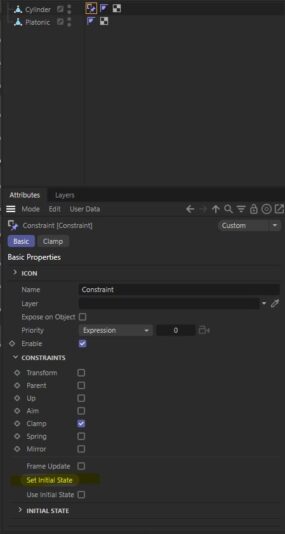
    Simply use the ‘set initial state’ on the basic tab of the constraint tag on the first frame of your project, and you should be good

  • Kouraib Abdmalek

    August 30, 2025 at 9:49 am

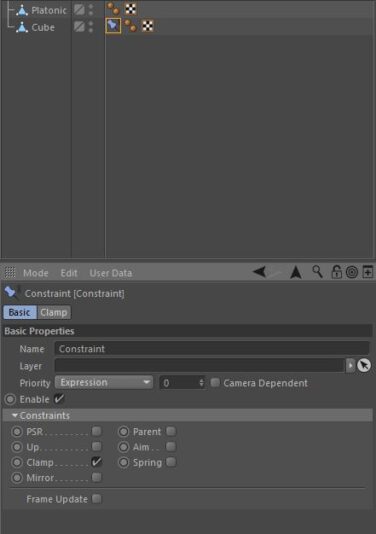
    Thank you Adrian for your comment, the original post was from 7 years ago and it talked about the issue with the R19 version and the feature you mentioned is not available on that version as in the screenshots below, I did the same thing on the R19 version then closed and opened the program and everything remained fine, so it might be related to a bug as they stated and it was fixed in the same version or there was something in his file settings that caused the issue.

We use anonymous cookies to give you the best experience we can.
Our Privacy policy | GDPR Policy