Hi Herb:
Thanks for getting back to me. I’ll answer your questions in order keeping in mind this is only happening in a multicam sequence.
1) Yes this happens on video one and all tracks. So in other words it’s happening universally on any multicam sequence I create.
2) this happens in Lumetri and also the effects control panel. when it gets really bad no matter what change I try to make via any property in any window, to that clip or clips, the effects controls and any control for that clip gray out no matter what or where they are. Then premiere eventually stops working.
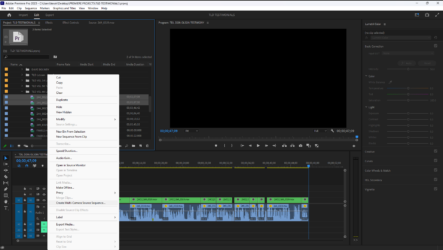
3) Yes, I create the multicam sequence via “create Multicam.” I highlight my clips in the Project window and right click and choose “create Multi-camera Source sequence” from the menu that appears. Please see attached photo.
4) I have uninstalled and reinstalled multiple times. I have also done a complete reinstall of all adobe products via the adobe cleaner app. I only update via the adobe cloud and am always up to date. I have even changed complete editing systems. Meaning a completely new computer and software and this problem still persists. Again this problem has been happening to me for years no matter the version of Premiere. If you’d like I can do a complete video of what I do so you can see how my workflow is and when the problem begins.
Herb if you have a solution I would be eternally grateful.
Thanks,
Kevin