Forum Replies Created
-

Jean, I had a problem with a font I downloaded from the internet – it had the word ‘demo’ as part of the glyph. It was very tiny and I wouldn’t have noticed if I wasn’t paying attention. Have you used this font before with no issues?
Jon
-
When you right-click on the media, you should get a menu that includes ‘generate optimized media’. You don’t have that?
Optimized media is the same as proxy media – but you’ll need to go into your settings, choose ‘Master Settings’, scroll down a bit and look for ‘Optimized Media & Render Cache’. My system defaults to higher quality media, so I make sure to select something I know is less than the worst quality media I have.
You can also make sure to select ‘Playback – Render Cache – Smart’ in the main menu. Your system will generate optimized media during inactive periods.
-
Jon Zanone
January 21, 2022 at 12:47 pm in reply to: About render settings while editing the timelineWhat format are your render cache settings set to? Try lowering the quality of your proxy settings. You’ll find them in the project settings (small gear on the bottom right). Look for ‘Optimized Media and Render Cache. Check your ‘Working Folders’ location – try moving your working folders to a separate internal drive if you can.
If you have an external monitor, you can also change your monitor settings for some small gains – set to single link and 8 bit – but it only affects your external monitor.
Finally, make sure you’re on the latest greatest DR version and that your video card is using the latest driver.
Hope this helps!
jz
-
You could place a duplicate the clip on top of your original in your timeline, scale up the bottom clip. You could then blur the bottom clip.
Or you could place some sort of graphic behind your vertical video to fill the black space.
Or you could just leave the margins black.
Finally, you could scale up the video, but you’ll lose a portion of you image and gain lots of crunchy imagery.
-
To move between the tabs, ‘shift + 1 (project page), shift+2 media pool, etc. By viewer do you mean the edit page or the full screen ‘cinema’ viewer?
-
As long as you’re in dynamic trim mode (‘W’ on the keyboard), J-K-L should work.
jz
-
Jon Zanone
October 29, 2021 at 11:27 am in reply to: Resolve 17.4 (Free) upgrade – unable to installYou’re positive you have admin rights to the drive? That’s the first thing I’d check.
-
Jon Zanone
September 2, 2021 at 12:07 pm in reply to: Problem—4K video with compressed clip speed via LG 4K TV playbackKarl –
Instead of setting your quality to ‘best’, try selecting ‘Restrict to’ and type in 8000 or 10,000.
-
I’ve had this happen more than once, and I’m beginning to think this is a bug.
Once DaVinci has opened, right-click on the project folder and look for something like ‘restore back up’ (it’s 0530, and I’ve barely made it through my first cup of coffee…). It should be fairly obvious from there. That should get you up and running.
I’ve had a project disappear after a 10 month hiatus, and more recently when I hadn’t started up my editor for a couple of months. I lost 3 projects in varying stages of incompleteness. I’m curious if upgrading is the cause. Like you, digging into the project folder just created panic. Once I restored the projects though, everything was there.
Good luck!
-
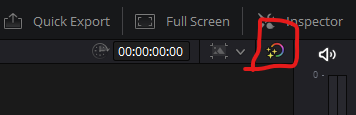
At the top right of the record monitor there’s an icon that looks like a circle with stars in it. It should look like the picture below. If it has a red slash through it, it means the color grade is inactive (usually to speed up performance). Click it again and you should see your grade again.