

Activity › Forums › DaVinci Resolve › Resolve 17.4 (Free) upgrade – unable to install
-
Resolve 17.4 (Free) upgrade – unable to install
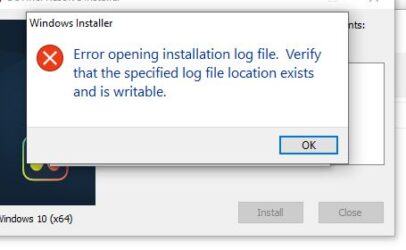
Posted by Michael Reed on October 26, 2021 at 1:28 amIt tells me I need to verify the location exists, and won’t install.
I have always just used the default paths etc for the installation so am confused as to what to do next.
I’d very much appreciate some guidance.
Thanks
Jose Gomez replied 4 years, 10 months ago 4 Members · 7 Replies -
7 Replies
-

Michael Reed
October 29, 2021 at 9:07 amI tried with 17.4.1 executable – no luck.
Backed up database and uninstalled Resolve and all other BlackMagic products.
Tried a fresh install of 17.4.1 but I get the SAME error and cannot install it at all.
So now I don’t even has resolve on my system, which makes me unhappy.
Maybe someone can look at their install and see if there is an installation log file please?
-

Jon Zanone
October 29, 2021 at 11:27 amYou’re positive you have admin rights to the drive? That’s the first thing I’d check.
-
Michael Reed
October 29, 2021 at 11:33 amWell it’s my home pc so yeah that shouldn’t be an issue and never has been in the past.
There is only one user account on the PC and that’s mine 🙂
I also tried right click ‘run as administrator’ – same result as always.
I have been trying various things and attempted to install previous versions of resolve (for which I still have the install files) and they are not working either.
So it is a general Resolve issue, not specifically a version 17.4 issue.
Hopefully that will help when it comes to narrowing down possible causes and remedies.
-

Tristan Summers
October 29, 2021 at 12:52 pmI had to install. Uninstall. Reinstall and restart before resolve studio would open a project when i updated to 17.3 and 17.4.
I copied the .exe from the zip to the desktop and extracted/installed getting there.

Reply to this Discussion! Login or Sign Up