Forum Replies Created

Page 6 of 46
  • Jim Scott

    July 29, 2021 at 6:29 pm in reply to: hair/roots growth area

    Thanks for the follow-up.

  • Jim Scott

    July 29, 2021 at 6:27 pm in reply to: creating a zero gravity simulation with?

    Blobs — you gotta love ’em.

  • Jim Scott

    July 29, 2021 at 2:57 pm in reply to: creating a zero gravity simulation with?

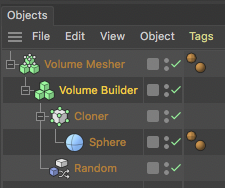
    Another option for creating blobs would be the use of the Volume Builder and Mesher with a cloner as per my previous example. The possibilities for creating blobs becomes pretty much endless once you start getting into using particles with Metaballs and Volumes, and the use of displacers and other deformers on other objects. Have fun.

  • Jim Scott

    July 29, 2021 at 12:29 am in reply to: how do i make the wind force affect only one object?

    You’re very welcome.

  • Jim Scott

    July 29, 2021 at 12:09 am in reply to: creating a zero gravity simulation with?

    Hi Joe, welcome to C4D.

    There are many ways to do blobs (such fun, aren’t they?). For the attached sample project I put cloned spheres into a Metaball object and used a random effector on the cloner to animate the position and scale of the spheres. The Metaball essentially creates a skin around whatever you use it with, so the scaling and moving spheres inside of it create the changing shape of the Metaball. Adjust the “Hull Value” in its “Object” settings to control the skinning, and the Editor and Render Subdivisions for smoothness. I changed the gravity setting to -20 in the Project Settings (CMD + D) > Dynamics, and I gave the Metaball some slow movement by enabling “Custom Initial Velocity” in the dynamic tag’s “Dynamics” settings and adding Initial Linear Velocity and Initial Angular Velocity values. If you’re not already familiar with the Help menu, get used to calling it up by right clicking on an icon or parameter in a menu and selecting “Show Help,” and you should be able to find explanations for just about anything.

    Hope this helps.

  • Jim Scott

    July 28, 2021 at 2:48 am in reply to: how do i make the wind force affect only one object?

    Regardless of where they’re located, forces like wind will affect every applicable object in the scene (the cloth flag and tablecloth in your scene) unless they are restricted by a falloff. Just add a field (box for example) around the flag and the wind will only affect it.

    Another option: Instead of using a wind force to blow the flag, you could use the wind parameters inside the flag’s cloth tag to add wind and turbulence as desired.

  • Jim Scott

    July 27, 2021 at 11:59 pm in reply to: Generating polygons with hair

    That’s encouraging. Let us know if you’re able to get your complex scene working.

  • Jim Scott

    July 27, 2021 at 11:57 pm in reply to: Generating polygons with hair

    I rarely use hair, but with just a quick test it seemed like I could switch back and forth between the generators. I’ll have to play around with it some more. Could you post your project?

  • A few thoughts: If this is only happening in one project, copy everything into a new project and see if that fixes it. That project may have become corrupted. If it happens in every project and a restart doesn’t help, you could try reinstalling C4D.

  • Jim Scott

    July 27, 2021 at 3:50 pm in reply to: Generating polygons with hair

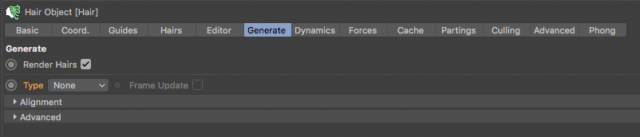
    You should be able to just select “None” for the Generate type to return to regular hair.

Page 6 of 46

We use anonymous cookies to give you the best experience we can.
Our Privacy policy | GDPR Policy